Is there any way to make the manufacturer profile the default profile for lens correction?

Hey all, just wanted to ask a quick question as I am unable to find an answer elsewhere.
I shoot primarily with a Fujifilm XF 16-55mm and find that images become very heavily cropped on the wide end when using the built-in Capture One lens profile compared to the profile from Fujifilm. Since Capture One defaults to its own profile, I find it rather time consuming to manually change the lens profile for every singe image I take.
Is there any way to make the manufacturer's built-in lens correction profile the default profile instead of the Capture One profile?
Thanks!
-

Hello Cam,
The only thing I can think is if you were to go to the Lens Correction tool, set it up how you like, i.e. select Manufacturer Profile, then save this as a user preset.
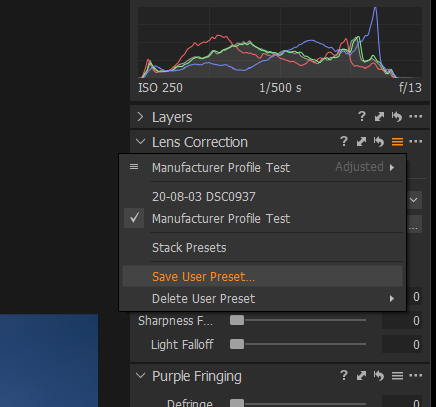
Then once you have the user preset you can then add this as an adjustment on import, this should have the effect of applying the manufacturer profile as default for all images in a particular batch import. You can also apply the user preset to multiple files already imported by just selecting all files you want to modify and then apply the user preset to all.
 1
1 -
Thank you for your help!
Unfortunately, even with the manufacturer profile saved as a preset and applied during import, the Capture One profile still enables itself by default. And of course, when the option "Disable Default Lens Correction" is selected, no profiles are applied.
It would be awesome to have a section in the preferences menu that allowed for the enabling and disabling of the Capture One lens profiles. They are certainly great to have, but aren't always the best option.
1 -
Ah well, was worth a try.
0
Post is closed for comments.
Comments
3 comments