CaptureOne reuses thumbnails of pics with same filename

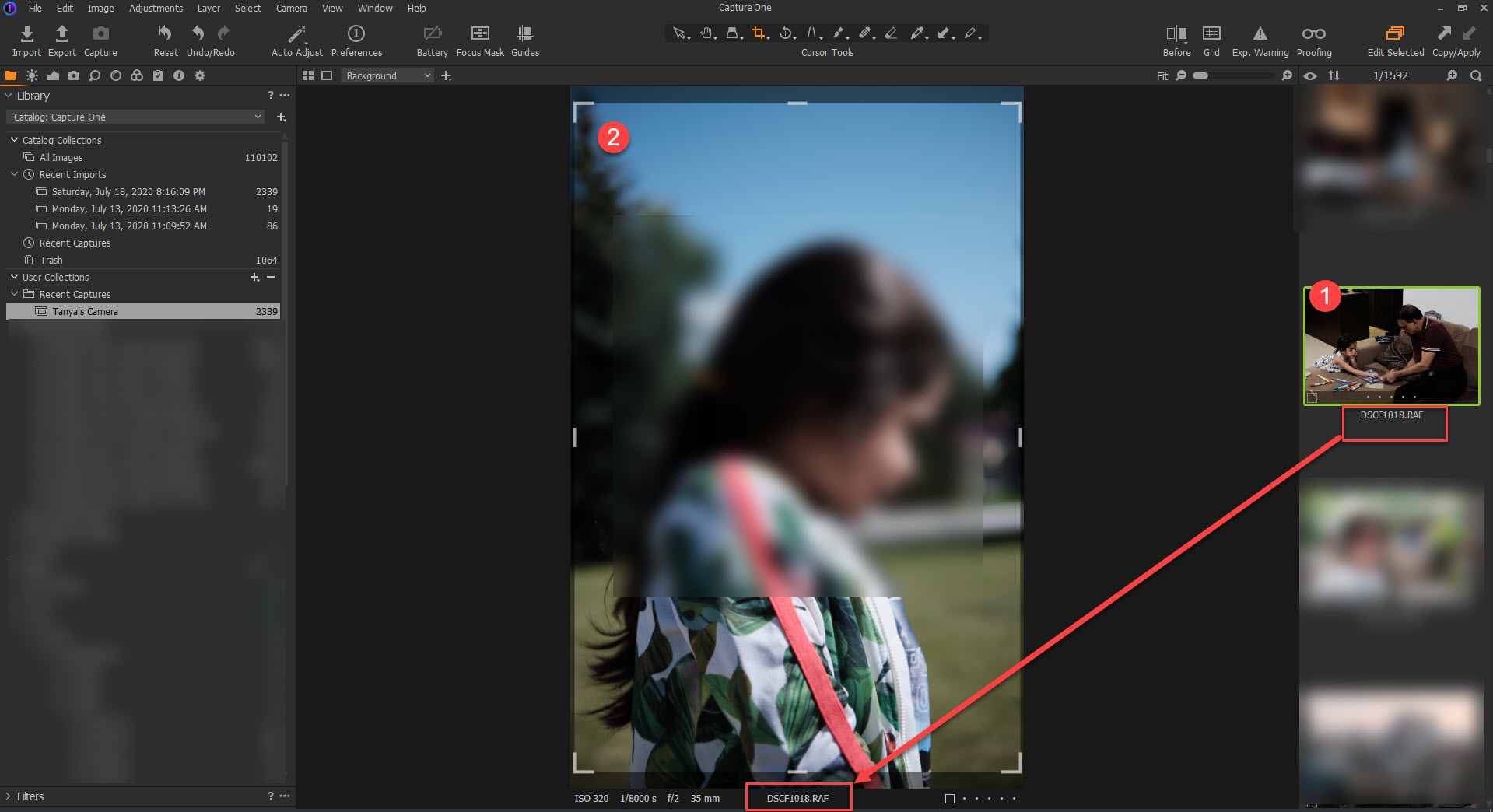
I have been using C1 for some time for my main camera (X-T3). Yesterday I decided to catalog my wife's camera pictures (X-T30). After importing my wife's pictures from her SD Card (to disk) I noticed that some of the pictures had thumbnails of places where only I had taken pictures some time back (marked (1) in the picture below). This behavior only affected the thumbnails, since as soon as I double-click any of the pictures the true image will appear (marked (2) in the picture below). This did not change even if I manually selected the pictures and re-generated the thumbnail.
Long story short, any picture from my wife's camera that has the same name as a picture I had already in the catalog (again from disk, located in a different folder, imported long ago) would take the thumbnail of my picture instead of the proper thumbnail of my wife's picture.
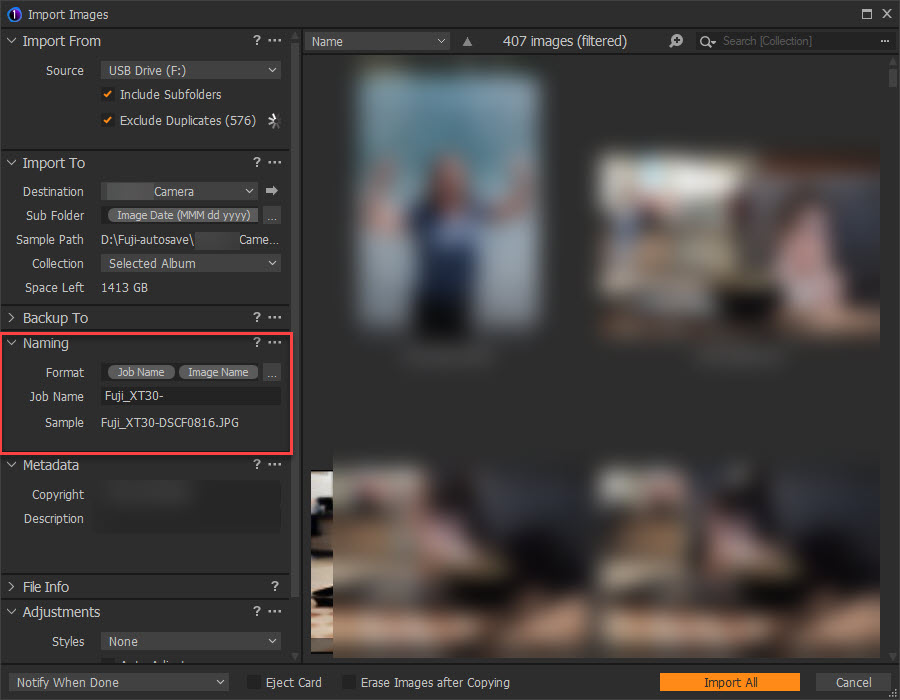
As a workaround, I deleted the import and re-imported including a job to change the name of all new files.
This is the import config to solve the issue (another option is batch renaming, then regenerating thumbnails work):
This looks like a major issue since many of us have more than one camera from the same make and it could be resolved by tying thumbnails to file hashes instead of just file name.
Is this only happening to me, or there is something to fix here?
-

It's never wise to store files with different data in the same environment in a computer, even if in theory separated in a folder based filing system.
C1 offers powerful options for making image names useful. Highly recommended for future use.
0 -
I'm not sure what is your definition of wise or what do you mean my different data in the same environment. All modern operating systems can deal with two files having the same name located in different folders. As a computer engineer, I have never seen that to be an issue.
I do agree that C1 has powerful tools for managing names, as one of the workarounds was to rename the files which was not difficult, but this never happened to me in my previous cataloging platform, file names were never a concern.
Also bear in mind that in terms of computing, the issue is not only that it was an unexpected outcome, but that it happen without warning or without previous recommendation on how to handle names with C1 to prevent this.
0 -
Hmm.
As a systems consultant for many multi-user business application implementations and data analysis activities I long ago learned not to rely on people dealing with repetitive unhelpful filenames - both developers and users.
These days the worst offenders on the internet seems to be banks and other large organisations that allow people to download files naming the "document.pdf" or some other useless name when it would be quite simple for their development people to make the name meaningful. Or at least give the user an option to name something usefully as part of the download process.
I could offer similar examples from within corporate environments.
If you worked with sessions - something more like a computer file system - you would likely not see the problem or at least not so evidently since duplicate names would be less likely than in a larger, everything combined, database.
My preferred "fix" would be to stop any possibility of duplicate names in the catalog database but that might slow things down. Using an extra numeric suffix for each instance of a file with the same name might be seem as an option but is a very poor solution for an interactive system with user renaming features in my opinion. And in any case proper naming is much more useful from an end user point of view.
However, if you wish to officially report this as a problem you really need to use the "Submit a request" option found at the top of most Community pages and so give the Support Team some details to work with as they assess whether there seems to be a generic problem, and OS version related problem or, perhaps, something strange in a local, dynamic config/workfile within your system.
https://support.captureone.com/hc/en-us/requests/new
Your self identified elimination of the problem is good but could be taken further and automated using the inbuilt token based naming system. I would thoroughly recommend its use.
HTH.
0 -
Thanks again for the reply and the extended description of your assessment.
As you stated, I posted a problem including the solution(s) that works for me, yet the post was to see if this is an issue only affecting me or more broadly present. As a tool with a community, raising this question seemed like a very fair step before submitting an issue.
The issue is interesting because C1 has ways of checking whether two files are the same as we can tell from the well-implemented "Detect Duplicates" in the import windows. That being the case there is validity in asking if this is a known or replicable issue.
With that context, you can understand that just claiming that reusing filenames is unwise doesn't move the discussion forward. In any case, I do appreciate the time you have devoted to the discussion since without quorum this question my die in limbo.
0 -
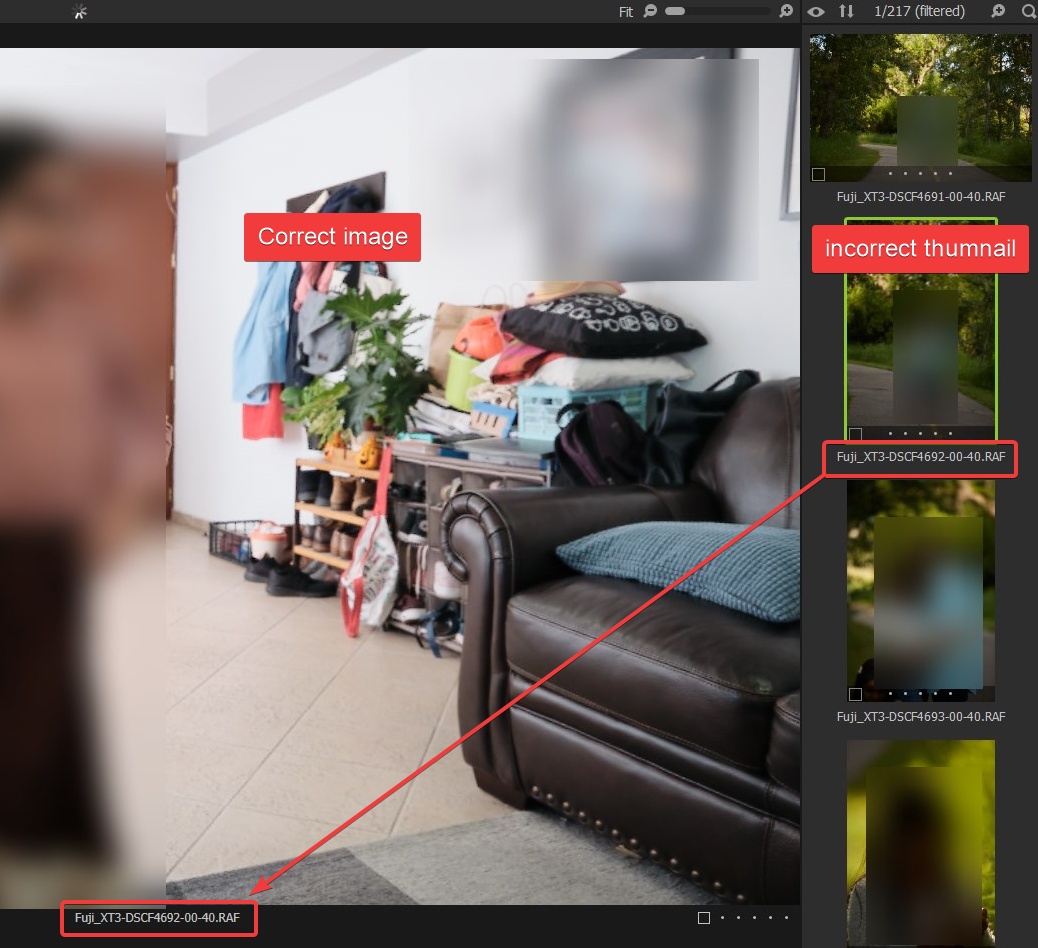
Despite using unique names when importing, this keeps happening. Thumbnails for the new pictures are old pictures on a different folder with a different name.
 0
0 -
Giordano,
If you were using a session I would suggest deleting the thumbnails (using Windows Explorer to do so) and allow C1 to regenerate them by opening the session and folder.
Given that the naming convention looks like it can now be discounted as part of the problem my attention would turn to temporary files - perhaps some work files created when generating the thumbnails originally (old images) is still lying around on the system even though it should have been "cleaned up". Internal processes use internal reference numbers for files (or parts of files which are then reconstructed into images for display) and because these are temporary numbers the system may re-sue them from time to time not expecting any previous usage to still be present in a temporary workfile area.
Or at least that is a theory.
The other option is similar. The file system reference generated during the import process for the Thumbnail happened to point to a pre-existing file somewhere else in the catalogue (i.e on the disk.)
That's the theory. It may be way off the target.
I'm not sure how you check for such possibilities in a catalog based situation nor what one would do to fix it.
I would suggest creating a Support request using the "Submit a request " option to see what the Support Team can come up with.
0
Post is closed for comments.
Comments
6 comments