Import Images from External drive to Catalog

Hi - I have my images organised in folders on an external hard drive. The are Cataloged in Capture One, but the images themselves are on the external drive.
So now I have added some more folders to my external drive (They contain sessions actually). So now I wish to import these extra folders into the catalog. Do I just Choose the folder to import and leave the Destination as "Current Location" ? Will they then be imported and added according to the structure on my external drive?
Thanks
-

Yes, if you use a referenced catalog (sounds you do), then you import the new folder a choose as destination"Current Location", as you said. But if its sessions in which you may have already did some first editing steps, you should select "Import Session" from the file menu
0 -
Yes you can just import from selected folders and they will appear in the catalog library tool/folder structure. As the images are part of a session you can check the 'include existing adjustments' box and the adjustments will be copied to the catalog. subsequent adjustments will only be stored in the catalog, whatever you do. You could also import the session (menu file-import session) which creates folders from your session folders and favorites in a 'project' in the catalog lib folder tool.
0 -
Thanks for the advice. Not sure about what happens when I import a Session as you suggested though. Where do these images reside? At present after editing a Session,I then transfer the Session folders to my external hard drive. Then I am importing those Session folders from the external drive to the catalog.
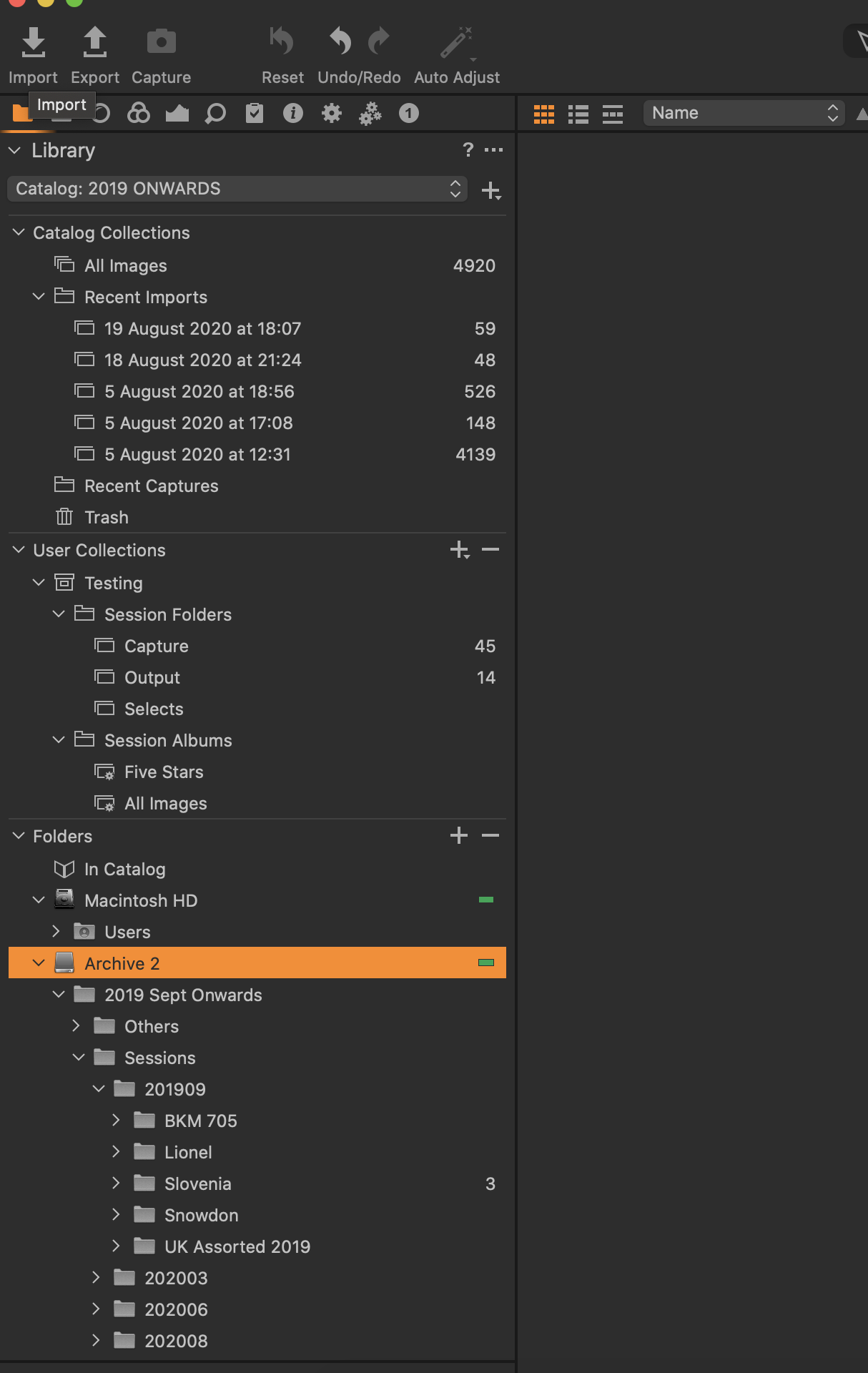
Attached is a screen shot where my external hard drive is "Archive 2". I tried importing the session "Testing" from my computer as you suggested. However I assume the images are still on the computer. How can I import a session into a catalog and copy them to a folder in the hard drive with the "import session" command?
 0
0 -
If you import a session with the import session command, then the images will stay where they are. All what happens is that the images are referenced to their location, the project structure in User collections is created (as for your "Testing" session), and the adjustments and masks are copied from the session sidecar files into the catalog.
So, you should copy (or leave) the session onto your internal disk if that is the final location for them.
If in doubt where raw files are actually stored, right-click an image in the browser and select "Show in Explorer" (I am on Windows, so your entry is probably "Show in Finder").
If you want to copy the raw images and their adjustments INTO the catalog (I think this is kind of a package on Mac, on Windows it is just on big normal folder called "Originals"), then you cannot use import session, afaik. Then you just "import images" from the folders, check "Inside catalog" and "Include Existing Adjustments"
Looking forward, as you library grows, I personally think "Inside Catalog" is not the best idea though. I prefer a folder structure with year/month or similar, and import the images into the respective folder ("Import To " section), or move eht folders first in Finder and then import the images with "Current location".
So, importing into a catalog does make the catalog aware they exist, and where, and depending on the -Import To Destination- they will either be copied or not. Import Session does not seem to have a similar choice.
0 -
Thanks - this is most helpful. Appreciate your help and advice. It's all coming clear now.
0

Post is closed for comments.
Comments
5 comments