Raw files Blue

Yesterday shot in 10,000 headshots. Had my Canon 6D Mk2 set for Raw and jpg S2. Had C1 set to only show jpg. Raw was set for full size at 26mb per image.
Everything in C1 seemed to work well. Today I looked at the raw files in C1, reset global view to show only raw and all the raw in C1 were strong blue cast. Removed the global view and showed raw and jpg. The jpg rendered just fine. All the raw were blue
Now during the tethered shoot I apparently had a problem with my tether cable and a few shots never were downloaded to my computer. Looking at the files on the camera, all were fine, raw and jpg. Only the raw images received in C1 are blue.
I apparently had a problem with the USB port I tethered to, so I moved to another port, and all seemed fine. But those raw files were all blue while the jpg versions were fine.
Re-hooked up my same 6D Mk2 camera, same tether cable, same computer, same USB port, C1 new session, full view, no global view adjustments. Both raw and jpg rendered correctly. No evidence of any problem.
Capture file looks OK, shows only the jpg version, but can see both formats in C1.
How do I recover my raw files to true color?.
Build 13.1.0.162 (e36fffc)
-

Do you mean they are all blue channel and only blue channel or that they have a somewhat blue cast?
What do the Histograms look like?
How has the white balance been set on import?
If you have files in the camera memory card I assume you were shooting to a Hot Folder rather than using C1 for operating the Camera? I'm not familiar with the 6D II but my understanding is that only certain Sony and Fuji(?) models can be connected to the to a computer in such a way that writing to internal cards is supported as well as "full" tethered operation. Is the 6D different in that respect?
0 -

I had a similar problem. I took wedding photos for my daughters wedding a couple of weeks back and some of the photos are now showing a "green spalsh" over the images.
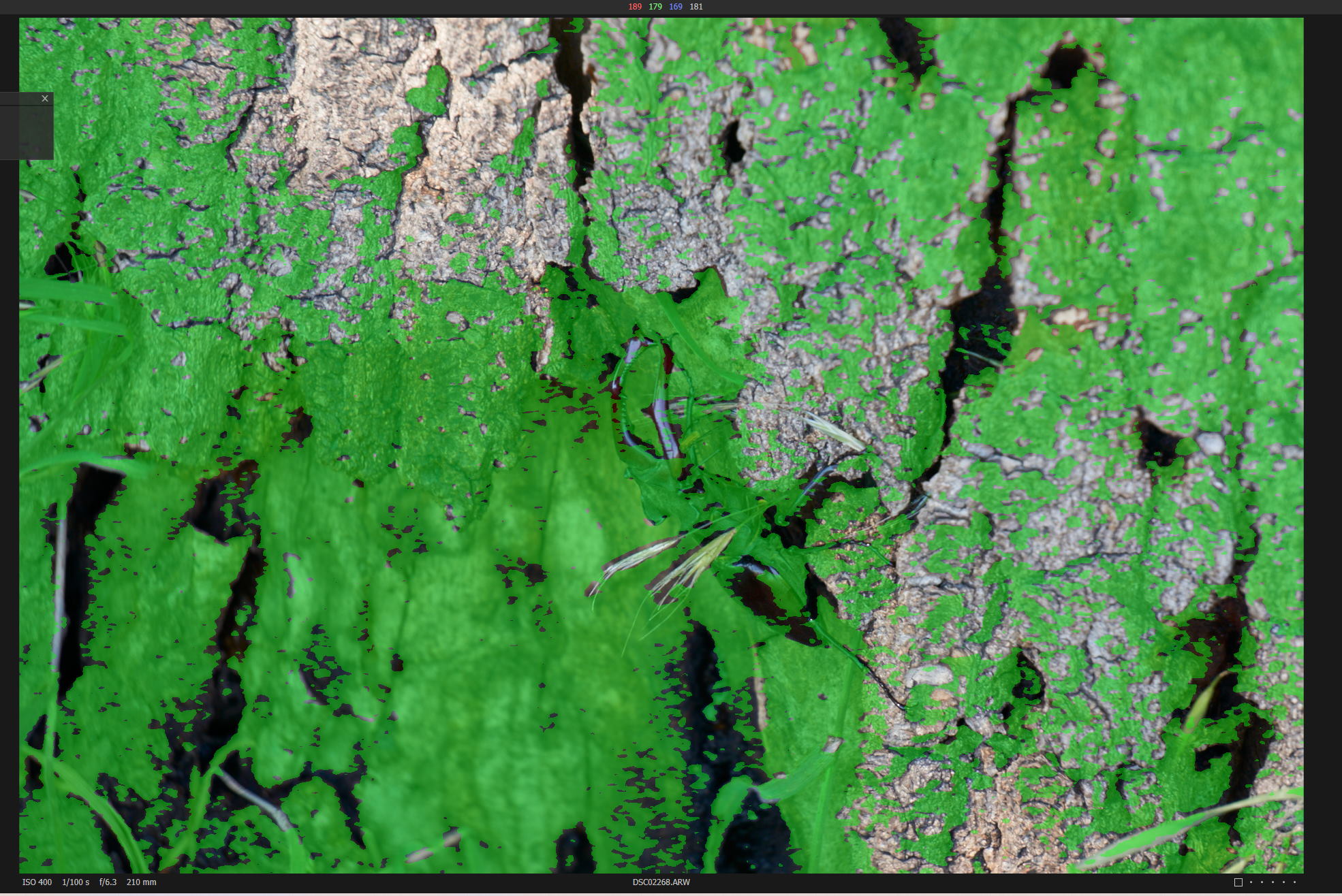
I imported a bunch of other photos today and the same problem. This (image below) is a black beetle on tree bark, little green in the image (a couple of blades of grass at the bottom). I would say, about a third of my RAW photos are now showing up like this. If I look at them directly in Affinity Photo, Photoshop Elements they are fine and if I edit them from within C1 in Affinity Photo/PSE, it creates a perfect TIFF image first. This is only affecting the display in C1, not the files themselves.
I tried deleting the "corrupted" images and re-importing, but they were immediately shown with the green "splash".
edit: histograms look normal. This is with a Sony A6000 camera with ARW RAW images. I upgraded to C1 Pro 2020 last week from the free version delivered with the camera. The images were OK before the upgrade and I hadn't noticed that they were "off" after the upgrade, just as I was browsing them this morning.
Windows 10 2004, July updates, Capture One 20 for Sony version 13.1.1.31
 0
0 -
David,
That looks like you have the Focus Mask active. Check the "View" menu.
Green is usually explainable.
Blue, with the suggestion that everything is blue in the absence of a photo or other details, is less easily identifiable.
HTH.
ETA: An image like your example but with Blue instead of Green might suggest that Exposure Warning is active and that the Shadow Warning component of that has been activated.
0 -
Grr! Many thanks for the quick help, SFA. I hadn't knowingly turned it on after the upgrade and it was only affecting about 1/3 of the images.
0 -
Ah, you need to get more of you shots in Focus David!
;)
Only joking. The effect is often somewhat random and in reality I would only use it to check in certain situations.
It may offer some merit if viewing a head shot at 100% an checking whether eyes are in focus. Generally rather pointless for landscapes and similar.
IMO.
0
Post is closed for comments.
Comments
5 comments