Keine gültige Sammlung

After a crash of the C1 20 catalog on my Mac and after recovery, I can no longer load images.
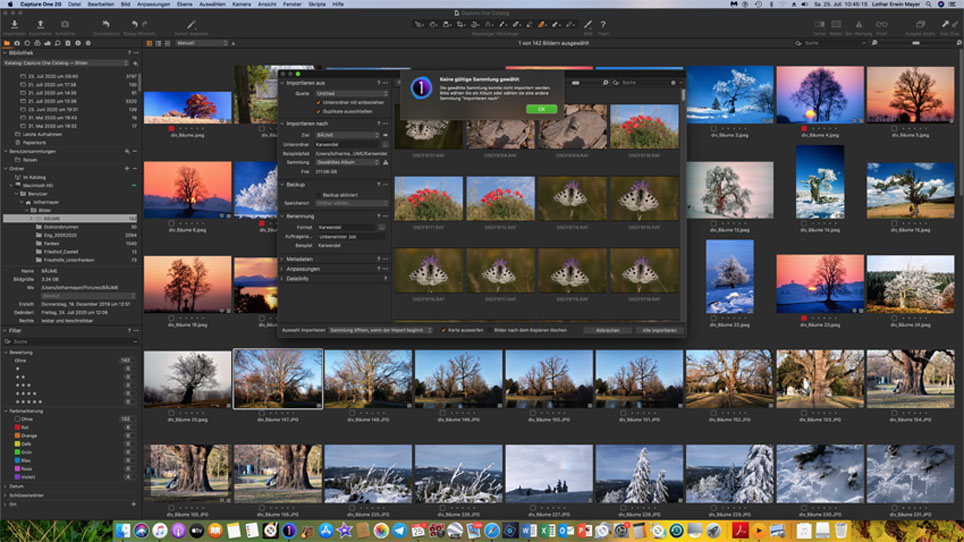
The dialog reports "No valid collection". I am doing exactly the same as I didbefore.

I need help.
-

First aid is to do a verification of the Catalog in Capture One. Open Capture One with the Alt-key pressed while loading, and the Recents dialog appears. Via File menu, choose the Verify Catalog or Session command and follow the instructions on screen.
0 -
Dear Mr. Steunebrink,
Many thanks for your E-Mail.I tied but failed. There isn’t a dialog which appears. The catalog opens and when I try to load from a ScanDisk the message "Keine gültige Sammlung“ appears.Best regardsLothar Mayer0 -
When you say that you try to load from a SanDisk, do you mean that you try to import new images from a SanDisk memory card that came from your camera? In other words, is the message "no valid collections" coming from the Import Images dialog? What is your action?
Or is it during a different action? If so, please describe the action.
0 -
Exactly, I try to import images from a ScanDisk and the mentioned message appears in the Import dialog when I press "Alle importieren".
Additionally I get the message: Die gewählte Sammlung konnte nicht importiert werden. Bitte wählen Sie ein Album oder wählen sie eine andere Sammlung "Importieren nach"
Regards
LM
0 -
In the Import Images dialog, Import To section, second field "Collection", you can select an Album to import to, or select "Recent imports only".
I suspect that you have chosen "Collection" but not selected a valid Collection in the Library tool beforehand. Select "Recent imports only" or select a valid Album before you open the Import Images dialog.
(I basically say the same as the error message)
0 -
This is my situation (see below).
Please consider that I am in status after recovery of a corrupt catalog.
Thank you very much for your support.
Best regards
LM
 0
0 -
See the exclamation mark next to the "Sammlung" field. Choose a different Sammlung.
Also, as suggested earlier, from the File menu, do a Verification of your catalog. This could also help.
0 -
Thank you. Now it's working again. May problem: I don't understand the catalog structure.
Best regards
LM
0
Post is closed for comments.
Comments
8 comments