Trying to import images but I'm seeing some weird ones.

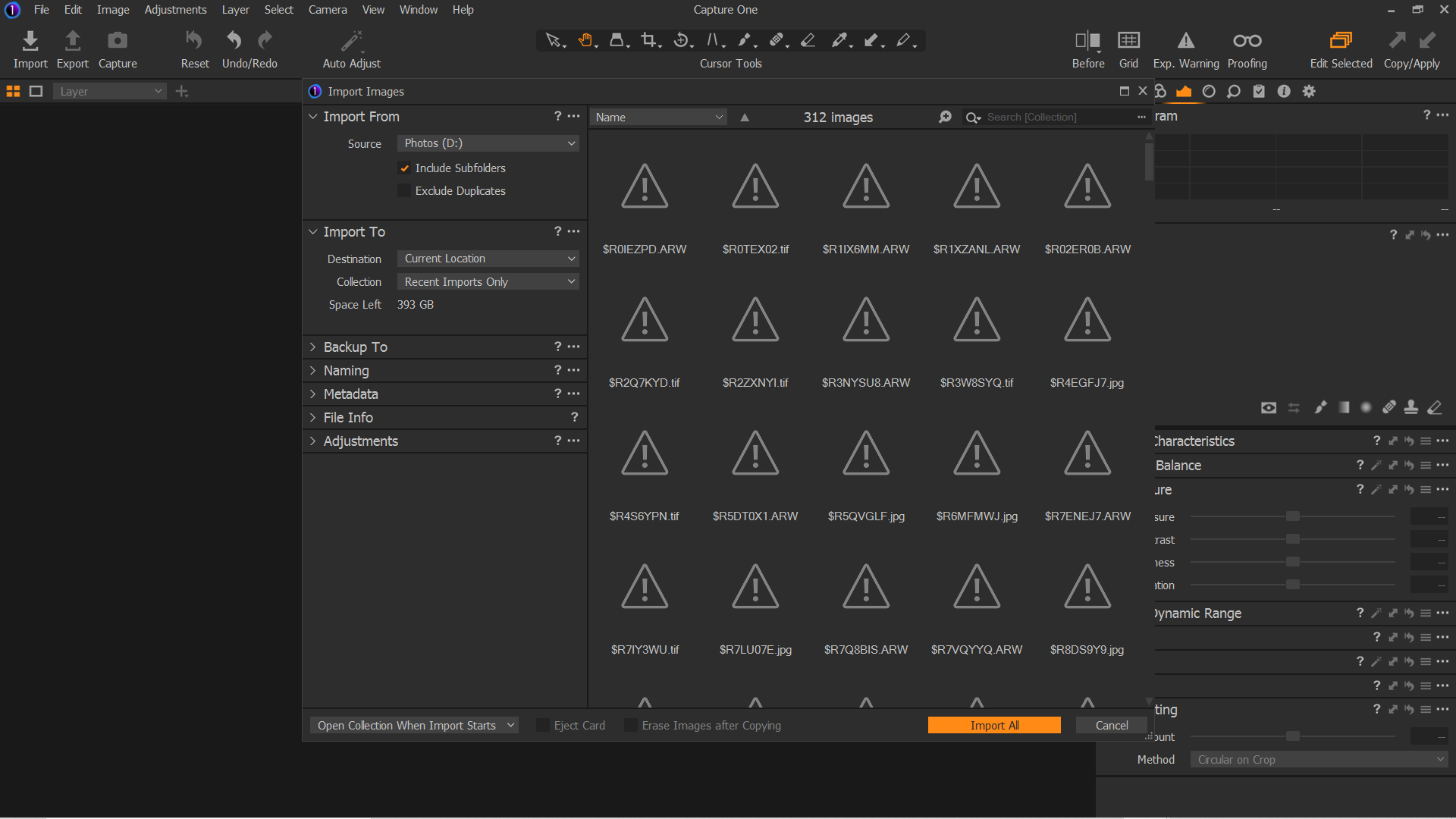
I'm trialling Pro and tried to import images. Most are showing but I'm seeing these strange files with with exclamation points. I have a screenshot attached. Obviously I'll only select the images with thumbnails but I wonder what they are.
Also I'm using DxO Photolab3, Affinity, iMatch and FastRawViewer. I'm trialling some of these too. Could there be conflicts?
Many thanks.
-

File names starting with $ or ~$ can often be left over temporary files (or "workfiles" ). Of if you are accessing a folder that is currently being used by another application it may be that applications active work files.
Those file names are extremely untypical or image naming conventions on any Out of Camera naming convention that I am aware of.
0 -
I'll just ignore them. When I go into File Explorer I don't see them and none of the other applications show them.
Thanks for the advice
0 -
If they don't show in File Explorer, presumably they are hidden files. You could turn on the option to show hidden files, then select and delete them (making sure first that there is no app running that could conceivably be using them).
Ian
0 -
I have the Hidden Items box ticked but they don't show.
0

Post is closed for comments.
Comments
4 comments