Copied and pasted adjustments between images: Now, export recipe fails.....help please?

Hi all,
Ok on a previous thread I asked and go answers to how to copy and paste adjustments from one image to others.
I thought I got this figured out....and the subsequent images all seemed to have the adjustments copied and applied correctly.
On the first (source) image, I had a few layers...on the paste option, I unchecked the layers that didn't apply to the other images.
The main one I needed copied over, was a layer that created a mask based on color...used to make color adjustments, that did get copied and applied.
Again, looking at the images, this seemed to have been applied just fine.
These were all DNG images.
I'm exporting to DNG with the adjustments to send to Affinity Photo for some compositing work.
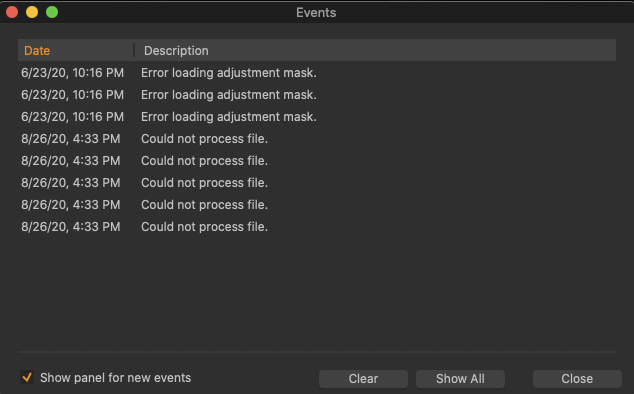
I tried and got a fairly succinct error message that doesn't give me much detail.
I've not had this much problem cutting and pasting adjustments in any other DAM...LR or On1 RAW.
I know I"m new at this, but geez....this is a simple, basic thing to do to an image processing application and should not prove to be this fussy.
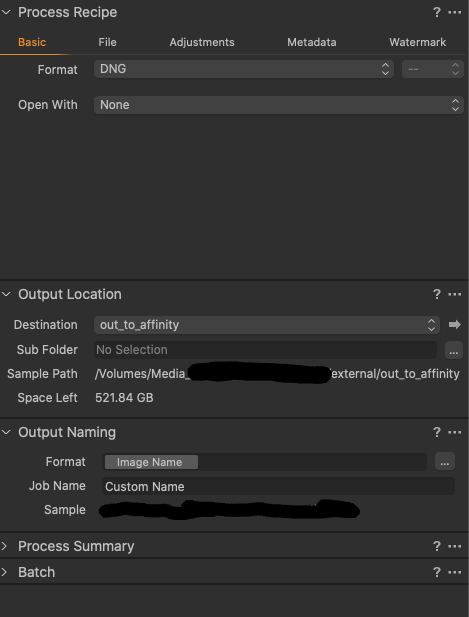
I'm attaching images of my recipe, it's simple:
Here is the window of the export error messages:
Any ideas or suggestions?
I'm really wanting to like C1, I really am, I don't mind learning new ways and new tools, but when the basics seem to fail you...hmm.
Thanks in advance,
cayenne
-

Just a guess, but I think the problem may be that DNG may be considered to be a type of Raw file. C1 doesn't ever touch the actual Raw files, so there isn't a way to create a new file that's Raw + adjustments. Therefore I'd suspect that you can't process a DNG + adjustments, either. All you could do is Export the file with adjustments, which produces your choice of the DNG file + a separate folder with C1's adjustments (which, of course, can only be used by C1) or a file that embeds the DNG + adjustments into a special type of C1-readable file with everything in it.
If you want to work on adjusted files in an external editor, your process recipe should produce a TIFF (best) or JPEG file that "bakes in" the adjustments and 's then very usable in Affinity and other apps.
1 -

....this is funny you still try to export dng with c1 adjustments ?
you could think that there is some kind of real support for this format when they offer an export option but wait this is c1 so it is only there to beef up there marketing claim of dng support but this is not intended to be really used.
0 -

Suddenly the export function is not working for any of my images, including a set that I exported with no problem in the past. I've never had this problem before. Anyone know how to correct it? I'm on Mac OS Catalina 10.15.6 (19G2021) and updated it yesterday.
0 -
I put a ticket in with C1 support, still waiting on an answer.
But it does seem strange that C1 advertises you can export to DNG...but then blows up?
I was hoping to go with the DNG develop and work flow as that DNG files as I understand it, are often much smaller than TIFF files, and keep the same fidelity.
I'm working with GFX100 files here...that are large to begin with, and am moving them through C1 to Affinity Photo for compositing.
These files also have been run through Helicon Focus, which is partnered with C1 and should run fine with them....
So, I had fuji raw...went through Helicon focus->C1 for adjustments...which seemed to work just fine, cut and pasted adjustments , one of which was a layer with a color range mask...this seemed to have been applied in C! with success, the images all look as I want them....and C1 gives the option to export as DNG....
But >*BOOM*<
So, still looking for answers.
I also am on OS X Catalina.....on a Mac Pro.
0 -
you can export a dng but without adjustments which is as you realised not very useful but I told you so... to export for AP I recommend you use .psd and not tiff because AP allows direkt save to .psd when you enable it but depending on what you want to do in AP it is better to resave to the proprietary .afphoto it is by far the best option and you can later export to any format you want anyway.
0 -
@CSP...then, why do they have the "capability" to export to DNG at all if not with adjustments?
That seems to be an ability without a use case?
And also in the error message, it was complaining about a mask somewhere, not just adjusements in general.
Ugh...I really need to get to working with these images, but I guess I may step back and try to export to DNG without layer/mask adjustments, and etc...and see how far it actually works or does not work with DNG images.
*sigh*
Frustrating to say the least.
0 -
Ok to follow up.
I took one of the DNG images in question.
I did a reset on it...NO adjustments on it at all.
I tried to export as a DNG....failed. This time it didn't complain about the masks...just a simple "can not process image" with no further details.
0 -
guess it is for leica camera DNG files only. export to 16 bit .psd or .tiff and ignor the rest. AP does also very good focus stacking btw.
0
Post is closed for comments.
Comments
8 comments