Problem with the tool "Output location"

Hello. I upgraded to Capture One 20 Fujifilm after using version 12 since it was released. While I had no problem with version 12, the new version 20 is causing me problems when exporting. The processed images do not go to the "Destination" of my choice in the "Output Location" tool, but to a destination that I had used previously! I guess this is a software "bug". I would like to point out that in the drop-down menu (...), I clicked on "Clear recently used paths" then on "Reset tool" with no more success!
Does anyone have the solution ?
-

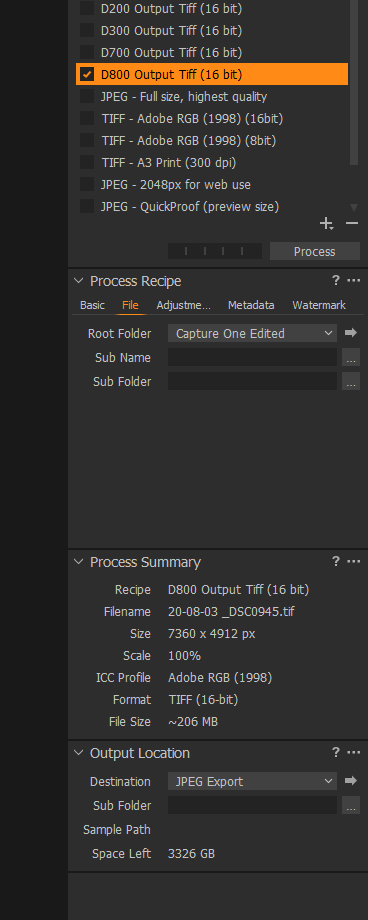
Assuming you use the process feature, not the export feature, the Output Location tool is only in charge when in the Process Recipe you selected, on the File tab, the Root folder is set to Output. Any other value neglects the Output Location tool.
0 -

I have not had this problem, it works perfectly for me. As Paul said, check the process recipe, you can set the output location from their.
 0
0 -

Same problem here.
Longtime multiple version number user over the past few years exporting with no problem.
Updated to v20 and every Process Recipe creates a folder for something that existing over a year ago and puts photos into that Output folder rather than what I have set as Output Location in Process Recipe. Even if I create a new Process Recipe it tosses them into a newly created folder for a Session I deleted over a year ago.
Original poster is not crazy. THere is some bug at play here.
0 -

Using windows the userconfig file retains information about previous settings used for each catalogue or session that has previously been used up to the max number of such entries retained as a default setting.
From V20 it appears that each release retains the last version that it knows about and creates a new folder for the release just applied and populates it with the values from the previous release as a starting point for continuity.
Presumably this process might, sometimes, lead to anomalies where the copy over update does not work as expected or only finds a much older version of the userconfig file as its starting point - which sounds plausible to Rick's description.
If one is prepared to dive into various parts of the files system that Microsoft and others would prefer were not disturbed then one can check the theory.
If that does not appeal I'm not sure what to suggest, other than creating a Support Case with C1 using the Submit a request function.
Alternatively work out whether the output process is using the Entry in the "Output Location" tool for its Root output and if it is check the Output Location tool to see where that thinks output are to be sent.
Doing that should then update the userconfig and.or output recipes file and eliminate the problem.
If it does not then there is something especially strange happening that needs to be investigated at a local level. I.E. system by systemto understand where and how the anomaly originates.
0 -
Fully capable of digging into the WIndows system if made aware of what to try deleting. I snooped around myself in AppData, etc and didn't see anything that seemed obvious to try deleting.
Also tried reinstalling and then Remove / Reinstall, but where it leaves behind User added things like Styles and Presets I assumed it also likely leaves behind some C1 related preferences.
I've been futzing with it since C1 release and trying different things. Just finally had the time to come here and search if anyone else had encountered a similar issue, or start a new issue.
0 -
Rick,
V20 (also identified a builds starting with 13 ) has further extended the concept of keeping version and release specific settings so that, if desired, peoiple can step back a release or more ans revert to setting relevant at the time that release was last used.
userconfig files in Windows used to be held elsewhere but since V20/13 are in Appdata/Local/Capture_One/ (note the underscore) and then the interestingly named next folder likely contains further subfolders named for whatever "13" series builds you have installed. In those folderr can be found the userconfig files. (XML files.)
Based on what you said I am confident that you will know to treat them with care if editing and make backups, etc., if necessary!
Just deleting is fine, of course, since new files will be created from defaults but there are a lot of settings in there that one might wish to keep under normal circumstances.
In terms of Output processing there is another side to the definition and the Recipe files can be found under the /CaptureOne folder - note NO underscore in the folder name.
You will probably have Recipes120. Version 12 was the last time there were significant changes to recipe data structures so at this time there is no need for the Recipes130 folder.
0 -

I have a free version of a tool that I could not live without when I was a Windows programmer back in the day. You can use it to locate strings anywhere on your hard drive. There are actually some strings that are ignored when you use Windows Explorer to search for things. I bet not many people know that. But this program find them all. A handy tool for your Windows toolbox.
The free version is called Agent Ransack.
https://www.mythicsoft.com/?src=abt0
Post is closed for comments.
Comments
7 comments