All images disappeared from a folder

Hi,
Ran into a very weird issue, hope someone here can help figure out what happened.
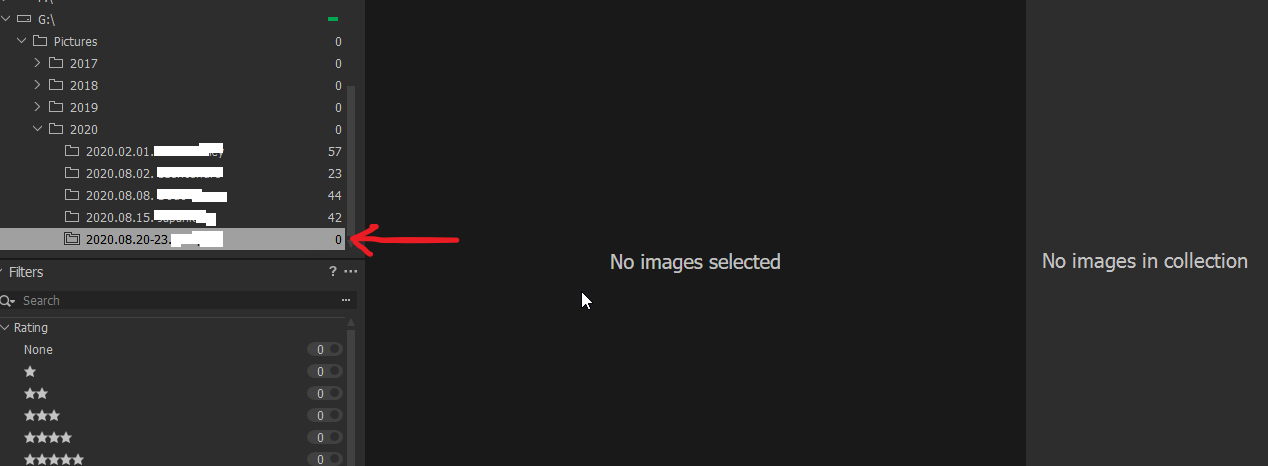
I've been working in one folder all day. I've just finished going through the images and exported some of them, I was gonna review the remaining few shots when I went back to C1 to find said folder completely empty.
I tried to Sync the folder but nothing happened. The latest backup is from this morning, i.e. restoring it would mean I'm losing the day's work.
What happened to the contents of this folder?
-

So Windows is also not showing any files in that folder?
What about a disk wide search for any of them?0 -

gb's questions are essential.
Additional question: Did you rename this special folder in Windows instead in Capture One?
0 -
Thankfully, all the raw image files are in their orignal folder on the drive, along with the JPEGs I exported from C1 earlier. I haven't renamed neither the folder in Windows nor the Collection within C1.
0 -
Have you tried verifying the catalog (under File menu)?
1 -
I just did now:
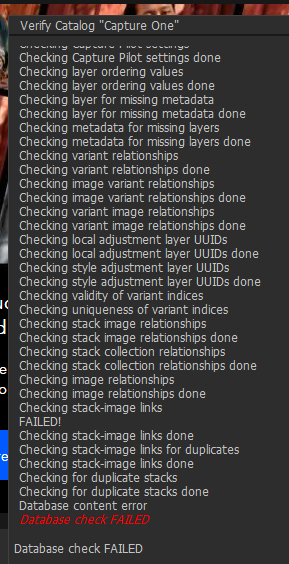
I ended up restoring a backup, losing a day's work. At least that put the images back in the folder and restored some of my edits... :-/ I'd love to find out what happened and how to prevent it in the future.
0 -
You didn‘t use „Repair“ button? Normally works fine.
Regards Ernst
0 -
I tried that but it didn't do anything :-/
Any idea why this happened in the first place?
0 -
I cannot tell you why this happened to you but it will happen sometimes anyway. ;)
Repairing the database after checkup is the way to get out of theese troubles for the moment. And this helps in 95% of a failed database check. So I see this issue annoying but not as one of the major problems. There are other things that really make troubles when working with C1. But nearly all of them do not destroy datas. This - beside the awesome output - is the most important recognition I got while working with Capture One.
"I tried that but it didn't do anything :-/"
This never happed during working with C1 the last years. Repairing a database is successful or fails, never "do nothing (or anything)". Which message did you get afterwards?
Kind regards
Ernst0 -

I am having the same issue, images that I had imported are missing from the session folder. I verified the catalog, used the repair, and the images did not reappear. I had to go through the original files one by one to find the ones that were missing and re-import them. The only thing I can think of doing next time is not even importing them and just go through the files under the system folders drop down, then you don't have to import anything. Then just use the rating system to keep track of the ones you want, and it will save space on your computer anyways because you are not copying the files to the session folder.
0 -

JB.
Are you using a Catalog or a Session?
Your description appears to cover both options but either way there is no NEED to make copy files in order to use C1 although of course it makes sense to make backup copies of original files somewhere.
0 -
I am in a session. It makes copies of the files when you import them, it copies them into the session folder. I don't know how else to import without it making copies?
0 -
If you want to manage the session as a single entity is is indeed easier if importing the images into the Capture folder provided or sub folders within it. That way it makes it very easy to copy the whole session as one thing and retain the file relationships.
That, usually, is what I do. Import directly from the memory card (via a reader), taking the opportunity to name the files usefully and then at some point formatting the card and re-using. Usually I have time (and enough cards) to process the session and move it to another drive or two or my NAS before repurposing the memory card.
If I already have the images on disk I'll simply save the original source files somewhere as a backup anyway.
However, with a session you CAN, if you wish, simply navigate through the System folders, find a folder with images in it, select the folder and C1 will find any images it can work with and allow you to edit them. If you may want to close C1 at some point and come back to that folder later you can make it a "Favorite" to create a link.
It will not make the folder a component part of the Session. So coping the session around will leave the folder outside the Session folder structure just where they were. But is will retain the links as "Favorites". So as long as the session can still "see" the folder that are Favorites you can still work with the image in them.
And of course there is nothing to stop you bringing the pre-existing folders inside the Session folder structure.
It's much more complicated to write a description than to make it work. It's a very simple and flexible concept.
0 -

I'm in C1 12 in Catalog, exactly the same thing, images disappeared from C1 folder. Than suddenly they appeared again. Next day they gone. I synchronised the folder and imported additional images. Newly imported images were visible old ones not. I checked the Catalog, verification failed. After repair the Catalog said that everything ok, in reality the repair deleted also the newly imported images and the folder is empty again
0
Post is closed for comments.
Comments
13 comments