Zooming creates artefacts (black or white picture parts)

My PC (i7-4770 / HD Graphics 4600 / 24 GB RAM / HD-monitor) has with C1-13.1.1 Pro problems when zooming in files with layers, specially repair layers. Rectangular white or black parts are diplayed. Problem occurs not after a C1 restart and if zooming just one file. (100%, 200%, 300%, 400% for and back 20 times without any issue.
But after swithing between 3 or more files and zooming to 100%, the problem starts. If layers are switched off, zooming is always possible up to 400% for many pictures.
Hardware acceleration ON / OFF, Proofing ON/OFF and preview picture size has no effect on the problem.
It looks as C1 does not clear all file content in the graphics memory when jumping to the next file.
Will a new PC (i7-9700 /32 GB RAM) with a Nivada GeForce RTX 2060 or a Nivada Quadro P2200) solve this issue?
-
It's been reported here in the forum recently I think, maybe you'll find some answers there.
0 -
Search for 'black rectangles'
0 -
Thanks BeO
Though the problem seems to be well known by Capture One and hopefully there will be a fix in a future release.
Indeed the problem occured only recently and there was some treatment of pictures in the former Capture One 20 Pro release,Remaining question:
Does a new PC with an up to date graphics card (more power and 4 ... 5GB memory) resolve the issue or is a PC upgrade useless?0 -
PC upgrade: If it solves the rectangular or any other visual artifact problem I don't know. If you are right then a C1 patch will solve the problem. Usually, artifacts are grpahic cards related, but you mentioned that hardware acceleration OFF did not solve your problem, so I would notbuy new hardware for the purpose of solving this issue.
This having said, new hardware means new costs, more initial work, but also more fun, right? :-)
I have a workstation, couple of years old, i7-5820k, 6 cores, 32GB 2666MHz, I believe DDR4. Geforce 960 gtx, 4GB.
I just bought a new XPS 13 2in1 with i7 1065G7 with integrated Iris graphics card, processor and card share 16GB memory, the memory is faster.
The workstation and laptop have nvme ssd (though the workstation has the catalog and raws on a normal samsung SSD), both computers drive Full HD screens.
The workstation is 2x faster with processing and also a little bit faster with preview generation, but the laptop feels noticeable snappier when working with one image, zooming in, browsing through the images.
The laptop is a newer generation and has faster RAM and architecture. That's probably the point.
I want to use it for the field, and using sessions with a limited number of images. I did not test it with my full catalog. And 16GB shared with the gfx card seems to be the absolute minimum.
I did notice that when you are using e.g. heal layers, the GPU does not seem to be utilized at all. Neither on the laptop nor on the workstation. And it is not used for initial preview generation either.
My recommendation always was and it has confirmed, buy the fastest CPU and RAM you can afford, omly then look into gfx card, unless your are exporting alot and do minimal adjustments in C1.
In addition: I don't have issues /artifacts with any GPU so far, but what if that changes in the future, I would have to disable opencl. Money (on gfx card) not well spent then.
0 -
Thank you very much BeO for all the interesting information regarding your experience with C1 and related hardware issues.
The search for "black rectangles" shows, that this issue occurs also on other PC's.Yesterday i made a short test with a 4K monitor. Display and zooming worked fine if applyed to only one file in the session folder with 450 files. If more files are sequentally zoomed to 100% and back, the problem occurs as with the HD-monitor.
0 -
Ok. Sorry but I have no explanation for the artifacts.
Btw, the bottleneeck on my workstation seems to be the RAM loading time, as the CPU and GPU, if they are used, are not that busy (maybe 50%) as on the laptop (up to 100%).
I think the biggest problem with 4K monitors is that if you zoom in, a bigger portion of the image is shown (much more pixels) which needs to be "developed" by C1 from the raw file plus adjustments, which takes more time. Unless the previews are big enough?
0 -

Ueli, I have a similar spec PC, except I have a 1660ti graphics card and I don't see the issue. Have you checked that your graphics drivers are up to date? You could also play with the graphics configuration options in Windows settings. Is the HD Graphics 4600 an integrated graphics card?
0 -
Thank you Mark.
Yes this is an integrated graphics on the Intel i7-4770. (I tested the PC with 27" 4K monitor and it works)
According Windows 10 Pro (Version 2004, 64 bit) all software drivers are up to date.
In C1 zooming of the first selected picture with repair layer the viewing is possible and the zoom can be toggled forth and back between full view and 400% view on the standard HD monitor after starting a C1 session with 450 files.
The troubles are starting only after viewing and zooming one or two other pictures in this session.
Though a C1 session containing just one picture with a repair and 2nd or even 3 layers works flawless. This is a possible but quit uncomfortable way to go.0 -
Does it look similar to the artifacts Simon has recorded here?
https://www.dropbox.com/s/ityis8ldpvht5b8/2020-08-05%2020-10-46.mp4?dl=0
From the thread
https://support.captureone.com/hc/en-us/community/posts/360011398278-Black-rectangles-when-zooming-
Did you create a support request already?
0 -
Thank you BeO
Yes, my first action was posting a request. Waiting for feedback.
And yes, it looks as in the referenced clip (sequences with rectangular black parts) when zooming to 100% or higher.I really do appreciate the new repair layer option in C1 as a very user-friendly improvement.
Before the new repair layer option was integrated in C1, I was using Affinity Photo for specific retouching of 16 bit TIFF files.
But I have to admit, that Affinity Photo was used in each case just for one TIFF file.The main target in opening this thread was to get information regardig: is it a software bug, or is my PC not capable in handling the zooming of files containing a repair layer.
It seems not yet confirmed, that a new PC (i7-9700 /32 GB RAM) with Nivada GeForce RTX 2060 or Nivada Quadro P2200 would solve the problem. (Eventually it may be smarter to buy a new camera or a new lens)
0 -

Ueli,
In your Preferences settings, "General" tab, there should be an indication about whether C1 is using Hardware acceleration or not.
My notebook has an earlier CPU and C1 assesses its built in GPU capability as insufficient to make it worth using. But I do have an old, low spec Nvidia GPU in the package and that just offers enough processing value to see it activated although it is rarely possible to see a measurable difference to performance between activated and not activated.
There are log files that will confirm how C1 assessed and acted on its GPU discovery exercise - which is run every time C1 is started.
If you are making a lot of changes on a lot of pixels (so at 100% and higher for example) there is potential for the processing to take longer in the background than is perceptible on screen. The processor(s) and the methodology used to deal with what to do when another user input demands changes before the previous activity is complete may be reaching a state of stress with internal I/O capabilities and memory/disc performance challenges.
If it seems sensible C1 may abandon and existing change instruction before it is complete because a different instruction has arrived. This one can sometime see strange effects on screen. This is true of any software but the nature of working with photo editing makes thing more apparent.
The nature of repair layers suggests that high levels of relatively complex recalculation are to be expected. Thus they are prone to showing up processing bottlenecks and a 4k display will very likely add to that overhead.
In addition C1 will usually try to present the edits based on its preview file rendition of the image. If that it set to be relatively small compared to the display size of the screen (or the 100% size of the image or the possible additional size controls of a Process Recipe definition) then the likelihood that additional total recalculation from the source file might be invoked to display full detail at 100% and then discarded fraction of a second later to go back to "fill" size probably becomes much greater. Much more of the image would need to be calculated immediately to fill the view compared to going to 100% on a lower resolution screen.
A higher spec. machine would likely help in that regard. It's not just the potential performance of the individual major components that makes the difference. What joins them together can be more important. Whether there are other things that you could do to reduce the problem and save the money for cameras and lenses is certainly worth considering. If you added a second to each editing action jumping around the zoom range (for example) would that minimise the problem you see and save you the cash? If so is that an acceptable compromise?
One interesting experiment would be to see if you observe the same effect with a lower resolution monitor. Such an experiment might offer useful guidance about the best direction for you to take with your budget.
0 -
SFA, many thanks for your ecplanations and propositions.
My standard monitor is a 1920x1080 device (4K was just for testing). The HD resolution is optimal and lowering i.e. to 1280x720 does not cure the problem.
As preset-settings for picture size I'm using the default of 2560. Changing it between 1080 to 3840 did not cure the problem.Both hardware acceleration are switched OFF. Switching it ON for display or/and for export acceleration does not help to cure the problem.
By the way, all tests have been made after closing and restarting C1.Your statment:
"If it seems sensible C1 may abandon and existing change instruction before it is complete because a different instruction has arrived. This one can sometime see strange effects on screen."Is the key issue to understand the problem!
The default setting for preview size is 2560 for a HD monitor. unfortunately I made test only down to a preview size of 1920 and not lower.
If the preview setting for picture size is set to 640 or 800 one can obseve a "slow and snappy effect" by zooming and selecting a specific part in the picture.
With a low preview size the calculation process appears visible and the process is not canceld before the specific picture aera is recalculated and displayed correctly.I have not yet tested if such low setting are permitting also a comfortably workflow.
But I'm supposing that a better graphics card may give better results regarding the zooming of pictures with a repair-layer.Sorry for bothering you all, but sometime it takes for an old man quit a while to understand the contex.
Many thanks to all helping me!Regards, Ueli
0 -
Hi Ueli,
New camera, lens or computer, only you can answer this.
I can confirm that I don´t have this issue neither with my old workstation i7-5820k, which is a newer generation than yours, nor with the new XPS.
Quadro cards are beneficial because they have certified drivers for CAD applications, not for c1. They are expensive for mediocre opencl performance. One can argue though that such cards have better quality drivers in general, because they are more expensive and target a professional market, but this is only my vague assumption.
I don´t rely on graphics cards anymore, they are a welcome addition if they work and if they are utilized. too many cases they are not.
if all your images have heal layers (instead of using Affinity), then I suggest you make a test, as i did. create a new catalog or session with 100 of your finished images. copy that catalog. this catalog copy, reset all your images, auto-adjust them if you like. open task manager and look at cpu and gpu utilization. test:
- regenerate previews
- process to tiff or jpg
- add a layer and mask and copy/apply to the other 99 images
note the time, and notice which component is used to which extent, cpu or gpu.
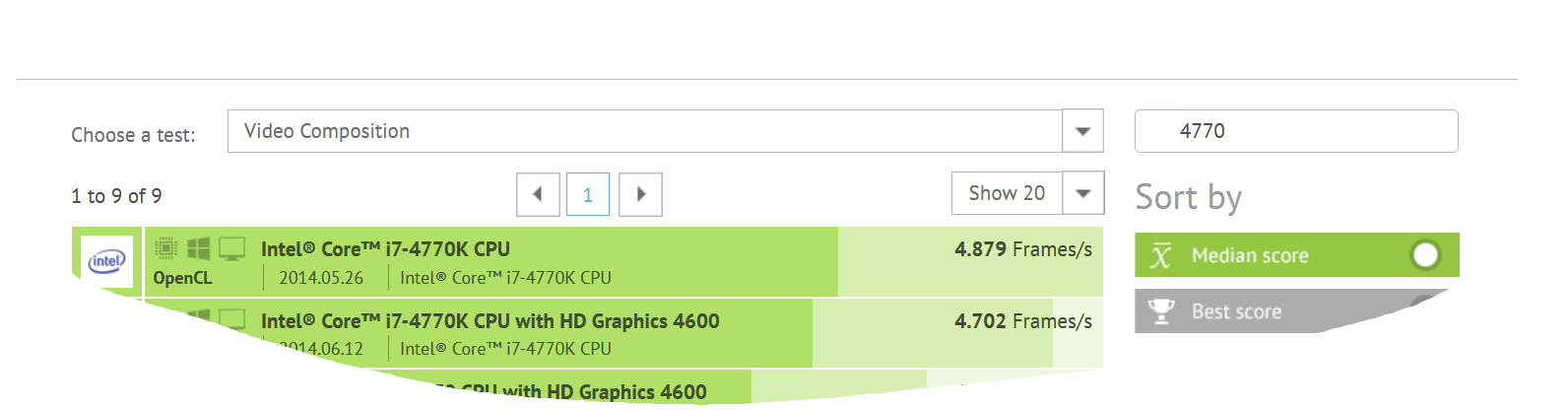
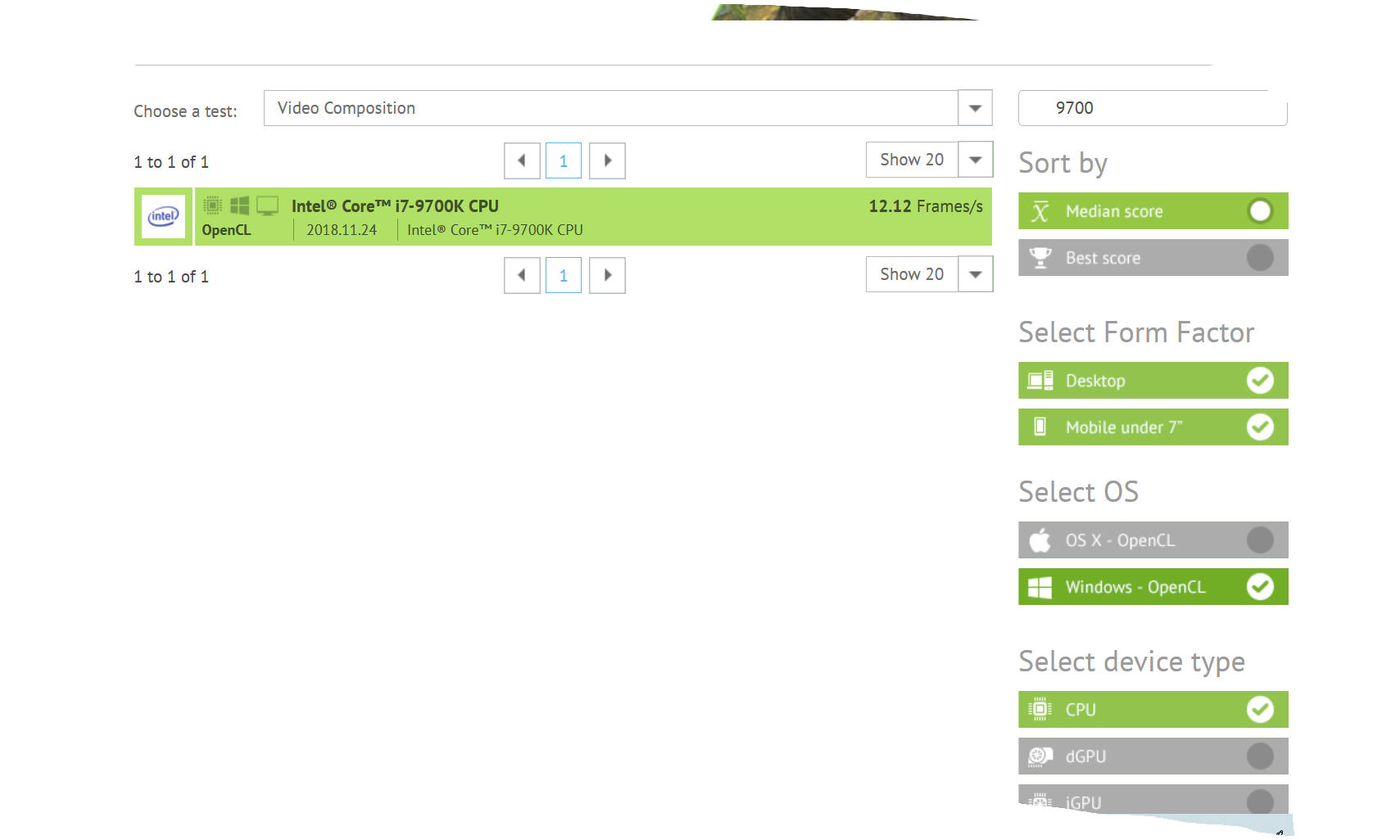
In a very old thread I was hinted by c1 associated Christian Gruner to a performance benchmark, you can use it for GPU and CPU.

 0
0 -
here is the link
GPUs have a much higher score (my gtx 960 scores with 76 or so), but c1 is not even twice as fast than without HW acceleration, IF it is used, which e.g. when exporting images without healing layer, i.e. adjustments and adjustment layers only. hence, you can compare one gpu with another, and one cpu with another, but not a gpu with a cpu.
0 -
Hi BeO
Many thanks for your proposals for the additional tests. I'll try to do follow your proposals later on.
SFA is suggesting that a part of the problems could be the interruption of a started prozess for the re-sizing of a picture.
Lowering the preview size to 640 or 800 does result in a correct display of a zoomed picture after a few 1/10 of a second.
This behavior may indicate some bottleneck in re-sizing the picture or not clearing some memory-content.
A time consuming calculation is acceptable compared to an aborted process resulting in black rectangles within displayed picture.Regards, Ueli
0 -
Interesting. The preview iamge will not be used at all then, all you see is rendered from the raw file.
regards
0 -
Final findings: This bug occurs with Windows 10 - Release 2004.
PC set back to Windows 10 - Release 1909 does allow zooming up to 400" with activ repair layer.
0 -
Hmm.
Interesting.
I wonder if there are updated drivers available for the GPU facilities or alternatively a "fix" coming from Microsoft?
I guess that will depend on which parties feel they have the greatest need to eliminate the problem - unless there is an as yet unresolvable technical conflict. It may be that C1 developers also need to consider how they can work for a better result with both Windows 10 and the GPU's drivers.
I still use Win 7. I know I will be forced to change at some point. I'm not looking forward to the experience.
0 -
Counter to what I said earlier I have now seen this issue on my setup.
From my experience, zooming the image with no edits does not show the issue, adding clarity to an image for example and then zooming does seem to cause the problem for me. It does seem random though, it does not do it all the time on my computer.
I have not figured out what the cause is, but I would say that it was less prevalent in earlier versions of C1 20.
0 -
Have made identical tests with the same 2 pictures on 2 diffrent PC's (Repair layer, HDR corrections and clarity set to 15%)
PC1: i7-7740 / 24GB RAM / Intel HD graphics 4600 (Hardware acceleration = OFF)
PC2: i7-9700 / 32GB RAM / Nvidia Geforce RTX 2060 (Hardware Acceleration = AUTO)
On both PC's zooming is seamless possible up to 400% if the PC is operating Win 10 Pro - 1909.
On both PC's zooming does create artefacts if the PC is operating Win 10 Pro - 2004.
(Red/blue squares when zooming > 50%)On both PC's zooming works up to 400% when the repair layer is switched OFF with both Win 10 releases.
Due to hardware acceleration PC2 does export 450 files files 3 times faster than PC1.
Hardware acceleration has no effect on the artefacts when zooming on Win 10 release 2004.I have submitted a support request to Capture One. The problem will be forwarded to the R&D department.
0 -

Have you news about this problem?
0

Post is closed for comments.
Comments
21 comments