Better in program management of Styles and Presets
Logged
I've recently moved over from Lr to Capture One 20 and I'm really enjoying the change! However there is one thing I'd like you guys to consider - more comprehensive styles management from within the Capture One program. After importing, deleting and renaming of styles only seems possible by diving several folders deep using Finder or Explorer depending on you computer of choice. Favouriting a style for easy retrieval for future edits seems impossible to do unless again you create a favourites folder and copy across the .costyle files, again from within Finder or Explorer. Couldn't all this be done from within Capture One itself?
Maybe I'm missing something? I'll play the newbie card only once - I promise!
-

Hi Andy,
Thank you for your post.
Indeed, the renaming of Styles is possible from within the folder which you can access with Explorer/Finder.
Meanwhile, it is possible to delete Styles in one of the following ways:
- Option 1. Go to the Adjustments tool tab and navigate to the Styles and Presets tool. Select the Style, right-click on it, and select Delete from the context menu.
- Option 2. Click on the Adjustments tab in the main menu. Then navigate to Styles -> User Styles and click on the selected Style to be deleted.
0 -
Thanks Lily. It would be great to be able to do all of this from within Capture One itself. In particular being able to favourite styles. It's not often I'd like Capture One to be more like Lightroom - but this is one instance where I think you could make some improvements :)
0 -
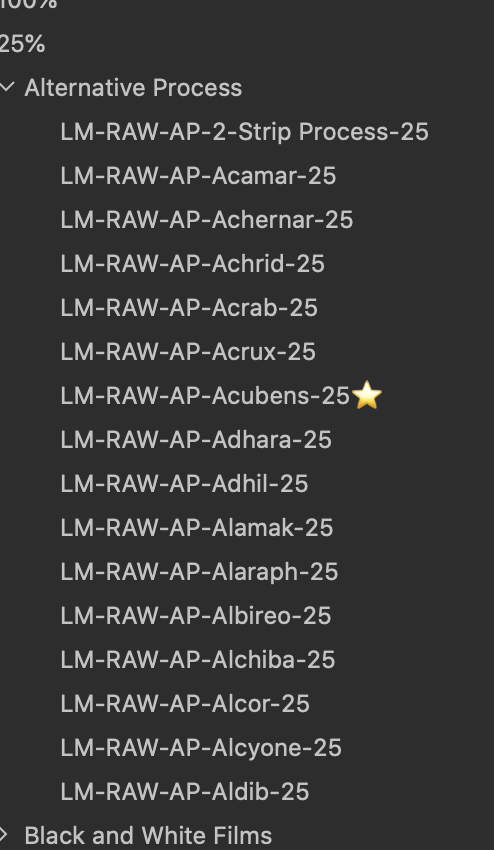
I also have a ton of styles and 95% of them i never use, but I do love to have the option to use them. So i fully support the idea of being able to favorite (add a star icon) to make it easier to try out the favorite looks before the rest.
Just something simple like:
 0
0
Post is closed for comments.
Comments
3 comments