Not using C1 anymore subscription But ingest in Photomechanic show C1 ARW files!

Why is this C1 software auto converting my Sony ARW raw 24 meg files to C1 files when importing from my sd card, reader into Photomechanic? it says this is the default. Well, how do I change that? It seems to be causing havoc now...it suddenly started to do this. I use Lightroom as an external editor to Photomechanic 6.
I'm a paying subscriber.
-

In the Capture One preferences, "General", "Importing", uncheck "Open importer....".
0 -
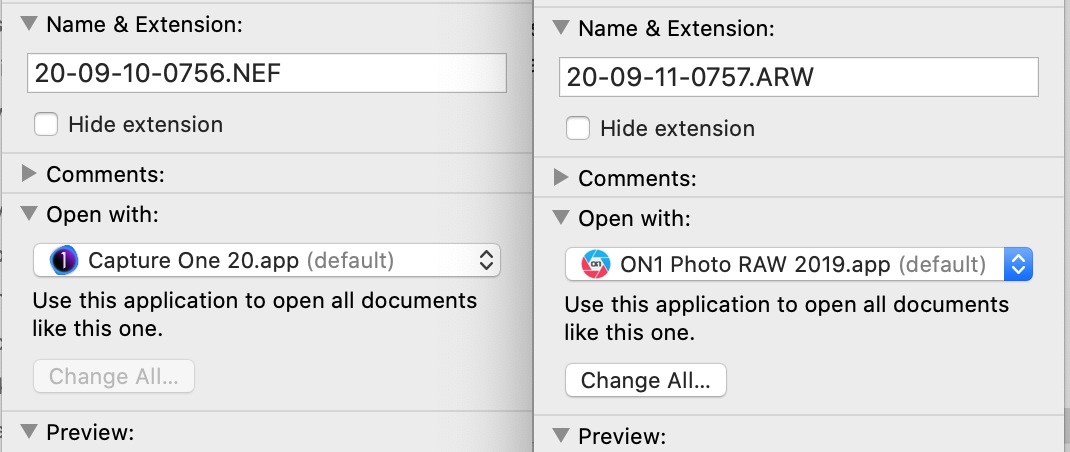
It can't be converting the ARW files into "Capture One files" because there is no such thing as a Capture One file format. But Finder may still be set to treat Capture One as the default app to use with ARW files. You can right click any ARW file in Finder, choose Get Info, then in the box that appears you can select what app opens it. In my screen shot you will see that this is set to Capture One for NEF files, and bizarrely to ON1 for ARW files (must change that now I've noticed!).
If I select a different app from the drop down list, the Change All button becomes active and it can set the app of your choice for all ARW files. (Which does not stop you using something else on a particular one if you choose.)
Ian
 0
0

Post is closed for comments.
Comments
2 comments