Where does Capture One 20 store predictive auto-fill (metadata) text? And, is it editable?

I have a handful of nuisance predictive text suggestions which repeatedly come up when I'm manually entering metadata. I feel like if I could find where Capture One stores these predictive suggestions I might be able to edit them to get rid of the nuisance items.
Where are they stored?
Can they be edited?
I'm running Capture One 20 Pro (13.0.2.19) on Mac OS Catalina (10.15.4)
-

In the Metadata tool, open the action menu from the three dots, top right. Choose 'Reset Metadata Completions'.
0 -
Hi Paul and thanks for the reply. I understand you can "reset" the metadata completions from that menu but that doesn't actually answer the question I was asking. I don't want to reset the info. That will simply wipe everything away. My question was, does anyone know where that data is STORED, and might it be EDITABLE?
0 -

I filled in a file with the information and © details I wanted
and saved it as "Gralla".The saved preset may be applied to new selection and many
presets may be created to all needs.
The data is editable anytime but must be saved.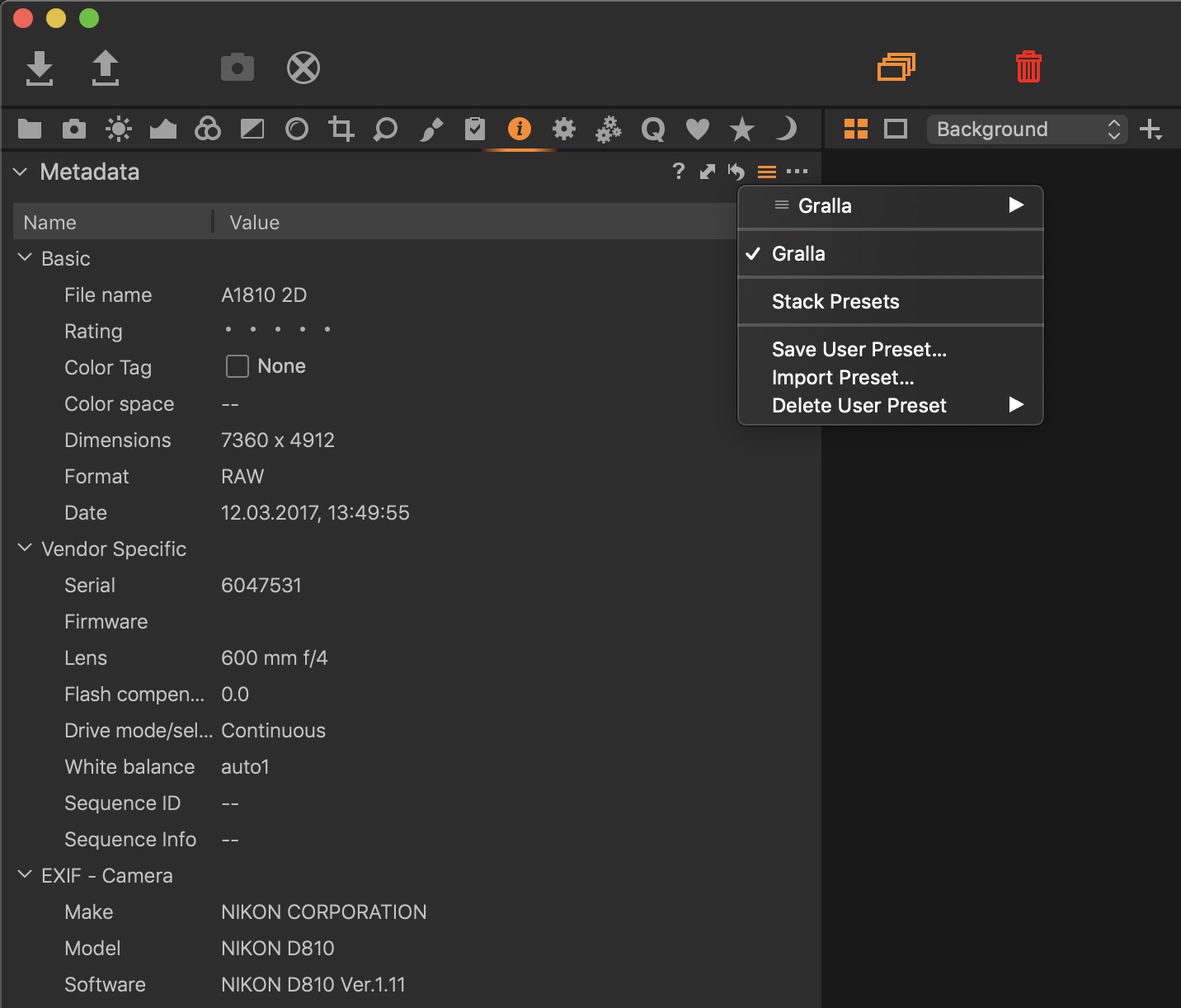 0
0 -

Gary,
Assuming I have correctly identified which metadata you are referring to ...
They build up dynamically field by field in the IPTC data, etc.
They are saved in the userconfig files in Windows so presumably the equivalent on Macs which I guess is plists?
I have never been distracted by them to the extent that I have investigated how one might eliminate them or whether deletion implies a reset that would result in re-population based on existing data held for pre-edited images.
0 -
— Where are they stored?
Not as a .plist but a .copreset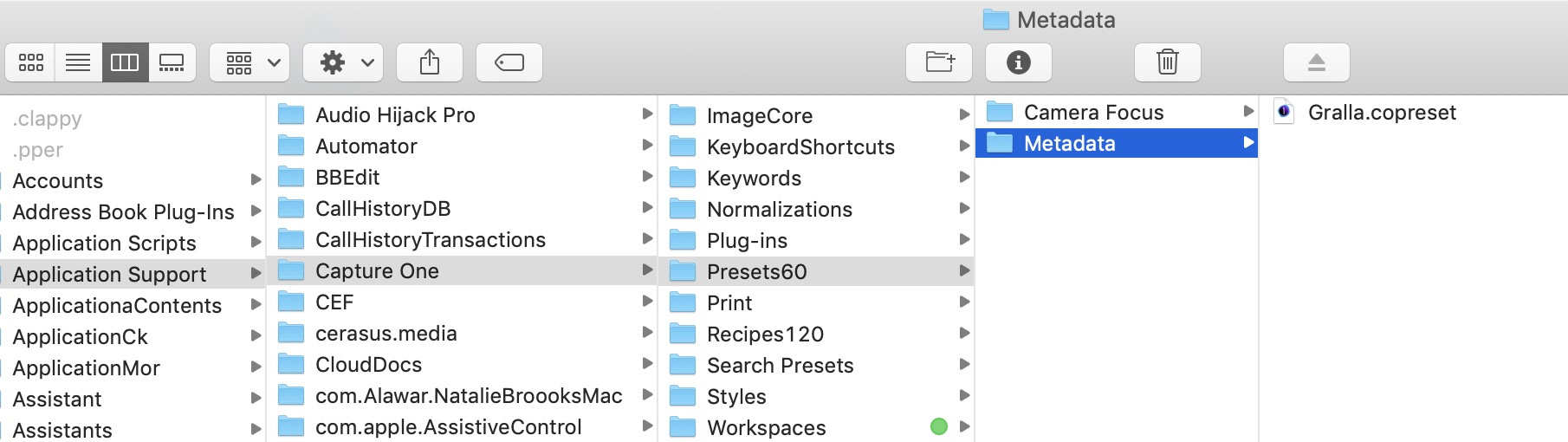 0
0 -
Nikon Shooter,
Thanks for the response. What you're talking about there are saved user presets. I'm very familiar with those, where they're stored and how to edit and create new sets, even from an external editor. What I'm asking about are the predictive text 'auto-fill' suggestions Capture One offers when you're manually entering some data. It's obvious from observation that Capture One is maintaining a cache of previously used metadata entries, as they are offered in a drop-down list when you're inputting data manually. I want to know where THAT is stored and how to edit it.
It's got to be somewhere.
I've got a few terms I need to enter from time-to-time but not so often it's worth keeping a user preset. On some of these I may have had a mis-spelling in the past and those are saved in the cache of 'auto-fill' suggestions that pop up. It's a real nuisance as there are occasion where I get that error 'auto-fill' suggestion in place by accident. I'd like to delete those past errors but not simply clear ALL of the past cache. The auto-fill is helpful but for those nuisances.
0 -
I've been assuming these predictive text auto-fill suggestions are held within the Capture One application and support files somewhere. Just seems to make sense since they are all application and entry field specific. Meaning when I go to manually add an entry for Content-->Headline, the suggestions offered are all previous entries I've used in that specific field. Move to Content-->Description and the same, entries I've previously used in THAT field, but nothing from other apps or system interfaces.
That said, is it possible this information is actually saved in the Mac OS somewhere/somehow? I really don't think so. They're always specific to Capture One past entries and specific to the exact text field I'm working in.
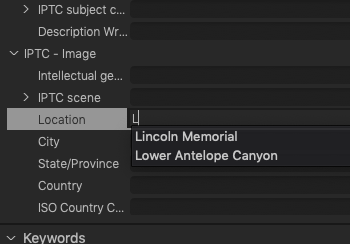
This screenshot shows an example of the auto-fill suggestions I'm referring to, as I begin typing in a field. On my other machine those auto-fill lists are much longer.
 0
0 -
Here, it's stored in this file: ~/Library/Preferences/com.captureone.captureone13.plist
If you search for "METADATA_COMPLETIONS" you should see several sections.
1 -
Thomas Kyhn, YES! That is exactly what I was trying to sort out! Thank you!!
All of those predictive auto-fill suggestions are there in the Mac system file you defined. One small correction though, the path is...
~/Library/Preferences/com.phaseone.captureone13.plist
Thank you so much for addressing the question in my OP!
0 -
Interesting, here the name of the .plist file is com.captureone.captureone13.plist, not com.phaseone.captureone13.plist. I wonder what the difference could be.
0 -
Regarding the name of the plist file for Capture One 20 (build 13.x):
build 13.0.x uses the naming scheme from earlier versions, hence com.phaseone.captureone13.plist
build 13.1.x uses the new naming scheme, com.captureone.captureone13.plist
The reason for the name change is that Capture One is now independent from Phase One since that release. Apparently, Gary is using an outdated version of Capture One 20. ;-)
0 -
@Paul Steunebrink – Thanks for the explanation.
0 -

Legend @Thomas! Thanks I was looking for this too. I use a huge database of names and hate having to fill them in over and over again with every new computer.
0

Post is closed for comments.
Comments
13 comments