Bring back "Show Enabled Only"
Implemented
Please, please! bring back the "show enabled only" toggle button in Process Recipes, or give us a shortcut.
I use a lot of recipes and without the ability to group/hide recipes and no toggle button, there is a lot of extra clicking going on. It is a daily source of frustration - reminding me daily of my years using Lightroom.
Cheers
Laura
-

Hi Laura,
Thank you for feedback on Capture One - this is always welcomed and encouraged among our users and we appreciate the time you've taken to contribute towards the development of the software.
I have forwarded your comments and suggestions on to our Product Management team as something to consider in a future release.
Whilst we cannot comment on future releases, we take all suggestions on board and hopefully your feedback contributes towards a future version of Capture One.
0 -
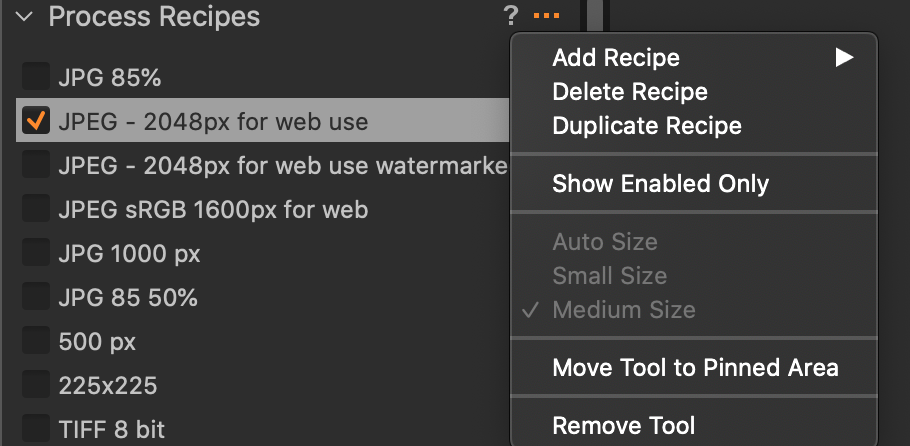
You can fairly quickly show enabled only - just click on the ... to see the menu involved. Or its that what you meant by too much clicking?
Ian
 0
0 -

Yes, we need it. Keep it that way, please!
-1 -
Long delay - life happens. And lets hope the New Year is a better one for everyone. Yes Ian that's too much clicking and even more annoying is that there is no way to deselect recipes in the "Show enabled view only"; so to do so one has to show enabled then scroll to find anything that is selected. Being able to deselect in this view would be even more helpful than the toggle button. If you only used half a dozen recipes the current system would work fine, but I have recipes for proofing, recipes for printing at varying sizes and recipes for individual clients.
Cheers
Laura
0

Post is closed for comments.
Comments
4 comments