Bug in search dialog field

it would be nice if the bug in the non modal search dialog field of the browser could be fixed. it's been there for some versions now but noone seems to care ...
This part of the C1 surface keeps "On Top" even if other applications are in the foreground - what can be pretty annoying since it sometimes overlays windows elements. See attached screenshot. (My C1 version is 13.1.2.35 - Windows 10)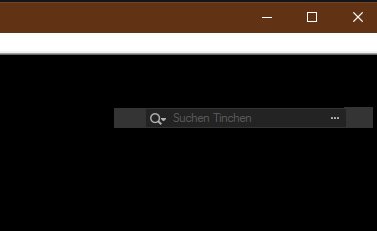
Cheers, Timo
-

Timo,
Does that persist for you even after you reboot C1 or you reboot your system?
I sometimes see something similar (also from other applications) but it usually clears when I restart the system. (Win 7 in my case.)
0 -
I can reproduce the effect even after a system restart ...
0 -
Maybe at least someone from C1 can take it into the bug list ... so it doesn't gets overlooked again ... it's really annoying!
0 -
I'm sure it's annoying and very rarely I see the same thing but it is something to do with Windows and how it handles the display or hiding of functional windows.
Normally, of the window fails to be removed for some reason during regular activity it will be removed by restarting the system .
I'm not sure that C1 could do much about it. I have seen it w-th other applications.
However if you want to bring is to their attention the way to do it is to create a Support Case using the "Submit a request". option.
You will need to send them the log files for the system. Plus anything else they may ask for that will help them work out what may have happened.
This link may also be useful.
0
Post is closed for comments.
Comments
4 comments