Anzeige von bearbeiteten Bilder

Hallo Zusammen,
Gibt es eine Möglichkeit über die suche nur Bilder anzuzeigen die man bearbeitet hat. ich wollte nicht mit Bewertungen arbeiten. Suche nur eine Möglichkeit in einem Ordner mit mehr als 200 Bildern die 5 Bearbeiteten anzuzeigen.
Ich hoffe mir kann hier jemand helfen
-
I'm sorry I can't reply in German.
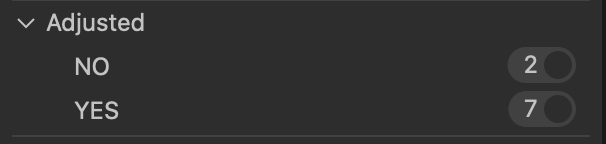
You can use the Filter tool for this. In the Filter tool, click the ... and then Show/Hide Filters. One of the filters you can choose to use is Adjusted. With that checked, you can see in any folder which are the images that have been adjusted and which have not.
So in this screen shot there are 9 images in the folder. I could select the Yes filter to see the 7 that have been adjusted, or the NO filter to see the 2 that have not.
Ian
 1
1 -
Thanks for your fast replay.
i don`t have this, i use the free Express version for Sony. i Think it depends on this i dont have it, right?
Regards Peter
0 -
That's probably correct.
Ian
0 -
:) if i buy the Sony Version then it is working. you know this? I think about to buy it.
Peter
0 -
If you buy the Sony version, it will have all the same features as the Pro version that I use, except only for Sony cameras.
You could download the free trial and test it for yourself.
Ian
0

Post is closed for comments.
Comments
5 comments