Seeing RAW and JPGs together.

How do I set C1 to place the RAW and JPG files together that have been captured in camera simultaneously?
-
You can, of course, import them to the same folder. If you view it in Date order, then each raw should appear next to the corresponding jpg.
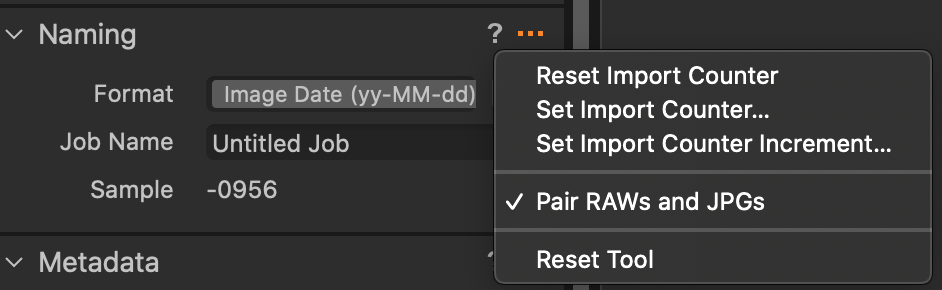
If you rename files on import, there is an option when you click the ... on the naming section of the import dialog box to pair raws and jpgs. That would mean for example, that DSC12345.NEF and DSC12345.JPG from the camera could be renamed to matching formats such as 2020-09-28-1234.NEF and 2020-09-28-1234.JPG. That way they will stay together in the folder whether sorted by name or by date.
Ian
 0
0 -
Thank you Ian for your fast reply. It worked a treat and now I can easily compare the RAW to the JPGs out of my Fuji. I like the focus masking associated with the RAW files to speedily eliminate unwanted images when taking runs of continuous (bird photography) and lately have been attracted to the straight out of camera JPGs....Pete
0

Post is closed for comments.
Comments
2 comments