Spinning Ball

More and more spinning balls with every update. I am seriously looking for and alternative I think C1 is getting bulky for most computers
-

Not for most computers, as it works perfectly with mine !
0 -

What hardware do you have?
I have an "ancient" 2012 MacBook Pro Retina with 1TB SSD, 2.4Ghz i7, and only 8GB RAM and I don't get the spinning beach ball of death.
However, I do get random lock ups every once in a while which require me to do a forced shutdown. I think that's just a bug though.
0 -
the spinning ball is mainly in my 27 in mac 5k my 2012 MacBook is great. any ideas? I have a ton of ram that i installed
0 -
I did a quick search on that iMac. By chance does yours have just a regular Hard drive instead of an SSD?
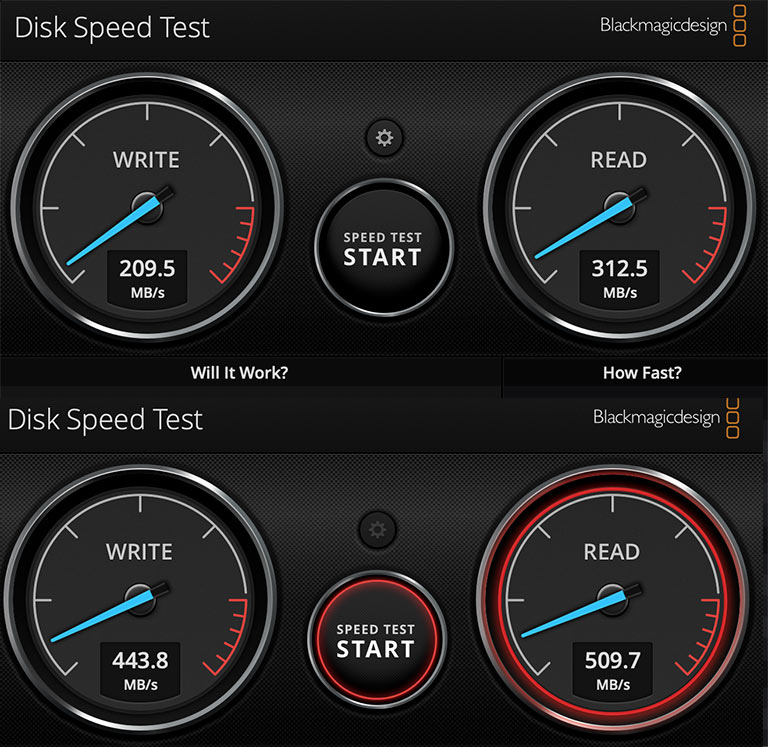
Also you can download BlackMagic's hard drive speed test app to see if your drive is slow. https://apps.apple.com/us/app/blackmagic-disk-speed-test/id425264550
I added my speed tests from my original 250GB SSD and the new 1TB SSD from OWC, I just added in my MacBook Pro. Quite a nice speed increase with the new SSD.
 0
0 -
what file do I choose
0 -
so testing my pictures folder I get 240.1 and 696.8 on the read
0 -
I just press start. I never select a folder.
Oddly slow write speed you have there, which is what the majority of C1 is doing.
0
Post is closed for comments.
Comments
7 comments