Orf Files

I have imported some older Olympus Orf files (they are about 3 years old) and they do not contain a background layer and I am unable to crop them.
Can I edit these images at all in Capture One 20?
-

Which camera(s)?
Are they on the supported cameras list?
I'm not sure what you mean by "they do not contain a background layer".
0 -
They are from my Olympus Pen F which I believe is supported.
When you open an image normally there is a background layer and you can add adjustment layers. These contain
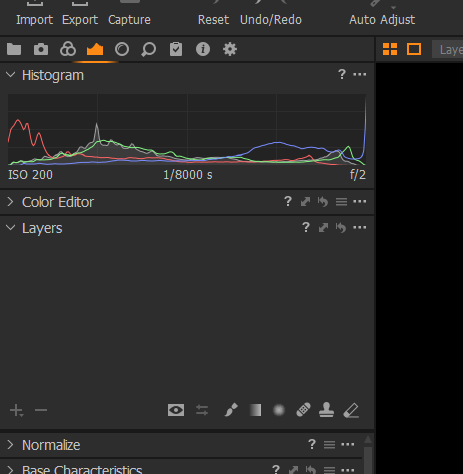 no layers whatsoever.0
 -
Well, that's unusual.
I assume you have an image selected in the browser since there is a Histogram displayed.
Is there a possibility that it was shot with Pixel shift mode active? That is not supported according to the Camera list notes.
If that is not a possible problem than maybe the best options would be to re-boot and if that does not work then re-install?
If no luck with that then perhaps use the "Submit a request" option and create a Support case to obtain personalised assistance from the Support Team.
0 -
Hmm I am not sure if the camera has (had) pixel shift but I see that is not available with Capture One. The JPEGS work ok but sadly not the RAW files :(
0 -
If you can open the files in whatever Olympus software was supplied at the time and then create a tiff file that may give you a better starting point than the jpgs.
The Notes related to supported cameras are dedicated to the functions available in camera at the time but not available in Capture One.
0
Post is closed for comments.
Comments
5 comments