Using C1 with a 3rd party DAM

This is an echo of a post on dpreview: https://www.dpreview.com/forums/post/64450046
I'm working through how best to use C1 v12.15 with another DAM.
Pretty much experienced the same issues as most others attempting to work with large Catalogs. It was my thought that the Mac version of C1 was better than the Windows version, but lots of reports here to the contrary.
One important thing to remember is that C1 was spun out of Phase One last year, literally in the middle of the night. The major impact of that was the closing down of the old forum with literally 20 years worth of user-to-user support and instead standing up a really crappy Zendesk forum structure. A really nice poke in the eye to customers. So any link that you might find to an old forum enter on the innerwebs is no longer functional.
After beating my head against a plethora of catalog issues with C1, I've migrated away from catalogs by doing the following:
- Create a session on the fastest drive in your computer. I've got two SSD's my windows box, so that was easy.
- Export your files, folder by folder using the export function. Make certain and set it to save all the metadata and such. I exported all of mine to a folder on my NAS box. It helps if you use metadata to create folder and file names, otherwise you will have to fat finger it... Sorry.
- Once you have all your images exported, close your catalog and open your session.
- The key here is don't import anything into the session. Browse to the folder desired. The first time you do this, C1 will create previews in the folder of the images of the folder.
- The good part about doing it this way, is you can back up all your previews and edits. This is major as I was starting to run into serious catalog instability issues and had to regress to a backup catalog two within a couple of weeks.
- The initial preview generation oftentimes takes a few minutes, but once done, it's done.
So now that my development settings are safe, I can now begin to toy with a number of other DAM's. In no particular order:
- iMatch, while probably the most powerful, is off the table primarily due to some happy interactions between the author and myself here years ago.
- A new entry called Photo Structure - A quick trial indicated it was more a Picasa like thing than a DAM. Not bad, but not what I'm looking for.
- Abemeda - The windows version of Neofinder. It insisted on cataloging every file in the folder tree, whether a photo or not. Couldn't figure out how to restrict it. Didn't look too much further as the sidecars vastly outnumber actual images and finding them was a chore.
- xnMedia MP - If this wasn't so friggen ugly on my windows boxes, I would be all over it. All the functionality I'm looking for, but it just hurts my eyes, no matter which theme I choose. And the themes are exceedingly inconsistent on my various Windows boxes, which all sport the exact same resolution. Don't understand this, but had to abandon it.
- Digikam - I like this one, but it doesn't look like you can tell it about multiple editor app's. It picks up whatever Windows indicates as the app to open for a particular file. Unfortunate, as the metadata handling seems to be very good.
- LR v6.15 - In all likelihood, I'll fall back to this as I own it, am familiar with it, and with a couple of add-ins can probably suit the needs, at least until I get a camera that it doesn't support. I've even gotten the Map module to work thanks to chicken.
One of the things I've been playing with in regards to Capture One is command line switches in order to work better with a DAM.
If you let it do the "Explorer" integration when you installed it you get this when right clicking on a folder:
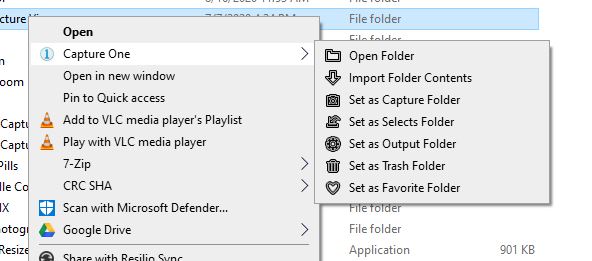
Doing some spelunking in the registry, I've copied the command line switches for the various selections. Using an empty Session as the default in Capture One, I've tested the switches with a filename, not a folder name as the input and this is what I've found:
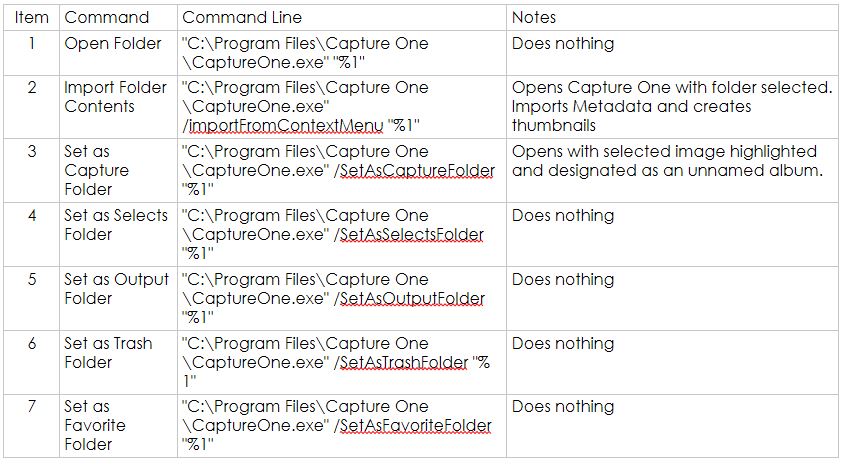
Sorry for the graphic, but the table is in OneNote and it didn't copy and paste well. The key result is #3. This is the best solution.
One key thing is, turn metadata handling in C1 to load or off. C1 will bugger up all your hierarchical keywords. DAMHIKT....
I'll play with the command line switches and John Beardsworths "Open Directly" and report back. I will also post this on the Capture One user forum to help others struggling with the same issues.
cheers,
chris
-

I am like this online blog here going to here connect browsing history this is the update for users can see batter working every time
-3 -

> Christopher Dubea: So now that my development settings are safe, I can now begin to toy with a number of other DAM's. In no particular order:...
Have you considered adding Photo Mechanic Plus to your list of DAM candidates?
0 -

....another vote for photomechanic !
0 -
Is there a guide on how best to use Capture One with Photo Mechanic?
Thanks
Chris
0 -
I use PM to import, cull and rate my images ( you can import from folders like sessions too ) in my archive with a simple folder structure. you can sync meta data like ratings between PM & C1 which is helpful, so when you have marke for me it is simply the best and fastest tool for this tasks but as I do not need the catalog features I had only a quick look at PM plus.
0 -

A 3rd party DAM isn't going to show any C1 adjustments in their views, is it? So I would be looking at my RAW and otherwise untweaked files in the DAM and wouldn't see what the adjusted photo looks like until I get into C1, yes?
0 -
yes, ( speaking for photomechnic ) what you see is the embedded preview your camera has generated
0 -
Today was the last straw for C1 unless your PM DAM trick works. C1 photo editing by itself - the actual editing of a photo - works well and seldom crashes on me. The rest of it - searching, organizing files, navigating, etc. SUCKS. I have written moew crash reports to C1 than I can count - hundreds at least. C1 crashes or locks up nearly daily. Yesterday it crashed on me twice; today it crashed once. I had to "repair" (what a joke!) my catalog the other day after C1 crashed renaming a folder. That left me having to restore the catalog from backup add folders back in again under the original name and sync'ing them. Thist left me with a directory of files for which the masks and edits are gone. The mask files, etc. exist in the C1 catalog directory tree but C1 won't use them.
So I have to try using PM for the DAM and use C1 ONLY for editing photos one at a time. This is what you're doing, right? You don't have to do anything else in C1 except edit photos, right? I'm willing to give that a try but if that doesn't work I'm going to have to move on from C1 or I'm liable to have a stroke!1 -
rule #1
don’t trust any company when it comes to DAM ! if they don’t keep their promises or things went wrong you are the only one who is f…ked.rule #2try to setup a archive structure which is also searchable with the OS and without the need for a DAM . for me it is enough to have numbered and dated HDs with folders containing the raw files named with client - project - capture date. the more independent and sophisticated you can get it the better it is !c1 is a software in decline and even when they now start to invest in more R&D in greece it is to far late imho. I´m extansivly testing dxo and so fare have not seen one crash...1
Post is closed for comments.
Comments
9 comments