Remove spot not copied over to next capture

Shooting a catalog with sunglasses and right in the middel of each capture I have a vague spot of dust on the sensor that shows up on the glass of the glasses. In previous versions of C1 I would put the remove spot on the background layer and it would copy over to the next capture.
it does not do that now. Here a screen shot of adjustment clipboard:
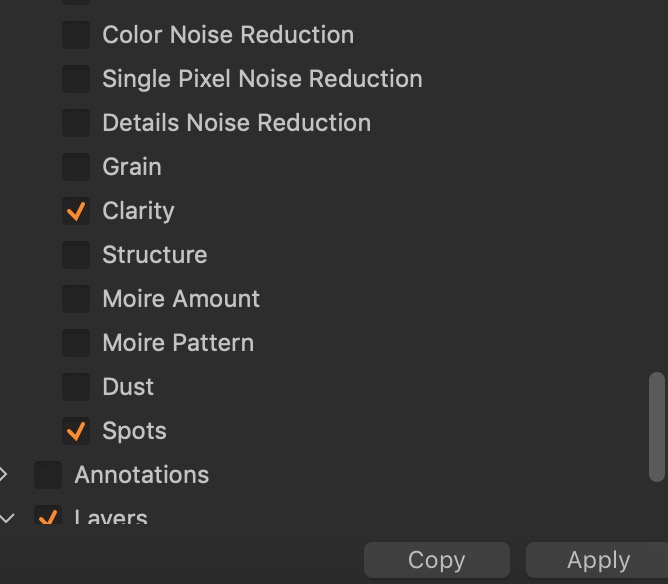
Am I missing something?
-

Just checking ...
Are you using the Spot tool (for spot and not dust) or a layer Healing adjustment?
I appreciate that you are using an approach that you have been using for some time and that you know what you are doing and recognise that the Spot correction applies to the background "layer" - but it would remiss to not ask such a question early in the attempted diagnosis!
I probably should also check with you that you actually used the Spot mode in this instance and have not accidentally made the correction a Dust correction without noticing the anomaly
1 -
Thanks for the reply. I use the keyboard shortcut "O"
Is that not the correct tool to copy over to next capture?
0 -
"O" opens the Spot/Dust removal tool and as far as I know that opens by default in Dust mode.
Dust mode may be the correct adjustment for your needs since is is intended to deal with recurring sensor type dust spots that appear in a fixed location - which is what you seem to have with your shots. It's a fixed location in the frame and particular type of correction calculation can be applied - usually successfully but it is a "healing" type of operation and may not always work completely in some situations as with any healing activity.
Spot mode uses a different adjustment calculation and is more intended for removing problems areas like facial marks in a portrait, for example. That sort of thing. Photo subject oriented rather than camera sensor originated problems.
In copying from one image to another the "Dust" correction is considered to be a fixed correction point for a fixed problem and can therefore usually be copied from shot to shot with each image being reprocessed at that spot to apply a correction.
Spot mode is less usually automatically selected for copy because the locations of the marks to be corrected may well move from frame to frame. However they can be set for copy if to do so works for you in the context of the images being processed.
On that basis you might check whether you have dust or spot type used for you correction and tick the box accordingly if it is different to current settings.
In the context of Tethering and the "Next Capture Adjustments" options there are further selection options that can be made but I get the impression you are in post shoot processing and so the is it a Dust or a Spot adjustment seems likely to be the first thing to investigate.
1 -
Still very much in the shoot process and having to select the remove spot tool EVERY capture slows me down. If you have a suggestion as to where to look so new captures automatically have the spot covered in the same place, that would be great.
Thanks again for tuning in
0 -
Andrew,
Your working in areas that I rarely head to and certainly not this particular part of tethering. So I don't feel I can (or should) offer anything claiming to be a definitive solution.
However the tethering part of the application (assuming you are talking full tethering rather than a Hot Folder approach) includes a "Next Capture Adjustments" tool and within that there are variable settings for several fields most of which also have variable "rules" available to control them.
To me it looks like you might want to use the "All other" field and then either Copy from Last of Copy from Clipboard but either way you will end up needing to check whether to tick Spot or Dust or choose both.
The Adjustment clipboard has some controls of its own that I presume may also be in play here and affect which edit actions get included.
If, no matter how you do it, ticking both Spot and Dust fails to do anything in the copy process so far as you can see then it suggests either the settings are, somehow, not as you expect them to be or something is not working.
If the clipboard tool is set to Select all Changed values any changes should be copied and therefore applied. However to provide the flexibility that people have requested over the years the controls may have become somewhat complicated and they seem to me to offer some ready potential for missing an implication of a setting somewhere and so observe a vanishing adjustment.
I'll need to check the way things work if you are using the Hot Folder approach.
That may need to wait until tomorrow - I need to do some other non-photographic things tonight. Deadline in about 3 hours.
0
Post is closed for comments.
Comments
5 comments