Lost over 500 gigs of pics time to change

I have gone through my older catalogues and what I get is this I have downloaded a copy off my cloys backup only to get the same message, this has affected no less than 6 of my catalogues. My recent ones work fine so I am thinking its time to give a more stable platform a try as this has happened before. This was a large group of my pics and cannot seem to recover them. Lesson learned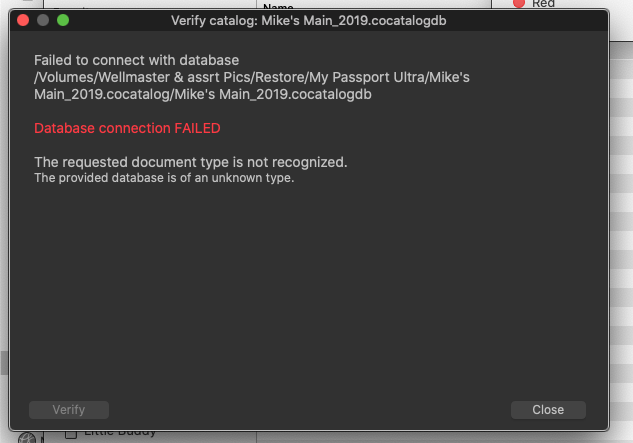
-

Sounds like time to file a support request if you haven't already. What's a "cloys backup"?
Have you tried repairing the database in C1?
0 -
Sorry cloud backup and I have tried everything. How do you repair the data bases
0 -
Open Capture One, then select "File...Verify Catalog or Session..." Then navigate to the catalog you want and click the appropriate box. I've done this before and verification of a 40k+ catalog doesn't take very long. C1 should display a dialog indicating that the process is complete.
However, I found that sometimes C1 doesn't let you know when the verification's done, so I watch disk activity as well. I use both MenuMeters and iStat Pro to display disk activity and when I see R and W activity drop to 0 I wait another couple of minutes and then assume the verification's done.
0 -

Open Capture One, then select "File...Verify Catalog or Session..."
That's what Mike was doing.
0 -
It won't let me in that far, it seems that C1 is a bit unstable I don't know if its because the catalouge is too big or what. The other catalogues are much smaller and they do the same thing so I don't know what is causing this. Its making me think that LR may handle catalogues better
0 -

Mike,
Firstly are you using a Managed catalog or, more pertinently, have you stored all of the images in side the catalogue? How big is it in Gigabyte terms?
Are you sure that recovering from Cloud backup gives you a usable immediate accessible catalog file rather than just a backup style file or something compressed that needs to be "extracted" to be usable?
Just some thoughts - somewhat randomly - from someone who does not use a Mac, or Cloud backup or Catalogues (other than for testing and experiments).
0 -

Mike,
I have only used Capture One 20 so my comments may be way off base and I realise that the name "Mike's Main_2019.cocatalog.db" does not mean it was created in an earlier version of Capture One but that name and the fact that you comment recent catalogs show no problems makes me wonder if you download an earlier version of Capture One if that may open your work. Of course if the catalog was created in version 20 none of this is pertinent.
I think SFA's comments may bear looking into. I wonder if the cloud storage could have had something to do with it. It's a tricky one.
0 -

'My Passport Ultra'. Are you storing your database on an external drive? While I expect modern external drives to be fast and reliable, I'd never leave something so critical as a live database on an external drive. This sounds like a drive hardware or communication problem, more than a problem with C1.
But that said, I had my first ever corrupted DB happen just a few days ago. Cheerfully I don't care, there's nothing stored in there that I want, so I just started a new session and carried on. (I honestly have no idea what the DB is good for, 'cause whether it works or not, my workflow isn't affected)0 -
@NFGphoto
Using sessions the db simply keeps track of related and "favourite" folders, and information related to albums and similar. It does quite a bit but is not a total disaster if 'lost' for some reason. That said I do not recall ever having a session db problem - or at least not one that I noticed.
If using a catalog the images may be saved as part of the catalog folder structure and all edits and cache files will be in there too.
It's not the end of the world necessarily but it can be a lot more disruptive to lose a catalog DB and there is nominally greater activity and so a greater chance of some sort of glitch happening with a catalog.
In my opinion and for my normal needs I, like you, stick with sessions, although from you comments I suspect we may use them in slightly different ways.
1
Post is closed for comments.
Comments
9 comments