Region based Contrast Adjustment Tool
Implemented
C1 provides various options to control contrast both globally and locally like Contrast slider under Exposure Tool and Curves etc... Also HDR tool can control contrast as well .
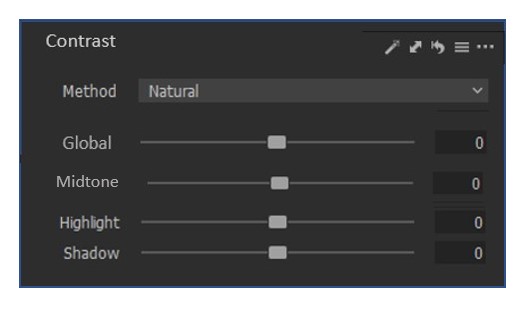
There can be a separate tool specifically for Global and Local Contrast adjustment with different sauces like shown below:
Methods:
- Neutral - Only Luma based Contrast adjustment, No change in Saturation
- Punch - Contrast adjustment with Saturation adjustment ( similar Color Editor tool Saturation slider)
- Natural - Contrast adjustment with "intelligent" saturation change with no color artifacts and protect Skin Tone etc..
Global - Affects entire tonal range (histogram) with NO clipping.
- Even though Clarify takes care of Midtone contrast, it is observed that behavior is different than just contrast adjustment. So having "Midtone" contrast slider is a good option.
- As Black/White zones are very narrow, they can ignored.
-

Hi Prasad,
Thank you for feedback on Capture One and the idea of the new tool.
I have forwarded your comments and suggestions on to our Product Management team as something to consider in a future release. Hopefully your feedback contributes towards a future version of Capture One.
Though we cannot comment on future releases and the features to be added, we recommend keeping an eye on this article - click Follow next to the title of the article to stay up to date with new features and improvements.0
Post is closed for comments.
Comments
1 comment