C1 20 pro, does not remember changes made to photos!

Hello!
Unexpectedly, I had a problem, namely:
I edit the photo, make corrections, add layers, etc. Finish work, close the program. After reopening the program, the previously processed image is as new without any changes I made before :(
I add that the program has worked properly so far.
C1 20 pro (13.1.3.13), windows 10.
load a blank photo.

changes and layers made.

restarting the program.

has anyone encountered such a problem?
-

Are you using a session or a catalogue?
It is only one image that is affected? The rest of the images in the browser look normal.
0 -
I am using the directory, I checked it and this is the case for all files that I have processed in the last days, all of them have no corrections. I analyzed the situation and decided that it was not the fault of C1 because it worked properly since the last update, and I will focus on the windows system that has had an update in recent days, there must be some "bug" in securing files by the windows system. Today, as soon as I find some time, I will check it carefully.
0 -
I found two ways to get around the problem: the first is to run the program like an administrator - and the program works fine. And the second way is to move catalog C1 "Capture One.cocatalogdb" to another drive, moving from D: / to E: / also made the program work properly.
C: / (ssd m.2) = system. programs
D: / (ssd sata) = data, documents, etc.
E: / (ssd sata) = photosBut I still don't know what the problem is to make it work as it used to be.
0 -
That suggests that for some reason the "user" you were using did not have write access to the D: drive.
That is probably too simple to be a full analysis but certainly worth checking.
It would be interesting to see if the problems show up in the C1 Log files. Are you familiar with the location and reporting structure of those files?
0 -
other programs have no problem writing to disk D: /
what and where to look for in these journals?
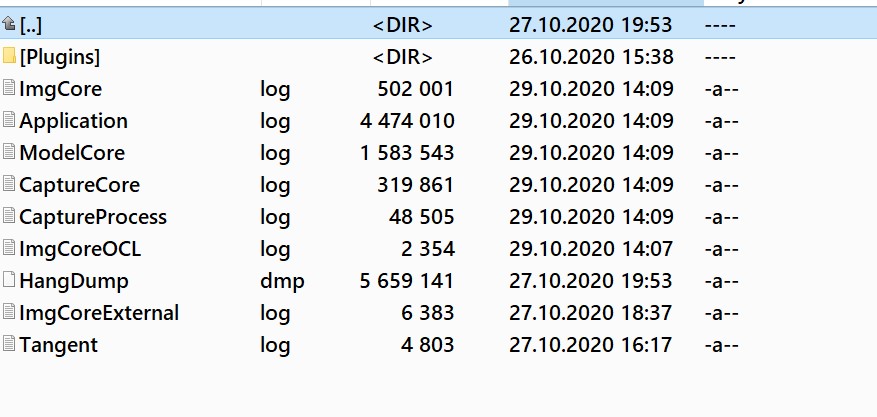 0
0 -
I think Application log and ImageCore log are likely to be of greatest interest.
They are very detailed logs. I would suggest starting with Application log.
Look for lines with dates and times during which you know you were working on images that have subsequently presented problems.
The line may well have the word ERROR in it and possibly have a message something along the lines of "unable to save/write to to drive d:"
I'm guessing as I do not seem to have had the problem so have no confirmation of what an advisory comment line might look like.
I might hope that you see a lot of lines that make it clear that drive D: was not accessible for some transaction and then became accessible once logged in as Admin (identified by the time of the records being created.)
That would confirm the previous guess about the core reason for the updates going missing.
But if no such clear message is visible this may be the tome to use the "Submit a request" feature of the support system to create a Support request and attach the log files and have C1 technical people provide more knowledgeable analysis.
0 -
the only line with an error is: " Error: CaptureCore object leak detected. 20 objects not released. "
Well, I'll live with it somehow!
0 -
Well that's one that I have no specific memory of - but then it might not have meant much at the time even if I have seen it before.
I strongly suggest Submitting a request.
If the problem IS something to do with a Windows update then C1 may no about it and have some suggestions.
If they have not yet found it or been warned about it they may want to know about it!
0 -

I spent years as a programmer and using some incredible tools and one of the things they would tell you is about objects not released (and therefore a leak was detected). Many of these leaks were in actual Windows core routines and you learned to ignore them. Mainly because sometimes there was not clean way to release the objects when the program as terminated. The leak was more of a "just so you know, you did not release every object you created".
Your solution by way of running as administrator pretty much points to a ownership or privilege issue and most likely at a directory level you have missed. Fixing the problem by running as administrator pretty much nails this as a ownership or protection problem.0 -
My logs all the way back a year ago all have "leak detected x objects not released in them. Some of the recent entries say 20 objects. Some say 12...
0 -
I know this is a problem with file security by the system but weird it arose after upgrading to 20H2, and even weirder that other programs have no problem with writing (or maybe I haven't noticed it yet). I log into the system using the administrator's account and additionally I have to run the C1 program with administrator privileges strange thing. I will see how it annoys me, I will return to the v2004 system. So far, as I wrote before, I moved catalog C1 "" Capture One.cocatalogdb "to another disk.
Or maybe in my free time I will reinstall the whole system from scratch, but with that I will wait for the new C1 version.0
Post is closed for comments.
Comments
11 comments