Exporting from RAW(SONY) as JPEG activity never finishes

REPRO Step:
- Import Sony Alpha 6600 RAW file (.ARW) to a Catalog. also a JPG file for comparison
- without any edition, Export RAW file. confirmed JPEG sRGB Process Recipy is default.
RESULT
- Exporting activity started, but never finish
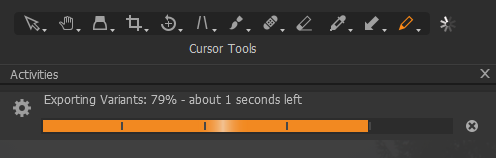
- Task Manager shows ImgCoreProcess.exe (C:\Program Files\Capture One\Capture One 20) keep runing with Very High Power usage. and this process continue running even after I close Capture One. this is terrible....
Environment
- Capture One 20 (for Sony) Build 13.1.3.13 (78b6a17). Purchased today 2020-11-08 as Capture One (for Sony) 21 - Upgrade + Professional Styles kit. Upgraded from Capture One 10
- Windows 10 Pro 64bit with GPU
- Sony Alpha 6600
Other Observation
- [Important Information?] This does NOT repro with JPG file. i.e. I can Export a variant from JPG file.
- License is activated.
- Windows Event Viewer shows warnings - "Event 1001, Windows Error Reporting" with
Fault bucket , type 0
Event Name: LiveKernelEvent
Response: Not available - for this sample image, Export Activity always stop at the same place 79%
- Process also takes time forever.
- This seems irrrevant though just for your info, when I installed Capture One 20, UI language becomes Japanese! I am using English Windows with English UI, with input method both English/Japanese. I have reset Capture One 20 UI language as English. then restarted Windows.
Your support is really appreciated, since it's critical to process and export RAW file to me. If Capture One 20 cannot do that, there is no reason to me to use this.
Please let me know if any further information needed, or any next step to check.
Thank you!!!!
-

You might get an answer here but this forum does not supply any official C1 support.
You should start the "submit a request" process to get official C1 support here:
0 -
Thanks gb! I found the link for "submit a request" after posted this item, and submitted a request last night... :-)
0 -
Ok, hope they can work it out.
Maybe you could try setting the OS UI and input methods to English only then uninstall/reinstall C1 to see if that helps. Then try the english/Japanese input setting again.
0
Post is closed for comments.
Comments
3 comments