Beta install on machine with exsiting install

I want to install the Beta 21, but not until I have assurance that installing it on the same machine as my 20 install won't hose my 20 install and any work I do on it. Can someone provide this? If something goes wrong with the Beta, I want to be able to revert back to using my v20 without any untoward issues.
Thanks.
-

I have the beta installed. What I can say is that the catalogue is updated for C1 21 and is not backward compatible. I backed up my catalogue before running C1 21 for the first time, so I can easily revert to C1 20. When C1 21 is started it asks if you want to update the catalogue, which I did. I did once run C1 20 and it said that the catalogue is not compatible (confirming the above). If I restore the C1 20 backup catalogue then C1 20 works again. If you want to try C1 21 then make sure you have an up to date backup of your C1 20 catalogue for safety.
What you could do is create a parallel catalogue file structure and catalogue one for C1 20 and one for C1 21, then point C1 20 at one and C1 21 at the duplicate (parallel) catalogue, then you can try C1 21 to your hearts content. Note though that the edits you make in C1 21 will not transfer to your C1 20 catalogue and will therefore be lost when you move back to C1 20. If you only want to try the software, then I suggest the safest thing to do is don't allow C1 21 to update your catalogue (when the question is asked) then create a new catalogue in C1 21, import some files and give it a test. I hope that makes sense.
Pretty much all I said above is contained within the video below:
https://www.youtube.com/watch?v=exysCQTIjV4&feature=youtu.be
0 -
I don't use catalogues. I wonder if it will mess up sessions. That might be a bigger pain in the butt to deal with. I create separate folders for each session (I think this might be normal), and having to back up each shooting session would mean I'm not going to beta test. Mind you, anything that will compromise my existing stuff will mean I won't beta test. :) Thanks for the info (not being patronizing). No doubt it will help others who do use catalogues and are thinking of beta testing. Very good to know.
0 -
I have not specifically tested sessions, but I have used sessions. I would have thought that if you duplicate the file structure of a session then you will be safe. It depends what the objective of the beta test is for you. If you want to try out the features and test it in your environment then you don't need to mess with your existing work, just setup a safe area and have a go. Capture One 20 still works on my system, they run in parallel fine. If you are thinking of doing any serious work in C1 20 then I would agree this is not a good idea, and they suggest this in the video.
As you have made me curious, I will give sessions a try later and post my findings.
0 -

William,
The safest thing to do as is always advised is to run as separately as one can.
So just create a new session and make some images available to it, perhaps copied to another folder that you can discard later.
The session database files are almost certain to be changed with every version release, sometime interim releases, and will never be backwards compatible. However if one converts a C1 sessiondb file, C1 creates a backup fie for the previous version automatically. This can be made available to the previous version if required simply by renaming the backup.
For releases since around Version 8 (maybe earlier but that is not especially important by now I suspect) C1 has created new "Settings" folders and contents within them for all of the images selected by a later version of C1.
This is one should choose to revert to V8 and open a V8 session file so long as the images it was used for (and their edits) have not been deleted or moved, it should open them just as it was. If they were outside the session folder structure and things have been moved around one might need to find them again but either way so long as nothing has been discarded you could set things up to go back several versions and run a session exactly as it was when last used.
So I am looking at some files I took 9 years ago and I can see folders for Settings82, Settings90, Setting91, Settings110, Settings 120 and Settings 130.
So things are quite secure in terms of retaining previous work.
Nevertheless the standard and wise advice is to always work on copies of files in specific an segregated areas of storage where possible and never use any software you are testing for full production work especially if the work is commercial rather than personal. (Unless, of course, you really really need to and are fully aware of the potential disruption that might ensue if something doe not quite work as expected.)
I hope that helps.
0 -
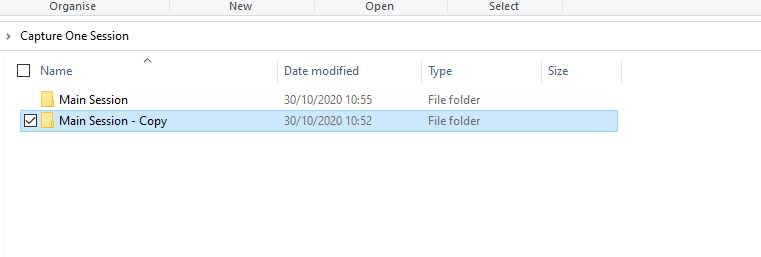
I can confirm that Session DB's are not backward compatible also. but I did just take a copy of the session folder structure and have loaded one into C1 20 and the other into C1 21, both run versions run fine with this separation.
 0
0 -
Thanks folks. I'll just copy some files into a separate structure to try 21 out on. I don't want to mess up stuff.
0
Post is closed for comments.
Comments
6 comments