Moving to a new PC

HI I am moving capture one to my next desktop and im somewhat confused but what i need to do and how.
I have installed C1 onto the desktop and I have copied the App data so far, adding that into the new location I can manage.
I use sessions but im now struggling to work out what I need to move as the guide doesnt seem to match up with what I am seeing (or im looking in the wrong places)
I also have the photo files which I can also move by a simply copy and past I assume?
Any quick way to move what I need to move across to set off as if I never moved pc?
Many thanks
-
We could give some suggestions, but it depends on whether you are using catalogs or sessions, so could you say?
Ian
0 -
I use sessions Ian.
Many thanks
0 -
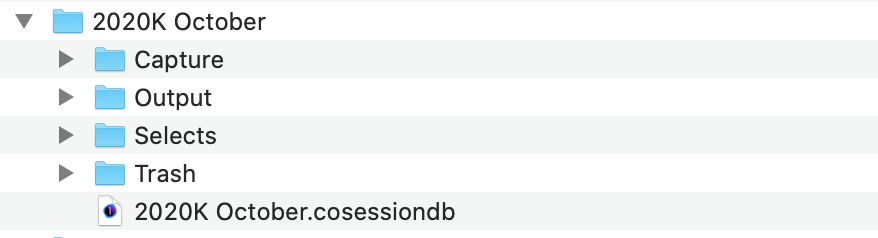
You could copy the whole of the session folder from one computer to another. So typically, you have a folder inside which is the session database file, subfolders for Capture, Selects, Output and Trash, and they in turn have subfolders which contain the edit information, thumbnails, previews etc. Here is a screen shot of a session of mine - on a Mac, but the principle is the same on Windows. I would copy the whole of the 2020K October folder and all its contents to another location. In Capture One you could then go to File>Open... and navigate to the 2020K October.cosessiondb file.
Ian
 0
0 -
These are the bits I cant find. Can they be got to from system files or only from inside the running program?
0 -
Not from within the running program. Close Capture One and find wherever you keep your image files (in my case the Pictures folder on my computer).
If need be open Capture One, open one of your sessions, find any image in the session, right click and choose from the context menu "Show in File Explorer" (is that what they call it on Windows? That should lead you to the right location on the computer.
Ian
0 -
So the picture folders i have have the c1 files in folders inside the picture folders.
So if I simply copy those folders to the new pc and also upload the app data files, will I need to do anything else to connect the dots?
0 -
Should be fine. You could do it without the app data files first and check that you can open a session. If that's OK, close C1 and copy the app data files if you want, then open again. It probably won't remember the history of recent sessions, but that will gradually build up again as you open them with File>Open.
Ian
0 -
Perfect thank you. I will give this a go tomorrow then. Thanks again
0 -

Jamie,
In general, as Ian has mentioned, if your session files are within the default session file structure (possibly in subfolders under "Capture" folder for example, just copy the entire session from the top level folder and things shout be OK.
If, however, the folder are elsewhere and the folder you access for each session as set to be "Favorites" for that session then you may need re-establish where those favourite are since the original paths to the image folder may end up on the new system pointing to a location that does not exist with the same name, etc., in the PATH.
0 -

I love it online blog here thanks for the share me here Use Night Mode Camera on iPhone 11 Pro & iPhone 11 it is the batter update for need you any time got it information
-2

Post is closed for comments.
Comments
10 comments