Réinitialiser Capture One 20

Bonjour,
Je voudrais réinitialiser mon Capture One 20 car j'ai mal commencé à l'utiliser.
Comment procéder?
Merci.
-
What did you do wrong at the start, and what aspects of it do you need to reset? Which version of Capture One are you using. (Pro, one of the manufacturer specific versions, one of the Express versions?)
Are you using sessions, catalogs, or both?
You can reset the workspace to default easily. You can create new sessions and abandon ones you don't want. You can delete catalogs you don't want and start new ones.
Say more what you want to do and I'm sure we can help out.
(I'm sorry that I'm not good enough at French to reply in French!)
Ian
0 -
Hello,
It's very sweet.
In fact I imported photos to test the retouching but I did it without method...
Suddenly, I have sessions, albums, ... I can't find my way around anymore.
I would like to reset everything I imported and reboot properly.
Thank you.0 -
OK. Then the simplest thing would be...
(1) Open Capture One
(2) On the Library tab, use the drop down list of recent sessions and catalogs, and at the bottom you will see an option to clear the menu. (It just clears the list, it doesn't remove any sessions, images or catalogs from your computer.)
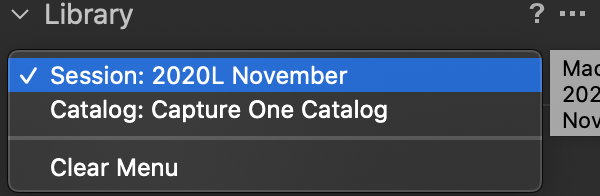
(3) Click the + in the Library tool to create a new session or catalog, and import whatever you like.
(4) Close Capture One and use Windows Explorer to delete any sessions or catalogs you don't want.
WARNING: make sure that you are not deleting any files you need when you do that. If you have files on a memory card, for instance, you can import them again. But if they are in an existing session and no longer on the memory card, you would need to import be sure to not delete the existing session folders without rescuing the image files first.
Ian
0 -
Ok thank you that's very kind.
I will try this tonight or tomorrow morning.
I will keep you informed.
Have a good day.
Pol0 -
Hello Ian,
Thank You, it's OK !!!
Best regards
Pol
0

Post is closed for comments.
Comments
5 comments