Exporting Variants Issue

Hello everyone.
Bare with me, I have been a PS user since 2003. Due to the lack of Adobe profiles for the R5, I have attempted migration with CO20.
Trying to wrap my head around export. and ran into a problem,
With one file (variant) retouched and selected, I opted to export one file. When the EXPORT dialog box arrived, the only option was to export all 172 Variants, Not the ONE that was selected.
Am I missing something? How do I export one capture, one variance?
Im not thin skinned and open to any advice... Thank You
-
Hi RJ,
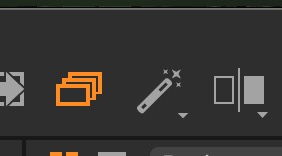
Check if the "toggles between edit primary and edit selected variants" is off (gray, and not orange colour). And/or that only the relevant variant has been selected.
 0
0 -
Thanks Robert,
Edit Primary only is selected. (The icon is greyed out)
Only one Variant is selected.
I actually selected all, as a test, still export 172, went back and changed it to one, same...export 172.
I posted in the C1 FB group this morning. Seems this has happened to others as well.
0 -

I have no problems selecting one varaint for export.
Make sure the orange boxes icon is greyed out.
Select the image first. Make sure it is highlighted with a white narrow frame.It should also appear in the browser as well as the thumbnails.
Then, go to File,select it to see a drop down option set. Choose export images.
Choose Variant(s).
A box will drop down. You will here specify where you want the variant to be exported, etc.
There are other conditions which . you might use. Consult the User Guide.
When finished , press export.
0
Post is closed for comments.
Comments
3 comments