Quality - viewer vs exported file differences.

Hello,
I need help with Viewer viewer vs exported file differences.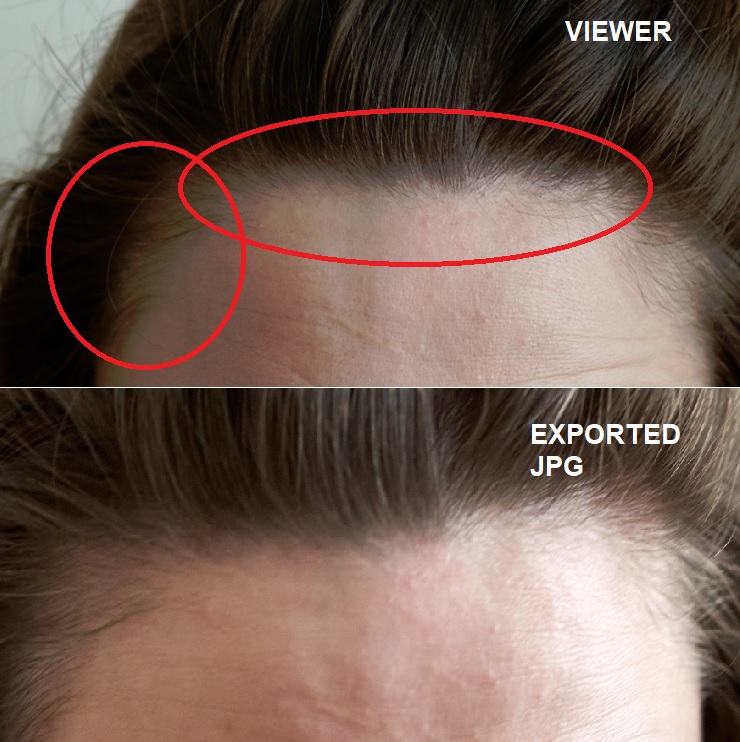
-

Did you export original or an edited variant?
What settings did you use for the export?
What size is your screen?
Which viewing software are you using?
Are they the same image?
0 -
Did you export original or an edited variant?
Oryginal.
What settings did you use for the export?
Standard - Jpeg - sRGB
What size is your screen?
1680 x 1050
Which viewing software are you using?
Viewer - C1 Sony Pro and for exported Jpeg - standard Win10 image browser.
I have been changing Proof Profiles to fix it - but there is no effect at all, I think it maybe this issue have appeared after Win10 update, maybe some Monitor colour profile, but it is to hardd for me to solve.
Are they the same image?
Yes.
0 -
If you Export ORIGINAL you are exporting the source files (RAW?) with no adjustment and no sharpening. Nothing at all from Capture One.
To my eyes they do not look like the same file.
0
Post is closed for comments.
Comments
3 comments