Preview generation nightmare

I'm trying to solve a trouble that results in a nightmare:
I'm working as a Photojournalist. Sometimes I get back home with a thousand photos, maybe a little more, and the download of the RAW files takes some logical time, but not the preview generation in Capture One, it is terribly slow and it seems to be illogical (2 or 3 hours waiting).
I'm using a Preview size a little smaller than my screen size, even that doesn't help.
The time to export a bunch of images is good enough. Also I can process a mountain of images in PS without much inconvenience and pretty fast, so I'm almost sure isn't a hardware issue but the software.
What can I do? and could Capture One be improved in that particular problem?
Thanks in advance.
-

I am not sure what the problem is. How many thousands of pictures are you importing? What sort of drive are you using and what are you importing from (USB3 card reader, SD, CF, XQD)? I do remember that when I first installed C1 after my move from Lightroom it took around 20 hours to import and catalogue the images, but this was around 300,000 36mp images, but again it was not the thumbnail generation that took the time, it was the importing and cataloguing that took an age. I think generally the import process is slow, but certainly on my system thumbnail generation is really quite fast, near instantaneous. You could try verifying your catalogue (option under the file menu), this I believe also does an optimisation.
Others may have a different experience to me and maybe more advice on the topic.
0 -
Thanks for the reply Mark,
I'm talking about from 500 to 1300 pictures.
I copy the pics directly from my camera (RAW files from a Nikon cam) to my external hard drive (I use some LaCie Rugged HD connected to an USB3 port) my OS is running in an SSD drive.
I do not use the import option in Capture One, I just create the Session and put all the pics inside the Capture folder, then... the dead time... a long long waiting until all the previews are generated.
As I write this I wonder if there will be any speed difference importing the images (plus creating the previews) instead of copying them to the Capture folder and then wait for the previews. I'll try it.0 -
Humm, should be pretty fast with that config. With a session yes I think it would be worth trying a copy to the Capture folder and then letting capture one create the thumbnails. I will create a test session, import 1000 files and let you know how quickly it does the job of generating thumbnails.
0 -

C1 was never a speed demon, you're right about this part of the workflow being very slow. In my experience though, if you're in a hurry, you do not have to wait for these previews to be generated while you get to work. If you want to edit a photo or three while this is going on, you can, it will do the previews based on wherever your browsing window is while you work.
And, yeah, it's not super quick editing this way, I know. That background preview work takes a toll.
My C1 experience changed completely when I upgraded my PC. A new fast CPU and the best video card you can afford makes all the difference in the world. I work in a similar way: copy files, load a session (I use 1 or 2 sessions a year) and get to work. 500 images takes a few minutes. The speed of the drive isn't critical, it's all GPU (or CPU) bound.0 -
So...I ran a test...well two actually. The first test I did as I suggested above and created a test session and copied around 1300 files to the capture folder (around 50Gb of data). It took around 10 mis to 15 mins to copy the files. and maybe around 10 mins to generate the thumbnails....pretty slow. Then I realised what could potentially be the issue. My D drive, which I suspect is an SMR drive is quite slow...when the copy happens some weird caching occurs which appears max out the drive and what appears to happen is that the thumbnail generation stops. When the copy had finished, then the thumbnail generation seemed to complete quite rapidly after that. As you can see the F drive has completed copying but the D drive is still maxed out...thumbnail generation does not restart until D is not maxed out.
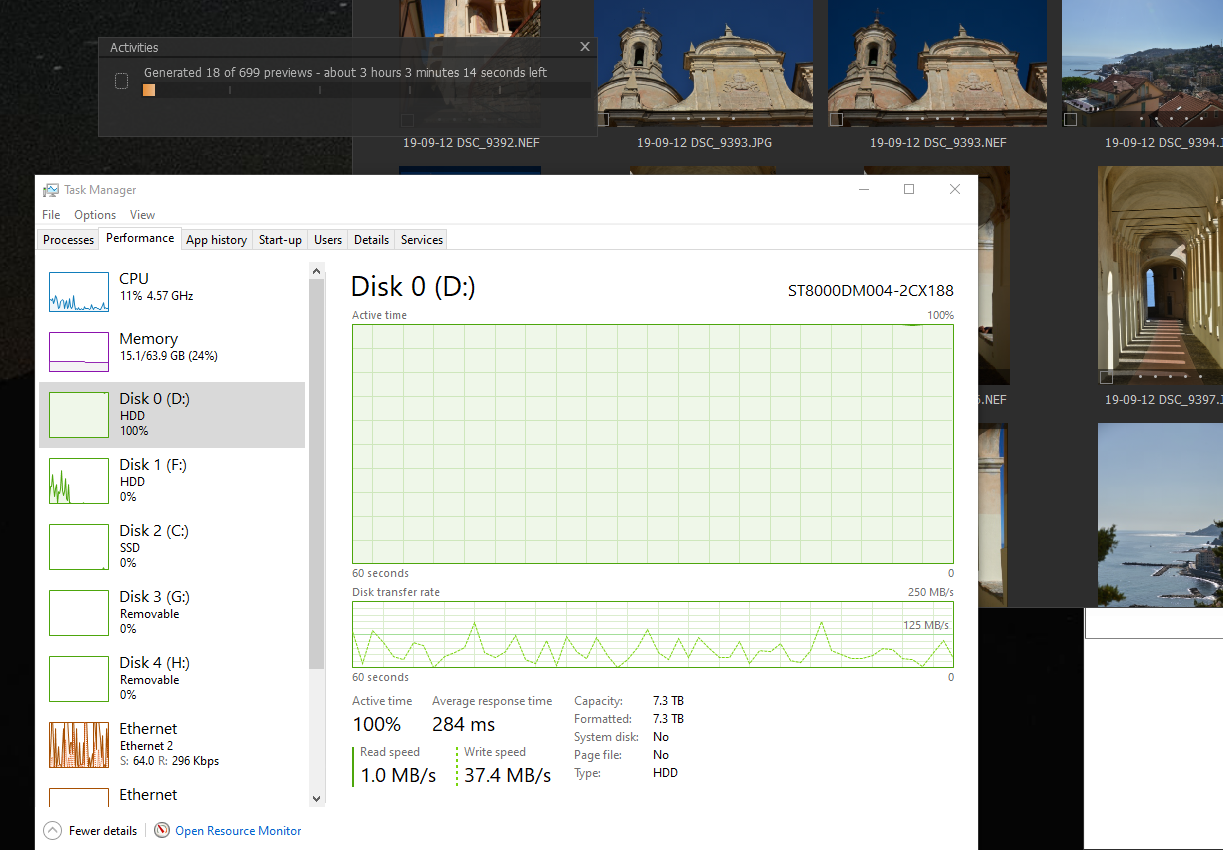
The second test I copied to my F drive, which is definitely not a SMR drive. As you can see the drive still maxed out, but the copy occurred much quicker and the thumbnails continued to be generated as the files were being copied through Windows Explorer. I would say it was probably about 15 mins end to end (inc generation of thumbnails) with my faster drive.
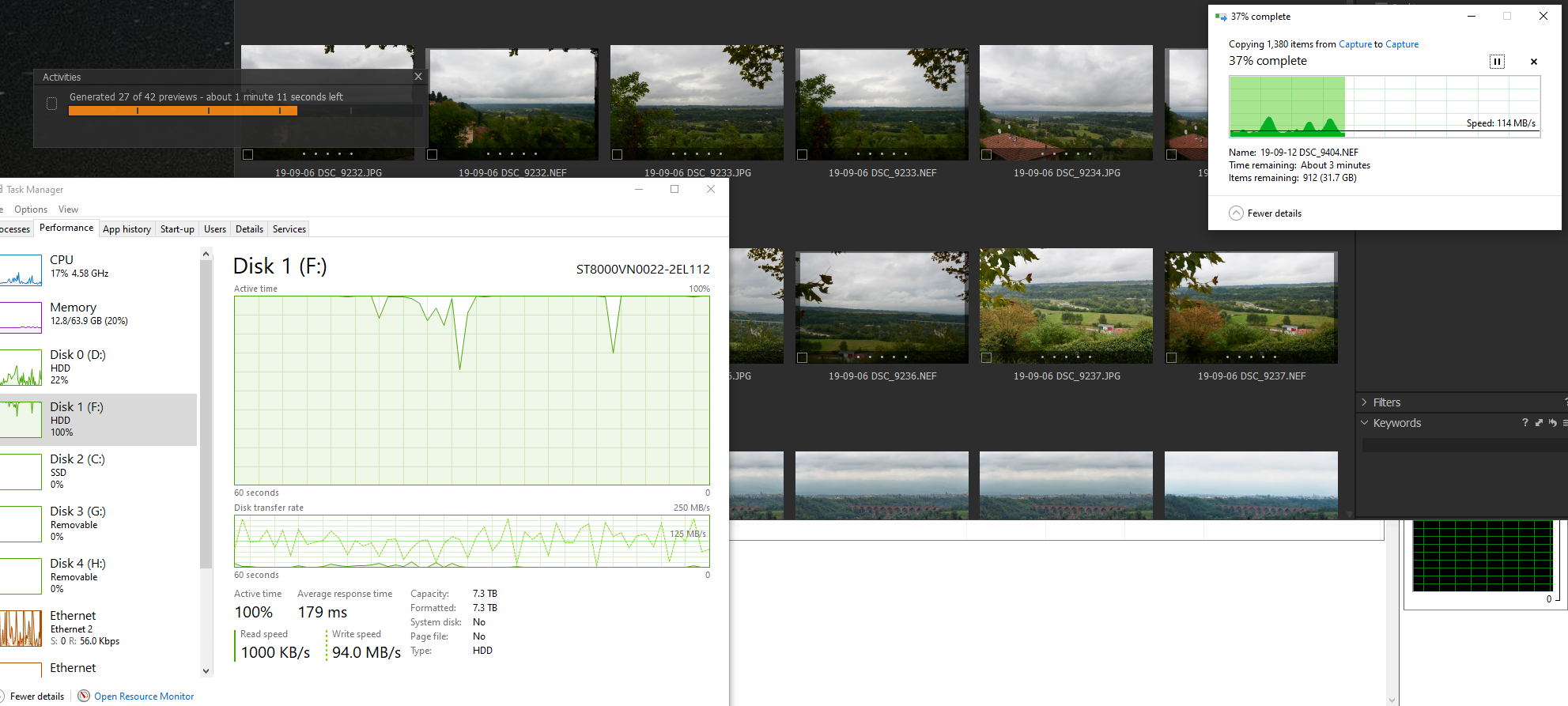
What I would do is get task manager up when you make your next copy and see if anything strange is happening with your system. If you have another drive you can run a test with then give it a try on another disk and see if you get a different result. I have a feeling that this is a Windows/drive technology issue rather than C1 issue, but this is just a feeling. You could always run a disk check and optimisation of the disc you are using as this may help with speed.
Of course the above may be just a peculiarity with my system and not the behaviour you are experiencing, but it is worth checking if there is some bottleneck in your system.
PS I have a very recent and very fast system (apart from the aforementioned drive), the CPU is not the bottleneck on my system, it's the drives, I suspect the same may be the case with you Alex.
0 -
SMR drives are absolutely the worst. In my testing, on an 8TB Seagate, the buffer was about 40GB and after that the drive would basically cease to function for a while as it shuffled the bits from buffer to SMR storage.
I just ran a quick test, 672 previews generated, about nine minutes. Drive read speed averages about 40MB/s.1 -
Yep, SMR sucks for sure. My suspected SMR drive is a 8Tb Seagate Barracuda and would quite happily smash it into a thousand bits for all the hassle it gives. My other drive is an Ironwolf and that is much better. Generally I am not too happy with Seagate drives. My backup drives are all WD Red 8Tb and 12Tb drives and they are very good. Unfortunately these days a lot of research has to go into buying a HDD, I certainly won't be buying anything that looks like an SRM drive going forward :)
0 -

Current drive technologies seems to be quite distinctly differentiated according to a "primary use case".
I suspect in part this is one of the issues related to using a NAS as a primary storage for photo editing. The choice of disks may be quite significant - along with the way the NAS is set up and the background tasks it is expected to run.
Even SSDs are not necessarily the panacea they might be expected to be reading the headline performance figures. There are many caveats to consider. However by comparison with HDDs they will always appear to shine especially once one gets to about 512Mb and above. (At least that is my observation. YMMV.)
Of course an internal drive will almost always offer better results than an external drive.
0 -
Seagate learned a lesson from the recent public backlash when SMR drives crept into the NAS product line, but WD seems to be steadfast in the opposition to clarity. They maintain that SMR is just fine, where Seagate clearly points out which drives of theirs will never be SMR (The Ironwolf series, for example).
You can't trust anyone these days, but I trust WD less as a result of their antics.0 -
Yes, need to be careful. I did a lot of research when buying the WD drives, but I will say that I have never had a WD drive fail on me in the past 25 years (now touching lots of wood), but I have had two seagate drives fail on me in the last year, and another that appears to be an SMR, although was not advertised as such.
I suppose we all have our preferences. The best drives I have ever owned were Hitachi, those were solid and fast.
0 -

Not sure if my issue is related, but when I tether and shoot I cannot see a rendered image, it is blurry. I shut down and restart and I can see it, until the next image I shoot, and that I cannot see rendered again. I thought perhaps it is the drive. I installed and tested a SSD drive I can use as a staging folder just to capture with C1 and then I can move the files onto the HDD storage...But this made ZERO difference, as it still did not render the new images I shoot.
Any insight?
0 -
Raffi,
Not sure on that one although I only use tethering infrequently. You could try different options of hardware acceleration and see if you get a different result...
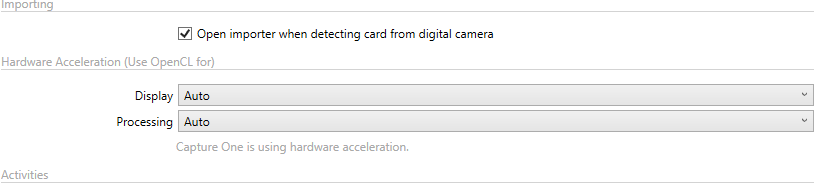
...or the preview image size settings
 0
0
Post is closed for comments.
Comments
12 comments