Edits gone after moving folder

Hi,
I recently started using Capture one. I moved all my sessions from my computer drive to an external one. Now when I open the session from my harddrive I can see all the images in capture one but all the editing, rating etc is gone. Does anybody know why this happens and how I can fix this?
Thanks
Briek
-
You need to know that for sessions, Capture One stores the edit information in subfolders to the session folder. So the typical session folder might look like this.
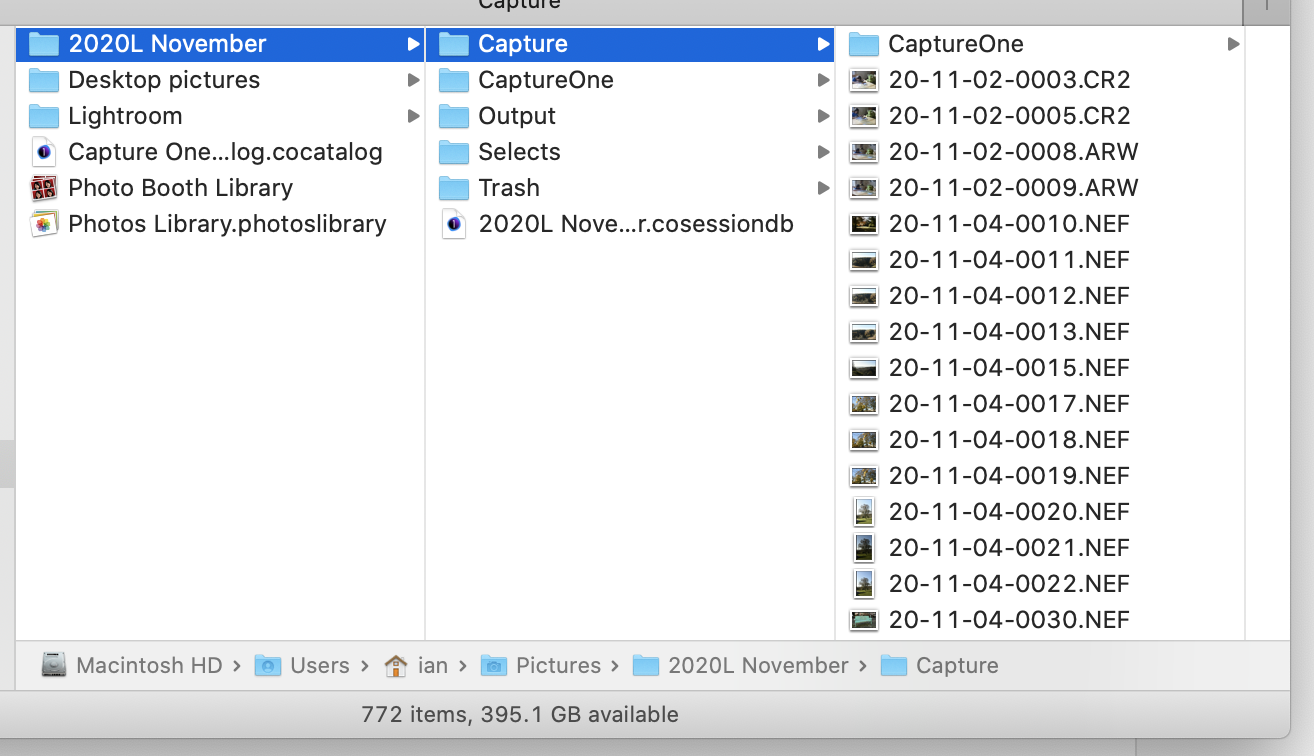
The .cosessiondb file in the middle column is the session database. The Capture folder contains image files (and the Selects folder would too). The Capture One subfolder of the Capture folder (top of the right hand column in the screenshot) contains further subfolders that contain previews, thumbnails, edits, etc. All of that needs to move. Then in Capture One you could go to File>Open and navigate to the .cosessiondb file in its new location.
If you moved the whole session folder (2020L November at the top of the left hand column, in this example) then all that moving should have taken care of itself. But you wouldn't be able to open the session using the recents menu in Capture One because it wouldn't know where you have moved it to until you had opened it manually.
Ian
0

Post is closed for comments.
Comments
1 comment