Aktivierung CaptureOne 21

Es ist jedes Jahr die gleiche Zitterpartie mit der Aktivierung eines neuen Upgrade - echt nervig!!!
Nach einem Preorder eines Upgrades von C1 20 auf 21 bei Fastspring habe ich einen neuen Lizenscode bekommen. Heute funktionierte zunächst auf einem meiner Laptops das Upgrade auf C1 21. Beim Upgrade-Versuch auf meiner Workstation kam dann die Meldung "Serververbindung zum Überprüfen des Profils konnte nicht hergestellt werden". Bei meinem zweiten Laptop die gleiche Meldung. Der Versuch über mein Konto alle Aktivierungen zu deaktivieren, um sie anschließend der Reihe nach neu zu aktivieren hatte nur zur Folge, dass C1 21 auf dem ersten Laptop jetzt auch wieder nicht mehr läuft. Zum Glück kann ich - trotz Deaktivierung!? - noch mit C1 20 arbeiten, sonst wäre echt angefressen.
Wieso muß das immer so kompliziert sein. Was wird als nächstes gefordert - vielleicht ein Vaterunser meiner verstobenen Großmutter?
-

The activation server was quite busy, as usual after a major upgrade. Maybe try again today.
Also, check for antivirus and firewall software not getting in the way of connecting to the activation server. If all fails, contact support.
0 -

Just activated v21 now and found no problems.
0 -

Hi,
I bought C1 Pro 20 incl. free upgrade to C1 Pro 21 just a couple of days ago.
I only received a key for Pro 20 up to now which I could use to activate 20 but with this key I cannot activate 21 now (even after deactivating Pro 20 at first) So where do I get the key for 21 or how is the workaround for my free upgrade?
Thanks
Robert
0 -

The keys issued in recent weeks were supposed to be for V21 but also usable to activate V20 (or earlier versions for those who have used them).
So your situation seems strange.
Having de-activated V20 and restarted C1 as V21 what sequence of events follows?
0 -
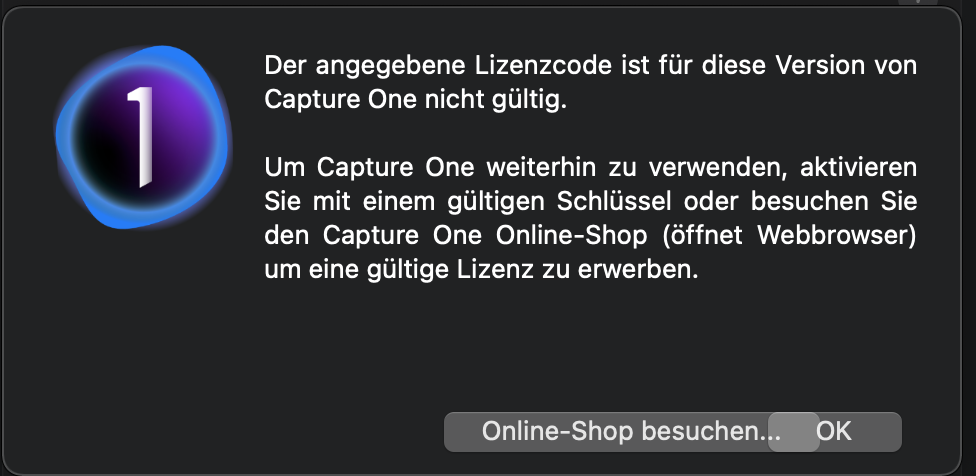
I deactivate license in V20 then I start V21 where I am asked for the license key. Here I put the same (and my only one) key in followed by online activation (name, country) and pressing button "activate"
Then always a message pops up that this license key for that version is invalid.
 0
0 -
Okay, this is clear. You accidently did not get a Capture One 21 key but a Capture One 20 key. Note that with Capture One for a certain version you can activate all older versions too.
Contact support with the message from the screenshot and you will be up and running with 21 shortly.
0 -
oki thanks! I will try that.
0 -
Might be quicker to check your online C1 account under manage licences and see if the v21 key is listed there.
0 -
I already did but unfortunately I can only see a C1 Pro 20 license there. And still no answer from their support :-(
1 -

Verbindung zum Aktivierungserver konnte nicht hergestellt werden
Hallo, ich hab aktuell die V12 und habe die V21 gekauft, ich habe also den Lizenzcode für V21. Die Aktivierung schlägt aber fehl, weil ich den Aktivierungsserver nicht erreiche. Die Fehlermeldung sieht so aus:
Check 01: Success
Check 02: BFEBFBFF000306A9 /
Check 03: 3757234082
Check 04: Exception: Die Anfrage wurde abgebrochen: Es konnte kein geschützter SSL/TLS-Kanal erstellt werden..
Check 05: Exception: Die Anfrage wurde abgebrochen: Es konnte kein geschützter SSL/TLS-Kanal erstellt werden..
Check 06: success
Muss ich eigentlich vorher die V12 deaktivieren? Die Deaktivierung schlägt ebenfalls fehl.
Antivirus ist deistalliert!
Kann jemand weiterhelfen?
Gruß
0 -
Hallo Michael,
mit welchem Betriebssystem arbeitest Du? Ich hatte ähnliche Probleme bei der Aktivierung auf meinen Rechnern, die mit Win7 laufen. Es war schier zum verzweifen. Bei mir half nur ein Upgrade auf Win10. Danach war die Aktivierung keine Problem. Wenn ich mich recht erinnere, habe ich C20 nicht vorher deaktiviert, weil das bei mir mit Win7 auch nicht mehr ging. Leider wurde das Problem mit Win7 vorher von Capture One nicht eindeutig kommuniziert. Die gehen anscheinend davon aus, dass inzwischen niemand mehr mit Win7 arbeitet.
Grüße
Helmut
0 -
Hallo Helmut,
bei mir läuft noch Win7. Ich habe zwischenzeitlich C1 offline freigeschalten. Das hat gut funktioniert. Das Programm läuft. Allerdings ist die Verbindung zum C1-Server immer noch gestört. Wenn ich den Lizenzschlüssel in C1 aufrufe, wird der zwar gezeigt, meine ID und "registriert für" usw. ist nicht ausgefüllt.
Für mich ist das Problem vorerst erledigt.
C12 musste vorher nicht deaktiviert werden. Da man nur eine Version laufen lassen kann, sind die Versionen 11 und 12 nicht mehr aktiv.
Gruß Michael
0
Post is closed for comments.
Comments
12 comments