After Switching PC, Variants are Broken

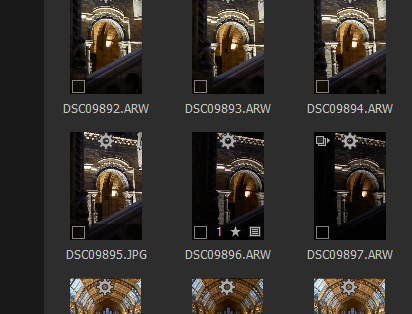
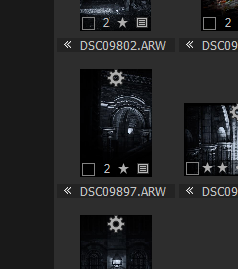
-

Select all of your images in the browser.
Go to the Image drop down menu and select "Expand Selected" (or the equivalent of that text in any local language that may be in use).
Any images that have a icon for multiple variants displayed - for example 9897 - should then present you with all of the variants associated with the UNLESS you have some filtering in place and active that would include some variants and exclude others.
I hope that helps.
1 -
Thank you for you fast answer, you helped me alot. Now everything is working fine.
C1 is an awesome peace of software.0 -
You are very welcome Sebastian.
Capture One retains a "userconfig" file when running Windows (something similar when using Mac) that will save the user settings in some detail for each session or catalogue as the settings are created and changed.
In general this is a great way to get you back to where you were the least time a session of catalogue was open and more often not this is desirable or, at least, not undesirable! However the userconfig files are system specific in several way as they also contain information that relates to the system configuration. So it is unlikely that sharing them cross PCs would be a useful thing to do.
I would guess that on one machine the browser was set to display in Expanded mode for that Session and when you moved the session to the other machine the userconfig file had no entry for that session and applied the default Collapsed setting. Either that or it did "know" about the session from previous activity or the session was unexpanded when last closed on that machine.
The filter result is a little different,
IF you had image with 2 variants, one being the primary variant (1) and the other the secondary variant (2), if BOTH had been tagged with 2 stars ONLY the primary variant would be display if variant display was set to be "Collapsed".
If the primary variant does NOT match the search filter but another variant does, the matching version will be selected and displayed anyway.
This may seem like an odd approach and has some potential to be confusing from time to time if one is busy and not thinking about such a possibility when seeing what look like unexpected filter results.
However I think it is quite a logical approach. Nothing else I have thought of seems to be more logical.
As long as one is aware of the possibility it should not be disruptive or confusing for longer than it takes to remember how it works!
0
Post is closed for comments.
Comments
3 comments