Need to backup preview, focus mask, or thumbnail files?

I regularly backup my Pictures main directory. In Pictures I have all my photos organized under subfolders. Also in Pictures I have all the folders which contain all my Capture One catalogues and files. I use SyncBackFree which only copies changed files onto my backup drives. I partner Pictures folder on my computer hard drive with the Pictures folder on the backup drive, so everything is backed up.
In the Capture One subfolders, I'm wondering if I need to back up the *.cop (preview files); the *.cof (focus mask data); and the *.cot (thumbnail data). These are all files under the Cache folder that Capture One uses. The files take a long time to back up each time. I'm guessing they get updated as I'm looking at photos in different subfolders. SyncBackFree allows exclusion of file types, so I would just exclude these. It appears to me that these files would be rebuilt by Capture One if I ever had to restore a full backup.
I would, however, continue to include all *.db; *.comask; *.cos files as part of backing up.
Am I safe to exclude the .cop; .cof; .cot files?
P.S. I only use catalogues right now, no sessions.
-

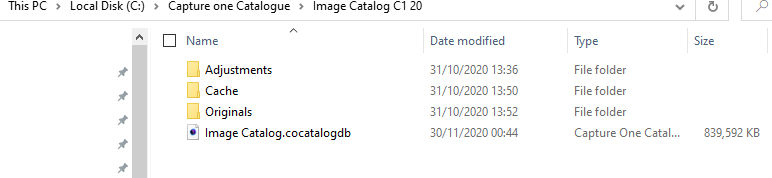
Generally I back the entirety of the catalogue folder....
...and my Images folders.
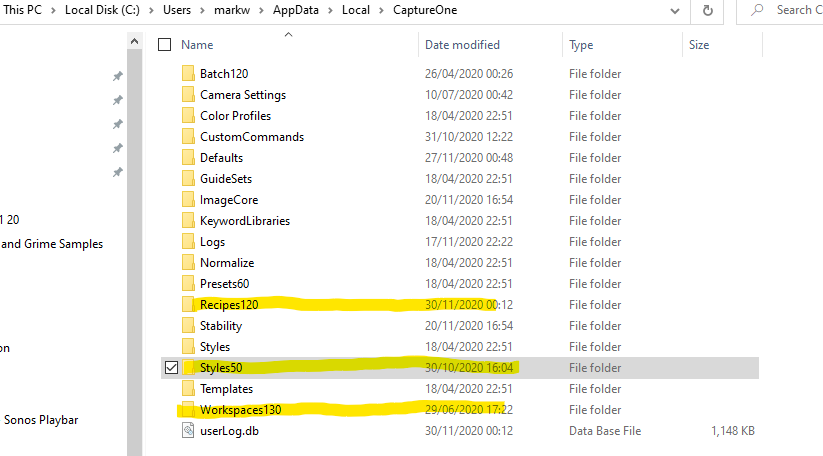
I do also backup some of the folders under AppData such as Workspaces, Styles, Recipies, etc. I would have a dig through this folder and see if there are any personal settings particular to your setup stored there, like keywords for example.
I am not sure if the entirety of the catalogue folder is necessarily needed, but I do it anyway. I suspect that most of it can be reconstituted by C1 and that the image catalogue DB is probably the only thing required, but I am not sure, so I back it all up. Looking at the backups that C1 produces itself, I think that the catalogue DB and Adjustments folder are the important aspects.
 0
0 -
Yes, backing up files in the AppData folder is what I do as well. Its a point many overlook when protecting their data.
I might try my own experiment...copy my Images and catalogues to another computer without the .cop, .cot and .cof files and see what happens when I run C1.
Backing up these 3 file types takes up 90% of my total backup time writing to an external drive so would be nice to exclude them.
0 -
You could always just copy the DB and the Adjustments folder to a separate folder and then double click on the DB file to open it with C1. This would let you know what the net effect is of just backing up the DB file and Adjustments folder. I suspect C1 will just go into a massive cycle of preview generation, but the rest will be ok.
0
Post is closed for comments.
Comments
3 comments