Strangulation by Cache

Capture One creates a subfolder in every single folder that is viewed in the program to store all the thumbnails and settings when I edit.
This is an incredibly poorly thought out system.
I have over 20TB of images stored in a hierarchy of perfectly organised folders across a multitude of hard drives. Literally every time I look at an image in a folder, Capture One has to create a new subfolder in that folder for the cache. If I make an edit, I get more subfolders. That is such an amazing mess of folders. Amazing.
If I wish to clean up the growing cache (which might seem like very little space, but from little things, big things grow), I literally have to trawl through my folders to delete them. There's just no quick way. Then I have to make sure I'm no accidentally deleting the important settings, just the cache, or I lose the edit. This reinforces the inability to do a quick cache clean up.
If I wish to move a folder, and I move it from within Capture One to ensure I don't lose any links to my edits, I get a new folder in the new location with the cache and settings moved across, but I STILL have the old folder with no images left in it, but Capture One's stupid subfolder still sitting there with a copy of the settings. Make sure you don't get in any way confused and delete the wrong folder or you'll lose those images!!! Easy enough? Well, after you've started reorganizing dozens of folders in your spring clean, you find that complications like having to delete duplicates of already moved folders end in mistakes where fll folders get the chop by accident. What a ridiculous thing for a folder that is moved to retain a copy of itself (and no, I'm not copying to a new drive, I'm moving on the same drive).
The mess of Capture One folders is right on the edge of being a deal breaker for me. If I hadn't already invested, I would have moved on to try to find a better alternative, because the file mess being left on my system by this program is utterly ridiculous.
And it doesn't have to be this way. I hate to point to Adobe, having just left them because of the prolonged decline in the quality of their product to the point where it's so dysfunctional that it is no longer of use, but this is something they did get right. There is an option in the program preferences to dictate where cache thumbnails are stored. ALL thumbnails for EVERY image in EVERY folder. ONE location. When you need to clear the cache,. you go to that ONE folder, and you empty it. Job done. No extra subfolders in every folder, no mess, no fuss, no time wasted. EASY and SIMPLE. There's no excuse for Capture One not offering this.
Further to this, Adobe also keep sidecar files with settings for the edits in the SAME folder as the original image. No extra subfolders in every folder, no mess, no fuss. EASY and SIMPLE. These files can be hidden in the browser of Capture One, and probably hidden on the OS as well if one really wanted.
This feature request is a no brainer for me. Maybe I'm missing something? Maybe working in catalogues will offer this? I have asked for support from Capture One and have been advised that for my workflow (browsing through numerous image subjects in various folders and editing only one or two in a given folder before moving on) opening one session and working from there would be the best option. I can only assume they would advise me on the best path, and if this is it, folder management is deeply lacking.
PLEASE Capture One offer a cache in ONE LOCATION which can be easily cleared, and please offer the ability to store my edit settings in a sidecar in the SAME folder as the image it is coupled with. Like, seriously....PLEASE! I beg you. I implore you! Fix this!!!! And when you do, please offer me this feature in the version I just paid in full for - I shouldn't have to pay twice for a feature that should have been implemented years ago.
Please find attached the Capture One assault on just ONE of my folders. Just ONE. Clearly Untenable.
Green dash = System folder
Red dash = Capture One generated folder
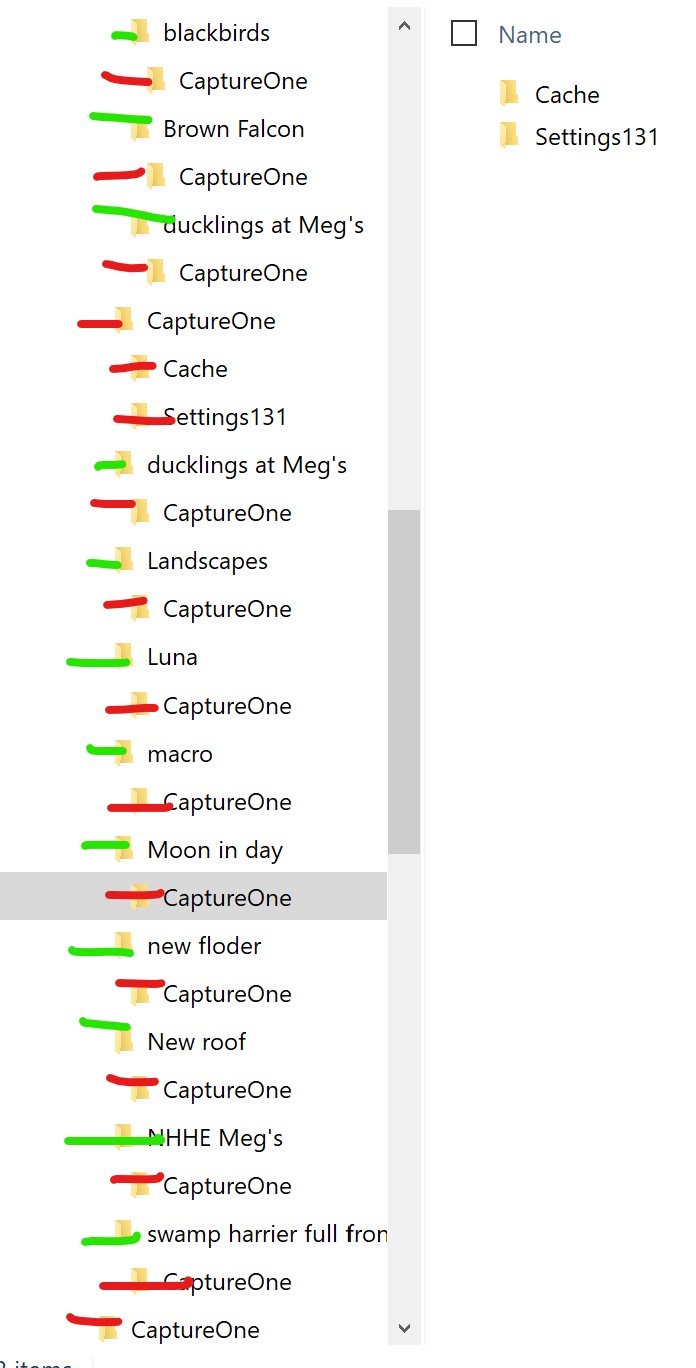
EDIT: Just discovered that even if you so much as rename a folder, Capture One makes a new folder, moves the images but does not remove the renamed folder. And today, it didn't just create a new folder. It created five new folders of the new name and wouldn't allow me to select any of them, at which point I had to close the program and complete the task outside Capture One and risk losing Capture One data. Problems like this are regular, though intermittent, and I don't think the browser capability in Capture One is very stable at all.
Screenshot attempting to rename "new floder" (sic) to "final fixes" resulting in five new folders and the old folder remaining!

-

Just found this ticket, but I first found an identical bugreport/ticket of 13 years ago. So I don't think it will help..
https://support.captureone.com/hc/en-us/community/posts/360012288377-Cache-location
It is rather disturbing indeed, I also have an archive of the past 20 years and this cachefolder thing is absurd..
Could it be only a problem when using a session? When one is using a single catalog, this is not a problem?
0 -

I am stunned that the cache folders can't be directed somewhere else without resorting to symlinks or similar. For safe keeping, I keep my catalog on my network storage. The network storage is backed up frequently. Capture One provides no choice but to keep the previews and the rest of the cache on the network storage. This means that my backups are getting clogged up with temporary files. It also means that I can't benefit from keeping the cache on my speedy local SSD. Seriously regretting my decision to jump from Lightroom to Capture One after finding all the basics that Capture One is missing.
0
Post is closed for comments.
Comments
2 comments