Sharing Photo Edits Between 2x Computers?

Hi All. I think this is my 1st forum post for Capture One. So I took a bunch of photos of my daughters wedding and started editing them on my laptop. Then I moved the photos into OneDrive and Capture one updated its session (I think its called session?) so I didn't lose all my edits on my laptop. So now I want to edit them on my PC and whilst I see see the photos the edits are gone. Rather than start all over again how can I share my edits please or if not how can I move my edits from my laptop to my PC? Many thanks for taking the time to answer. Paul
-

Welcome Paul,
I don't use Sessions too much but here is my take on it.
Sessions are dependant upon the images being in the correct folders, Capture Selects and Output.
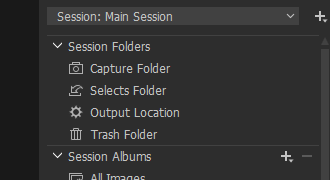
If you moved the files out of the Capture folder (for example) then they will no longer be seen in the session folders although you can scroll down to the System Folders section and browse from them there.
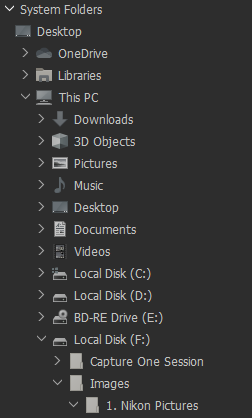
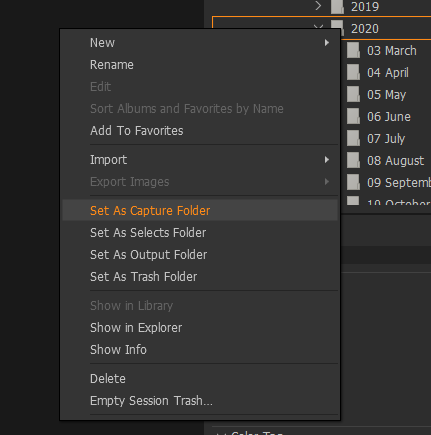
Under the System Folders section you can right click on any folder and set it as the Capture (for example) folder. By doing this any images within this folder will be shown in the respective session folder. I think this can be done with a OneDrive folder, although I have not tried it myself.
The thing I am not sure about is how edits you have made get translated. My understanding of it is that the edits are stored in a sub folder called CaptureOne. If you did not move this folder along with the files then I am not sure if C1 will understand that edits were made. I think someone with more experience with sessions may be able to answer this question better.
There are some videos on the Capture One youtube channel about sessions, I would give them a watch.
0 -

Might be easier to find that "Wedding Session" folder on your laptop and then copy it to your PC via Windows explorer.
Then look in the "Wedding Session" - Capture sub folder.
If your photos are still there, good.
If the photos are not there copy/paste them to the "Wedding Session" - Capture sub folder from where they are.
Then open the "Wedding Session".cosessiondb file in the "Wedding Session" folder to start C1.0 -
Thank you both for posting your answers. I never did create a new Catalogue to work from. From what I've found a Catalogue contains the "adjustments" made to any photo in that Catalogue. So I don't know where the "adjustments" are stored outside of creating a catalogue? I can move the Wedding Photos to another drive but the data that contains the "adjustments" seem to be stored somewhere else on my laptop?
0 -
Could you clarify whether you are working with a Catalog or a Session?
0 -
It looks like I'm working from a session. I've just upgraded from 20 to 21 and everytime I open Capture One now a "Recents" windows opens and the onlyt thing in that windows is "G:\Pictures\Capture One Session\Capture One.cosessiondb"
0 -

Paul,
A session will, by default, have a set of folders created within its top level folder.
If you use the Import process and bring in the images you wish to edit the default location for those imported images will be the "Capture" folder BUT you can if you wish, make the import separate things into subfolders.
Or do something completely different.
Or use folders that are outside the session's structure.
IF you have kept everything INSIDE the Session folder structure than you can simply copy a session in its entirety by copying that folder to another device.
If you have some or all of the images OUTSIDE the folder structure things get a little more interesting.
In a session the edit date and everything else for an image resides in a set of sub-folders in the "Capture One" folder that sits alongside the images. So long as you copy or move the entire folder - images and sub-folders - the images and edits will stay together wherever they go.
0 -
Are the images still on your laptop.
If you think they are, do a disk search on the laptop to find one of them (get an image name from PC copy).
If you find the folder where they are look for the .cosessiondb file that might be with them or one sub-folder above them.0 -
Please ignore my last post about the "Recents" page opening up everytime I opened Capture One 21. Turns out I was clicking on a capture 20 link not Capture 21. I've since setup a new Catalogue on my PC and better understand that now but I've still not been able to share my adjustments made on my laptop wedding photos yet?
0 -
Paul,
You need to know (or rather we need to know to be able to help out) whether you used a Session or a Catalog on your laptop. You may have confirmed this already but if so I have missed it trying to speed read the thread.
Secondly, what (exactly) did you copy to OneDrive?
Thirdly, what is still on your Laptop? Do you still have a running and fully functional catalog or session on that?
0
Post is closed for comments.
Comments
9 comments