COPY PASTE LAYERS AND ADJUSTEMENT

Why copy paste adjustments and layers doesn't work in C1 20? It was working very well in the previous version.
-

Please provide more details. For me it is working the same as it always did.
0 -
I want to copy and paste all settings and layers on the next image as I did in previous versions of C1. Unfortunately, it is impossible in C1 20. Simple I want to copy everything and paste it on another image. It doesn't copy and paste layers. Is there any chance to work wit V20 like the previous, simple copy and paste?
1 -
Orkun, as you can see, others say it works as it should. Therefore if you would like users here in the forum to assist you, you need to give more details. What exactly are you doing? How are you doing the copying and pasting? Does anything get copied, or nothing at all. Give us some details and we might be able to help you figure out what is going wrong.
Ian
0 -
I was copying and pasting all settings and layers with one click in the previous version from the arrows on the right top corner. When I try it now, it doesn't copy and paste anything, in every image same error. Please check
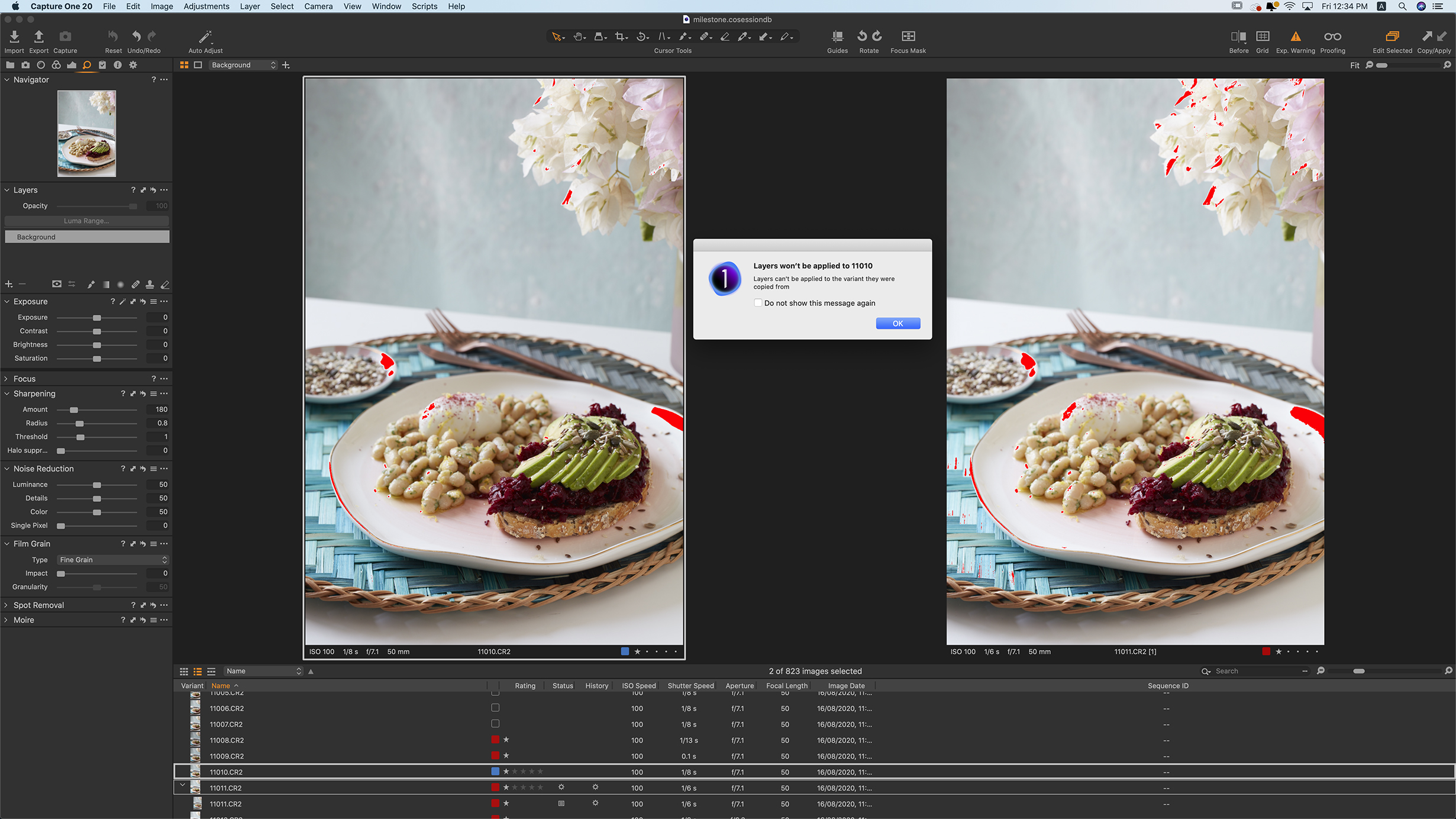 the attached image.0
 -
You are copying from the image on the left to the image on the right. When you click on the up arrow, you copy the adjustments, layers, etc from the left hand image (the one with the wide white border) to the clipboard. When you click on the down arrow, the adjustments are pasted from the clipboard to all the selected images, which includes the image on the left. The error message is telling you that it won't paste the layers back to that image. This is because when it pastes layers to an image it adds them to the existing layers rather than replacing them. You don't want it to do that because it would double up the layers on that image, so for example if you had a layer that added just the right amount of saturation, you would end up with two layers that did that, resulting in double the amount of saturation boost you had intended. You can safely ignore the message, The layers should be pasted perfectly well to the other selected images.
The reason why you see this message on Capture One 20 but didn't see it before is that what happens when you copy and paste layers was changed in Capture One 20. Before that, when you pasted layers, they replaced any existing layers. With Capture One 20 they changed it so that the pasted layers were added to the existing layers. So there was no need for that message before but there is now.
It does no harm to see this message, but if you don't want to see it you could deselect the source image (the one on the left) before you paste, so that when you paste it is not included. But there is no real need. Capture One is smart enough not to paste the layers back onto the source image, and that is all the message is telling you.
Try this: get an image (any image, it doesn't matter, this is just to test the working of the system) with no adjustments. Select your left hand image here and then select the unadjusted image also. Copy the adjustments as you have done and paste them. Don't worry about the message. Just click the OK button. Now go to what was the unadjusted image and see whether your edits, including layers, have been pasted in.
Ian
0 -

Could I add an opaque layer, perhaps with text on it? I have scanned images with artifacts surrounding the image, which could be used as labels'
For example, for a "contact sheet" of scanned film negatives that need to be identified. There may be 24 images on a sheet.
This is easy to to in PS, but I don't want to need PS.
0

Post is closed for comments.
Comments
6 comments