Rotate freehand - the same shortcut for many things ?

How should one handle these functions while all of them have the same shortcut R ? I want to rotate free hand but I have to always select it manually because pressing R starts doing something else. A bit confusing ? 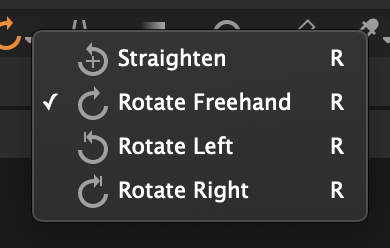
-

Repeated use of the defined shortcut key cycles through the the options.
That written, with my Windows system "R" selects the Rotation tool (Default setting) and to change the mode of the Rotation tool requires the use of Shift+R.
The cursor icon changes to reflect the currently active mode.
0 -
Hmm, that sounds quite unpractical and confusing to me. To be able to assign a separate keyboard shortcuts to different selected functions would make more sense ? Also - why for example it is not possible to assign shortcuts to various crop modes ? Original, square, unconstrained etc?
0 -
There used to be more example of cursor tools that would cycle through their optional settings using repeated key strokes.
It is actually quite logical when simply choosing a mode of use for a tool - only one key to remember and people probably do not change the modes very often.
The is always the drop down list of options for the cursor tools to provide an alternative way to make the change of mode.
There are also limitation on how many keys can be found on a minimalist keyboard and that is probably a criterion the designers have to consider.
My specific use of the Rotation tool modes is limited. I tend to use it only in Straighten mode. Freehand I can do in the Crop tool where is makes best sense to me. I never seem to need Left or Right. Whether I am typical of most users or an Edge case I am not sure. Possibly typical since this is not a subject that appears in the forums regularly.
I can't really comment on the crop question as I rarely use preset ratios anyway. I generally work with Unconstrained or Output.
However if I do choose to set something else I don't find right click and select the ratio I want to be onerous and it saves me having to remember any keyboard shortcut combination.
That said I do recognise that some people totally prefer to work only with KB shortcuts wherever possible. Not me though. A regularly used sub-set of all that are available is enough for my brain to deal with.
0
Post is closed for comments.
Comments
3 comments