File Management

Long story short: I select a file from my Capt1 catalog. I click edit in photoshop. I decide to "save as" to create a new file from this newly edited image. I go back to my catalog in Capt1 and that new file is not listed. I go to import it and it IS listed but greyed out as if it's already in the catalog. So bottom line. it's not accessible via Capt1 and it's not importable. Q: What do you do if you decide to edit a file in photoshop, don't want to save over the original, and want it to be added to your existing Capt1 catalog?? Really struggling with Capt1 file management system. Thanks
-
I use Affinity Photo, not Photoshop, but the process is the same.
Use Edit with... and pick your program. You'll get this window.
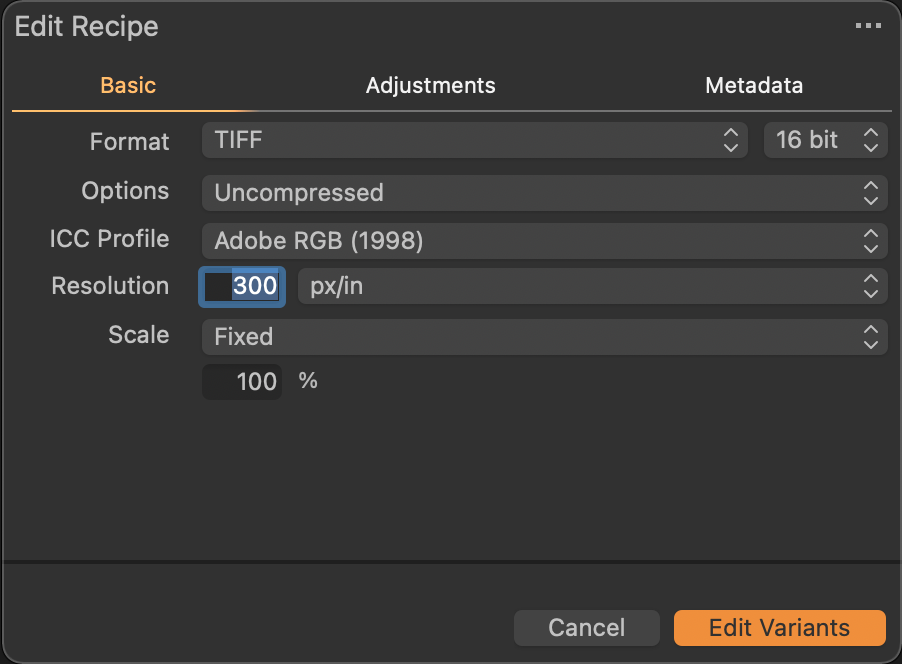
Pick your format -- you may want to use PSD instead of tiff. Capture One will create a new file in the desired format from the selected image with existing edits baked in. That file will be added to your catalog/session and your program will be launched. After doing your editing in Photoshop or whatever Save, not Save as. You are saving the copy that Capture One knows about and already added to your catalog.
0 -
Big help. Thanks Marco.
Of course, if I am working on and save this new variant in Photoshop, but then make more changes which I want to save as new variant, I might find myself in the same predicament (variants have to be created from Capt1).
0
Post is closed for comments.
Comments
2 comments