where to find 20 cataloque after upgrading to 21?

I have upgraded to the trial version of capture 21. While opening the 21 the 20 catalogue was updated with a message that the 20 catalogue is automatically backuped. Now trying to open capture one 20 again I can't find this backup catalogue. Where do I find this or how can I restore my capture one 20 catalogue again?
Thanks for any advice and have a good festive season
Daniel
-

First I'd make a copy of the current catalog, which you can delete after you're positive that the restored one is fine.
Right-click on the C1 21 catalog, select "Show Package Contents", and you should see a file named "Capture One Catalog.cocatalogdb" and a series of files with names like "Capture One Catalog.cocatalogdb.backup" (there may be a number after "backup". The newest one is the C1 20 backup made when you started the trial.
Delete the "Capture One Catalog.cocatalogdb" file and rename the newest backup file to "Capture One Catalog.cocatalogdb". macOS will ask if you want to add the new extension, and you click "Add". Then close the package.
The next time you open the catalog, you should be back to your old version. When you know all's well, you can delete the copy you made above.
0 -
Hi there
Thanks for your help. But where do I find the C1 21 catalog? I did find it the first time and went through your instructions. But as the only half of my former catalog was restored, I wanted undo this and now I can't even find the Catalog.cocatalogdb again.
0 -
You have a catalog. It is a file that is inside your catalog that determines if it is a version 20 vs a version 21 catalog. Example.
I've a catalog named "Capture One Catalog.cocatalog". It looks like a single file, but it is what Apple calls a "bundle" or a "package". I can right click on that catalog and select "Show Package Contents". That will show something like this:
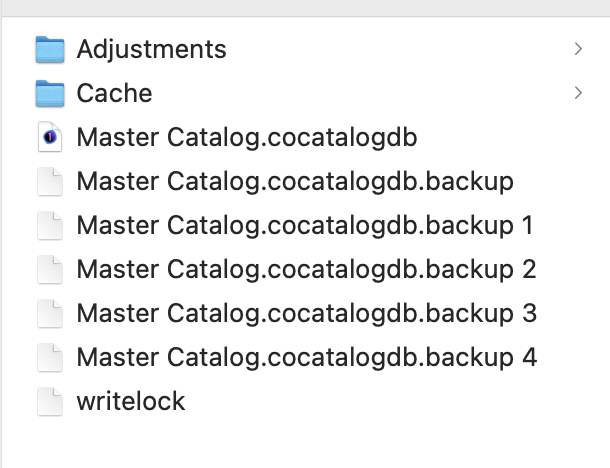
Those backup files are from various Capture One updates. The last one, backup 4, is the catalog before I upgraded to Capture One 21.
Does that help?
0 -
Hey Marco
Yes that did help a lot. I now have found my files again.
Thank you very much for your help and time.
All the best Marco and Abbott and allways good light
Daniel
0
Post is closed for comments.
Comments
4 comments