Did you find any advantage of C1 21 "speed edit" ?

At first it looks interesting. But now I am thinking if it is really any advantage: to try to remember the shortcut, to press it on the keyboard and to move with the mouse/fingers on the trackpad vs just moving the cursor left to the selected function and move with it :) What do you think ?
-

For me... when I tried it it felt like a coming up with a new feature for the sake of it. Invent a problem then fix it.
While some may find it useful, using it with a Wacom Cintiq was a PITA.
0 -

It's useful for some people in some situations.
Anyone needing bulk processing and perhaps using a Desktop with some video editing type specialist devices would probably find it useful for their travel laptop.
I might use it some of the time for some of my shoots but, as you point out, the normal functionality works well for me in most cases.
For anyone who much prefers and regularly uses KB shortcuts it will probably offer benefits over the existing options for such adjustments.
Also for fixed value bulk processing of a set of images it should work well. That's different to cut and past and applying specific values.
It may not be especially useful to everyone but for some it will be a great facility.
0 -
I find it pretty useful, especially with doing fine adjustments. In the past I would have to click into the slider’s value field and use the arrow keys to make small adjustments. Pressing a key instead may not seem like much but it keeps me focused on the image and not the tool bar. Remembering the shortcut becomes second nature after you use it for a while. As SFA said, it will work for some and I’m glad it is there.
0 -

I think it could be useful.
I have one suggestion:
Is it possible to show the assigned speed shortcut beside the tool or by mouseover (like it is done by the cursor tools)?
I found it very difficult to remember all these shortcuts.
0 -

In my point of view it's a useful feature.
But it would be even more useful to have the possibility of resetting the actual adjustment with a double click for example.
As far as I have experienced this new feature I still have to click on the slider to reset the adjustment.
0 -
Hmm, very strange - I assigned my own speed shortcuts to my personal shortcut system and it worked yesterday. Now I tried again and all my new shortcuts have gone ... and previous ones remained. I had to do it again now. Very strange. Let us see how long it will last .
0 -

I’ve only used it a couple times and found it very easy. Of course I will have to remember the keyboard shortcuts, but pressing a relevant key then just sliding my finger across the top of the Magic Mouse and instant changes, very precise too.
Only time will tell but very promising for me personally as somebody who regularly imports hundreds of photos from a portrait shoot.
0 -
@jj kk
When you set your own shortcuts did you save the settings?
If you did, did you use the original name or a new name?
If you used the original name - what was it? The same as the C1 default or something different?
Have you made any further updates between re-defining the keys and closing and re-opening C1?
Which Shortcuts definition is associated with your current workspace?
0 -
What is really missing here is a kind of quick reset of the opened tool ... They forgot about it ?
0 -

Quick reset by double-clicking shortcut key would be quite useful.
Memorizing new shortcuts is growing pain that will pay off in the end. Easier than learning how to type on a keyboard the first time :)
Just group them close into a couple rows.
0 -
So i tried for some time and could not help in the end: adjusting the values in a normal way by sliders of the tools on the left is much easier, more relaxed and faster ...
0 -

Nice gadget I guess… something everyone needs like a hole in the head.
The achievements for the pro user in CO 20 were brilliant but I will not
fall for CO 21.0 -
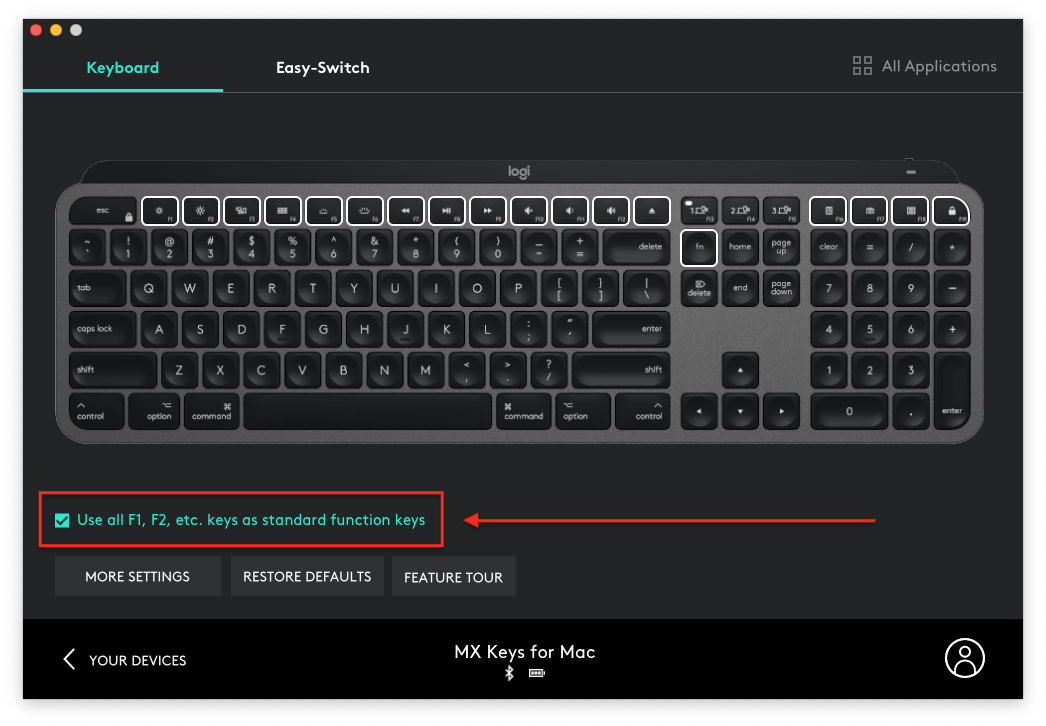
At this stage, I haven't found the way to assign the shortcuts on the Function keys, on a Logitech MX keyboard.
Maybe it's in the Logi options ?
0 -
Found it.
One indeed needs to tick the box "use F1, F2, etc as standard Function keys"
 0
0
Post is closed for comments.
Comments
14 comments