getting into old catalogs on capture20-21

I know I posted on here about this my problem is I can't open the older version 20 . why not. to get to my catalogs.
-
Why do you need to open version 20 to open your catalogs? Version 21 will open them (and update them for you).
You won't see the old catalogs at first on the list at the top of the Library tool in Capture One, because that is a recent documents list that builds itself up from scratch with the new version. But you can open them from the File menu: File>Open... then navigate to the .cocatalog file you want. After you have opened them once, they will appear on the list in the Library tool.
Ian
1 -
well yes I can see the file folders of catalogs but when imported there pre shows no picture and a big ? mark with a circle around it not showing any preview.so the catalogs are there but won't open in cap 21
0 -
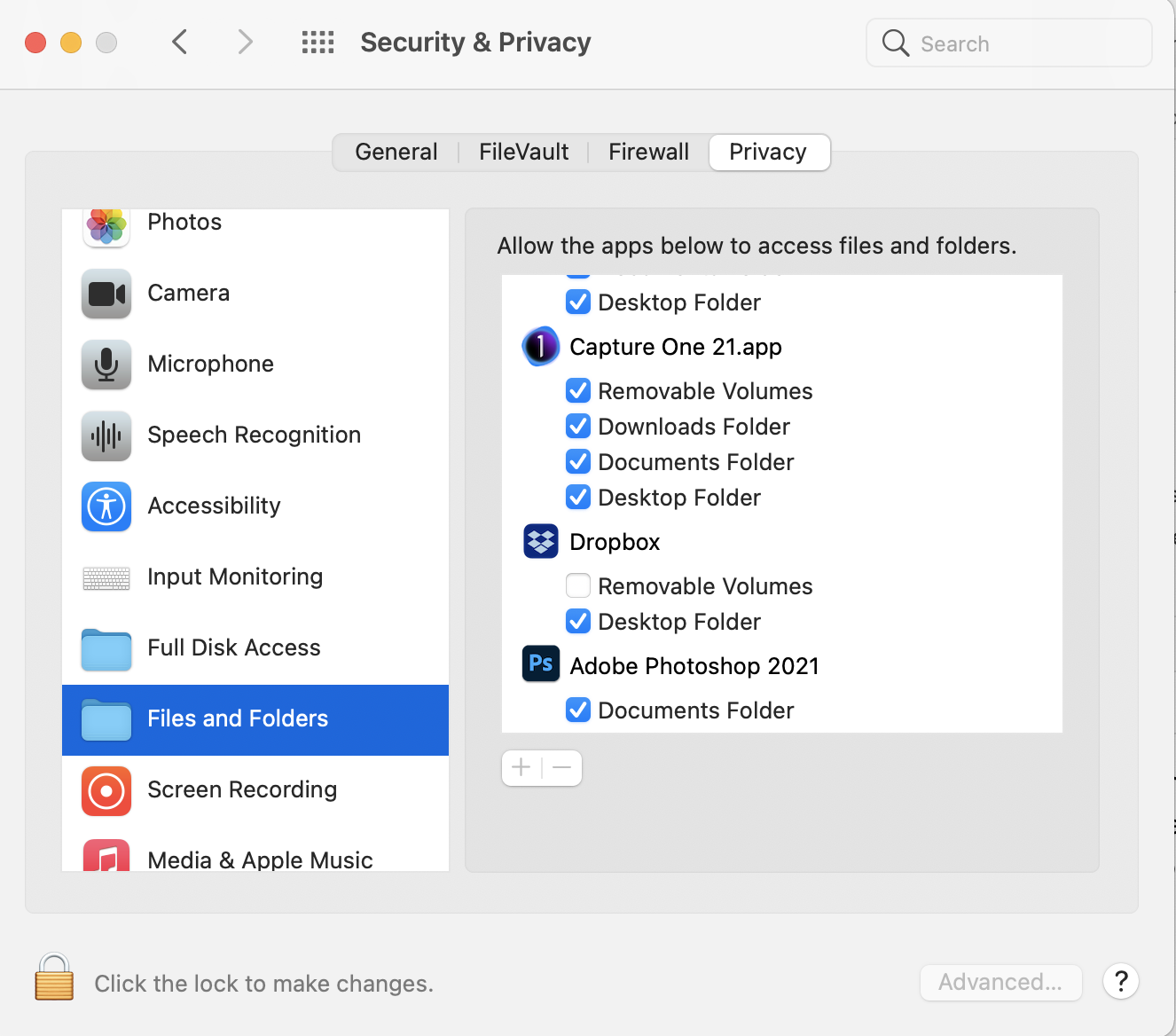
I assume that when you opened the old catalogs in version 21, it upgraded them to v21 format. if you are seeing a ? then it may be that the images aren't accessible to Capture One. Where are they stored? Have you looked at permissions for the image location? Does MacOS need to be given access to files and folders in System Preferences (depending on your version of MacOS, perhaps? - I'm on Big Sur in the screenshot below).
Ian
 0
0 -
thank you now I just have to pic through the catalogs. you were a big help.
0

Post is closed for comments.
Comments
4 comments