Delete & Move to Selects icons have just appeared squeezing my tool bar

A load of 'Delete & Move to Selects' icons have just appeared squeezing my tool bar..
Don't know why this would be and how to get rid of them..
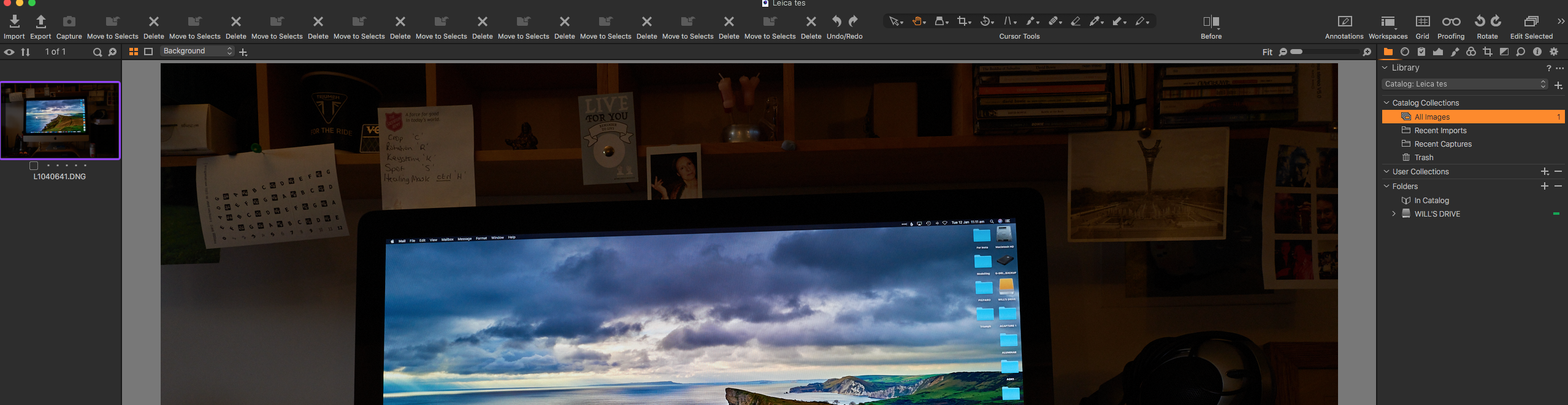
-

Edit the toolbar or reselect the Workspace. You should get whatever it was by default if you reselect the Workspace, assuming you have not saved it with the extra icons applied.
0 -
Many thanks
W
0 -
You're welcome.
Did you work out how they had appeared?
0 -
No can't fathom that one out ... very strange
0 -

I had a problem in C1 20 that might be similar to yours (it hasn't happened in 21 yet).
I use custom workspaces on all of my machines. On one, the Delete (X) icon kept magically appearing in the tool bar and I couldn't get rid of it by customizing the menu again. I rebuilt the workspace from scratch and the same thing happened. I'd replace the workspace from a backup, it would work for a few launches, and then "X" would magically reappear.
I finally solved the issue by locking the custom workspace file (use "Get Info" and mark it as "Locked"). It was a really weird problem. As I said, so far it hasn't happened in C1 21 using the unlocked workspace.
0
Post is closed for comments.
Comments
5 comments