Exporting files with Apple M1

Good evening, I have a question about C1 with my Mac Mini M1. When I edit my images and export them, the export is not correct. I got images with strange noise, also layers were not exported, sometimes the export of 180 images is ready in 5 sec, but when I check to output folder, no images are exported at all.
I am running 14.02.49 on a 16gb Mac Mini M1
The same session on my Macbook Pro 2019 Intel runs fine
What's happeining?
-

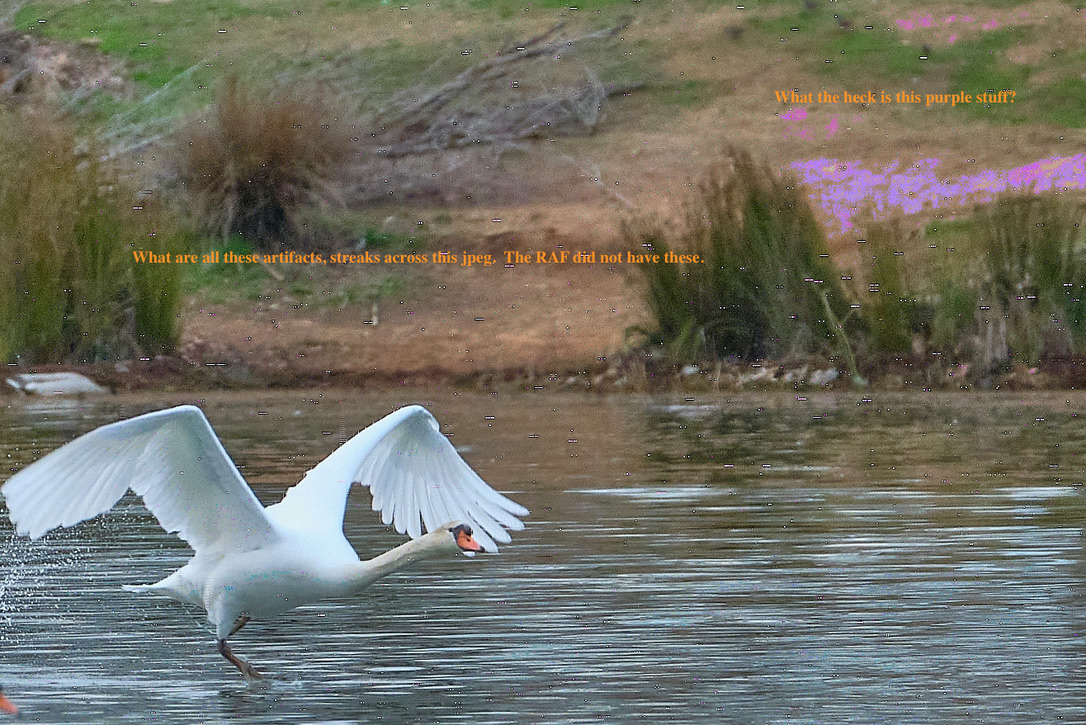
Me too, I'm trying to figure out what's happening. I exported 50 ea. RAF pics, all good when editing, then looked at the jpegs and they're all messed up with artifact, streaks and spots, of like neon colors. Baffling.
 1
1 -

Something is decoding correctly, as I don't use those files (I am on Nikon) I cant test it out. But I don't see any artefacts in the NEF exporting to JPEG on C1 21 when using a M1 MBP.
Just out of interest do you get the same issue if you turn off both options in Hardware Acceleration?
It might be worth clearing the imagecore and allow C1 to rebuild it.
Regards
0 -

Same here, and C1 slow down if you try to Crop or take a picker for Color Editor, possible to make a gradient level :(
0 -
thanks for the example, I have the same thing. Sometimes exports are worse.
Without Hardware Acceleration I have not tried yet.
The funny thing is that it did work before the latest update of BigSur. Today thatlatest update from Apple 11.2 is there.. I will check if it helps
0 -
It may be worth opening a support request, I believe some reports in the C1 Facebook groups have reported similar things
0 -

I have an comparable problem on my M1 Mac Mini with DNGs and Sony ARWs:
The repairing layer isnt in the export. HORRIBLE, Software not usable at the moment.
0 -
Okay: So i disabled the hardware acceleration, both ticks, and it works fine...
Seems to be a good idea to turn hardware acceleration off, masking itself seems to be much faster!
(Mac Mini M1 8GB)
1 -
Hello,
I will try this... deactivate hardware acceleration.
It seems to be unpredictable behavior.
Hope we have a M1 update soon..!
0 -
Instead ot the Apple update, let's hope Capture One M1 will be here soon :)
0 -
It works fine !!! I just deactivate hardware acceleration for treatment and not for display.... Thanks @Matthias Meyer.
Capture One M1 update of course !
0 -
FunFact: Same behavior is on Windows10!
0 -

Unfortunately I just started a similar thread, but only now found your contributions here. Your suggestion about deactivating hardware acceleration did wonders. I had to tick both boxes though - processing and display, before it worked.
So relieved now! Thanks!
0
Post is closed for comments.
Comments
12 comments