Cannot upload pictures to Capture One21

I am new to this software and couldn't find a helpful link,
Having a problem with uploading photos could you help me on this issue;
I uploaded my pictures from card to iPhoto, created a folder on Desktop and moved selected images, they are RAW JPEG, when I open a Catalog on CaptureOne I am selecting these pics from the folder to import but they do not appear on the screen,
How can I upload my photos to edit?
Thank you
Tutu
-

Hi Tutu
I uploaded my pictures from card to iPhoto, created a folder on Desktop and moved selected images, they are RAW JPEG, when I open a Catalog on CaptureOne I am selecting these pics from the folder to import but they do not appear on the screen,
Firstly, individual images are either raw or JPEG. Do you mean that each image is stored as raw and JPEG - or just JPEG?
If they are JPEGs only, check your View > Global filters setting to ensure your copy of C1 is able to see JPEGS:
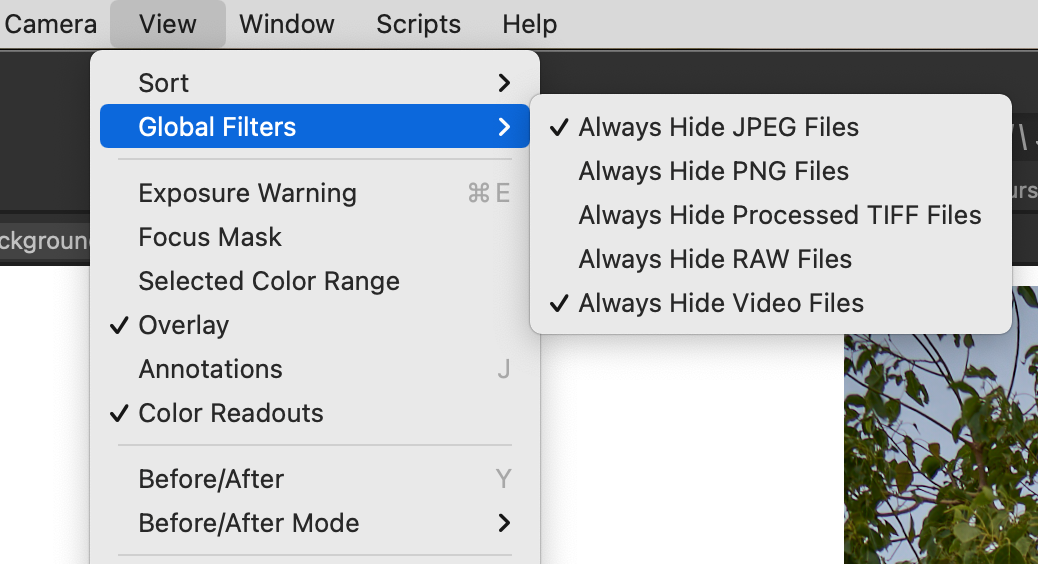
If always hide JPEGs is selected, click on it to turn it off.
Good luck
Shane
0 -
Hi Shane,
Thank you so much for your help and sorry for the late reply,
I followed your instructions and none of the Global Filters are selected,
I took all photos in RAW format and uploaded as jpeg to iPhoto,
Unfortunately I still cannot upload any of my desktop jpegs to C1,
thank you,
Best
Tutu
0
Post is closed for comments.
Comments
2 comments