Library folders do not update subfolders within a catalogue

I have a catalogue named 2021.
It contains 12 monthly folders where al Raw-files in the month are imported to.
All processed files from a month folder go to a subfolder called "finished >current date>. This is my standard under process recipe. All subfolders are present in folders hierarchy outside CO.
For some reason, CO has not updated its internal folders list in the catalogue since 2021-01-05.
Why is it so and how do I update the catalogue folders list?. When I add the folders manually CO does not see the files inside.
-
In a catalog (it's different in a session) the folders, including subfolders, are not added to the catalog unless you add them. And processed output is not automatically added to the catalog unless you add it. (This tripped me up for a while after I started using a catalog after years of only using sessions.) You can click the + in the Folders section of the Library tool to add folders you want included.
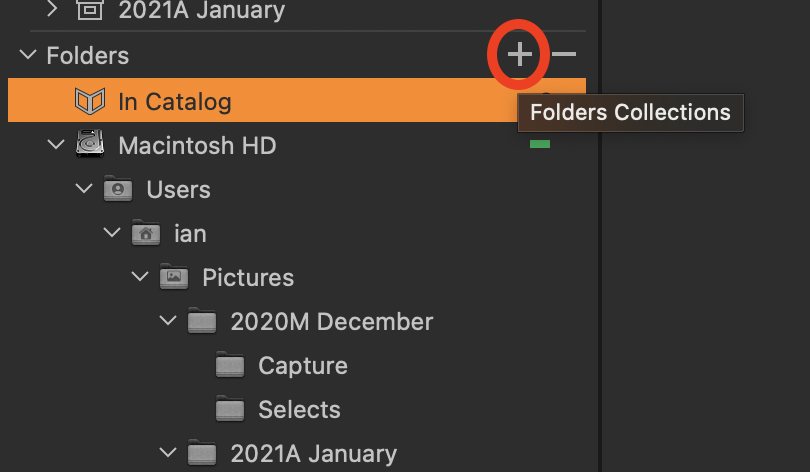
And you can then choose to Synchronise those folders after you have added them.
Alternatively, you can use the Import tool - choose to Import, then navigate to the (sub)folder you want and it will add the folder and the images in it.
Ian
0 -
Your suggestion works. Batch add/import would be wonderful though. :-)
I have a feeling that I may have stopped some something as this has worked until 5/1 2021.
0

Post is closed for comments.
Comments
2 comments