Backing up Sessions - include CaptureOne folder with Cache and Settings or not?

Dear sir/madam,
I am still considering the final switch from Lightroom to C1, but I am somewhat put off by the backup procedure for Sessions. Using Sessions, C1 will create a folder "CaptureOne" with proxies and settings and this seems to amount to quite a lot of extra disk space. Leaving them out however would require de-selecting this folder for each backup, which is not a very attractive alternative. I read the community posts and found some other users complaining about this. Is there any solution to this issue? Thanks in advance for your help.
Johan
-
If you use sessions, the simplest thing is to back up the whole session folder, so for example to back up my 2021B February session I would want to back up the 2021B February folder here, together with all its contents and its subfolders and their subfolders.
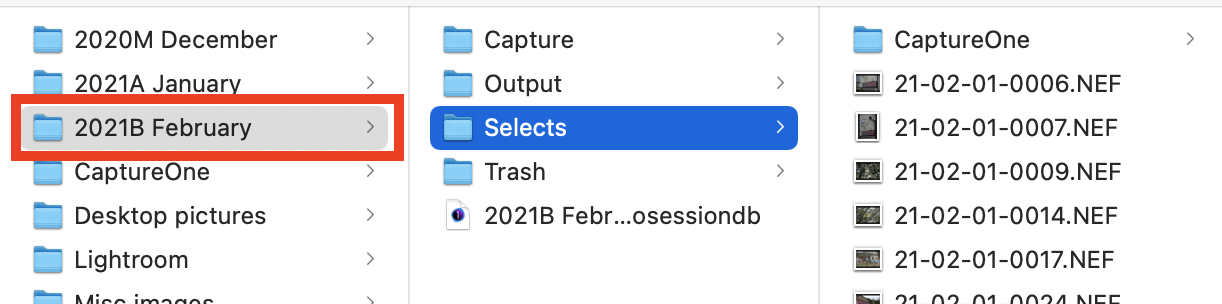
Among the stuff in the Capture One subfolders is all your edit information. (Not stored in the session file itself - a different approach from catalogs.) So you MUST have that backed up. The thumbnails and previews are less of an issue because Capture One can regenerate them.
But really just backing up the whole folder is the easiest thing. I just rely on my regular system back-up for this (Time Machine on a Mac). Unless space is an issue, in which case investing in a larger backup disc is worth doing!
So, effectively, no special backup procedure for sessions is required provided you have regular and robust system backups already.
Ian
0 -
Dear Ian, thank you for your swift reply. I would much prefer to have a backup which consists only of the raw originals and keep the various output versions and edits separated. But I guess this is just the way C1 works. Many thanks, best wishes, Johan
0 -
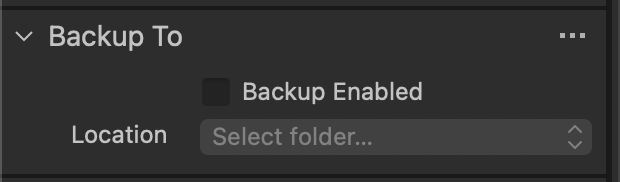
Well, you can, of course, just back up the raw originals. One of the options for that is that in the import dialog box, there is an option to make a backup copy of the files at the time of import to some other location.
Ian
 0
0

Post is closed for comments.
Comments
3 comments