creating/managing perspective control

Hello. Really hoping I can find some help, urgently, please.
I am new to COP, working with the most current release. I have many years of PS experience, but am looking at using COP for certain tasks.
Most importantly, I urgently need to correct some shots of square products (floor tiles) in which the top edge and the bottom edge are not perfectly parallel to each other. Because each tile had to be shot independently, it was impossible to ensure they each were positioned exactly the same way relative to the camera.
After making the top and bottom edges horizontal, I need to ensure that all the shots have the same vanishing perspective. In other words ensure the left and right edges of the squares are uniformly at the same angle.
What I've found using the keystone features:
1. I can usually (through fumbling) get the top and bottom edges level/horizontal and thus make them parallel to each other. However the left and right edges are not at the exact same angles, i.e. the left edge may be 55 degrees relative to a vertical line, but the right edge may be 61 degrees. I need them to each be 60 degrees. And I need to make corrections to 6 different files, so that they are all normalized (have the same geometry).
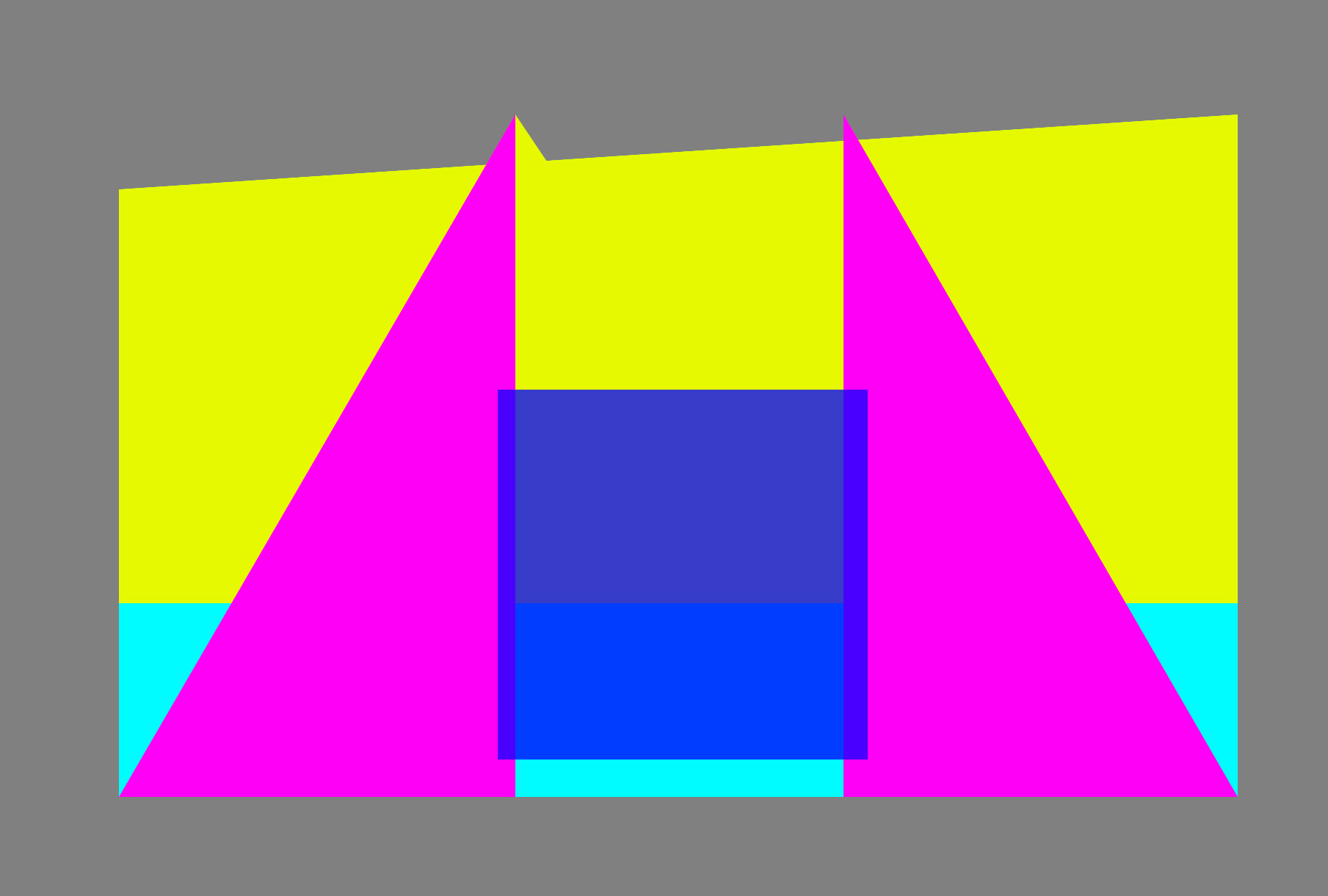
Attached is a simple test file I created.
Two things I'm trying to figure out how to do:
1. "Distort" the image so that the yellow portion ends up being a rectangle. Said differently, I want to pull on the upper left anchor point, the corner of the yellow block, and pull it up vertically until it's horizontal to the right upper anchor point.
2. The two pink triangles represent 60 degree angles relative to the outer bottoms of the triangles. These just help visualize the angles.
I want to create a vanishing perspective so that the blue square's sides follow that 60 degree vanishing perspective, while keeping the bottom flat/horizontal.
If this were a square in real life (e.g. a floor tile), it would be the same as having this flat on the floor, the camera a foot above the floor and at some distance "south" of the square's bottom edge.
I'm aware of the various tools in PS including the new perspective control feature, but have 12 shots that all need the exact same transformation. The idea of doing this in bulk resulting in uniformity via COP has a lot of appeal.
Thank you greatly for your help,
Jerry
-

Jerry,
I think you will need a full-on pixel manipulator like Photoshop - especially since that is what you are used to.
If the task is urgent you really should use a tool you already know well. Also, one that comes from a graphics data manipulation background rather than a photographic adjustment approach to image editing.
0 -
Thank you SFA.
Ordinarily I would agree with you. I turned to COP, because the actual images are very large, and trying to make the changes I need require handles/anchor points at the edges for the full layer. Because of the size, these force me to be zoomed far enough that I can't see what I'm doing to try and accomplish things accurately, even with guides etc. in place. It's like trying to move a car a few inches while viewing from the 100,000 foot top-down.
In COP, putting those nice circles to control perspective seemed like the right approach. Zoom in, carefully place the circles, zoom out and use the "auto" keystone function. But, I keep getting very unexpected results, so I obviously don't know how these features really work (and have watched the few tutorials out there).
And, what I really wanted was to use the edit one, apply changes to other files, so there'd be some identical transforms applied...
Damn, was hoping.
Thanks,Jerry
0
Post is closed for comments.
Comments
2 comments