Lens corrections resetting

Capture one 20 build 13.1.3.4
Lens Fuji 16MM F2.8
This lens does not have a C1 lens profile in version 20 but does have the manufacturer profile on the lens. This is selected as the manufacturer profile on import (which is nice). The default distortion setting is 100.
The behavior that I have noticed is that when I return to a set of images that have been previously edited the distortion setting adjusts to "0" (verse the earlier 100%). Not on one or two images but on all of the images for this lens.
Upon opening C1, you can see the image in the browser and it shows the "crop" from the distortion control. When you select the image it sometimes appears with the distortion correction and then the viewer "blinks" and the image resets without the distortion correction. Most times it loads without the distortion correction, no blinking.
I can reproduce this simply by closing capture one and then opening it again. All the images return to zero.
I am not aware of changing anything within the default settings that could cause this.
Please advise,
Dave
-

David,
As you have described the problem is sounds very odd and clearly quite specific to the combination you are working with.
You are asking other users when addressing the forum and that's fine if you want to know whether others have the same experience. However, the unexpected change reads like something that should also be reported as a possible software-induced problem of some sort and that suggests it would be a good idea to report it as a possible technical error.
Use the "Submit a request" community feature to create a Support Case if you have not already done so.
0 -
Thank you for the feedback, yes it did seem odd. I was hoping that it was something else had encountered and reconciled. I will send in the support request.
David
0 -
So an update since I posted this and have figured out a work around (in case someone else has the issue).
I confirmed that I was on the most recent version of Capture One 20 (14.1.4.3 – believe I transposed 4 & 3 earlier). Anyhow I did a fresh installation in case there was something missing and the behavior continued (resetting to 0 for distortion control).
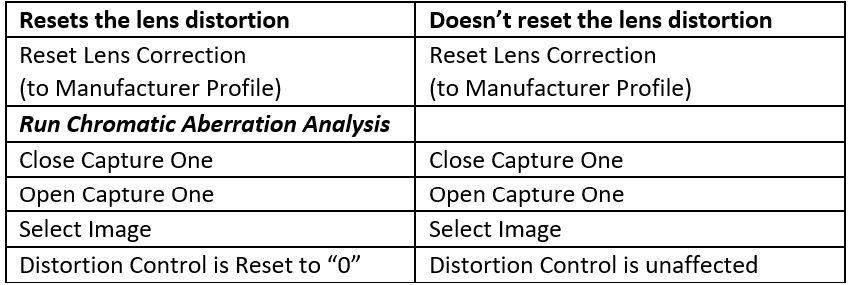
I discovered a refinement of the issue though that is interesting (and perplexing). I began to think “maybe the Manufacturer Profile (from Fuji) is 0?” To test, I reset the lens correction with the reset switch for that section. This returned the value to 100% (confirming that is the manufacturer profile setting). The interesting part is now when I close and reopen Capture One the lens distortion does not reset on the images which have been “reset”.
The only real action that I take on the lens correction page is to use the “analyze” for chromatic aberration action so I did that on a couple of images. When I closed and reopened Capture One those files reset distortion control to 0 and the ones I did not analyze remained at 100% (did not reset).
I know that is a bit wordy so I’ll chart the workflow below. A bit bizarre? Yes. Anyhow, I have my workaround (don’t analyze for chromatic aberration with this lens). Hope this saves someone some time in case they have the same / similar issue.
 0
0
Post is closed for comments.
Comments
3 comments